

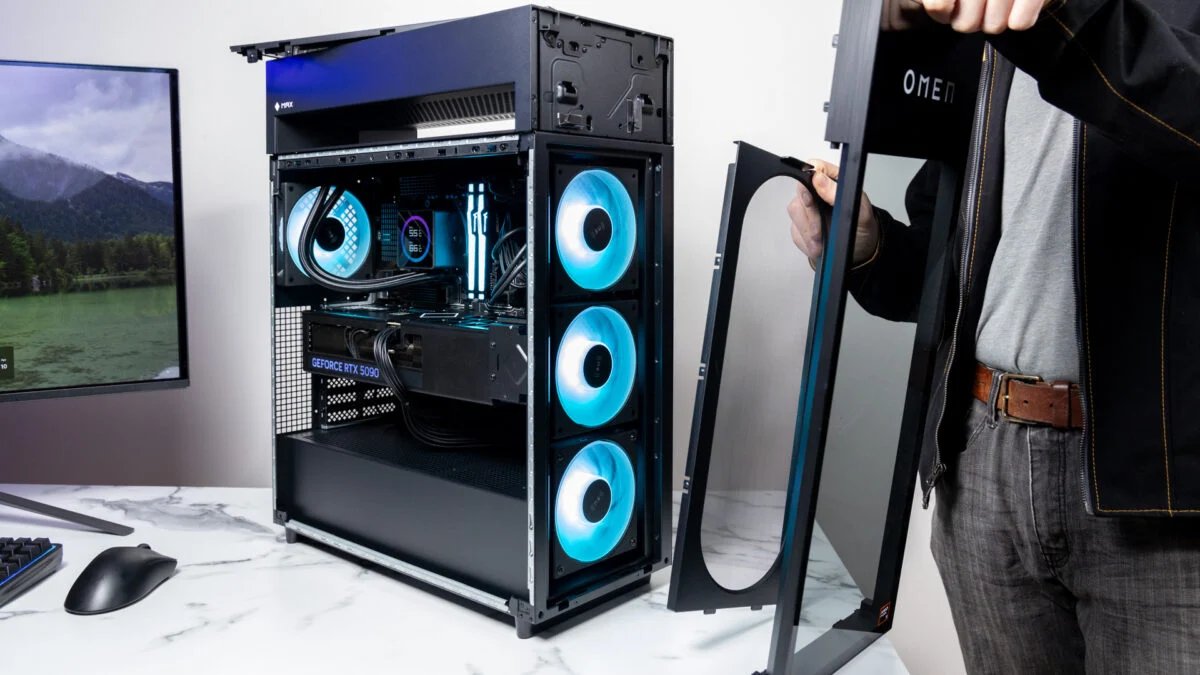
HP’s Omen Max 45L desktop is an obsidian shard thrumming with energy and subtly shifting light. There’s one alien-seeming channel running through the top of the slab, a glass panel obscuring the front and exposed top air vents, plus a mess of wires inside that don’t seem organized by a coherent thought.
That description would seem right at home with an Alienware desktop. But no, these are our old friends Hewlett and Packard, offering what may become my new preferred desktop case design for sleek, mid-sized gaming towers. The Omen Max 45L is using a unique form of AIO cooling that removes the radiator from inside the case and lets it breathe in cooler air up top. It’s a design that makes sense, so much so that we’ve already seen Asus ROG copy it with its G100 prebuilt tower.
HP Omen Max 45L
This desktop may not be the most pitch-perfect pre-configured tower, but small innovations and a reasonable(ish) price make it very appealing.
- External CPU radiator keeps it cool
- Sleek case design
- Runs silent
- Impeccable performance
- Messy cable management
- No rear HDMI
- Costly for highest-tier components
The natural inclination is to ascribe an expectation of quality to devices that cost more. This pre-configuration of the HP Omen Max 45L loaned to me for review costs $6,500. If that number made you blurt out any blasphemy, don’t worry. It’s on one of HP’s patented perma-sales for around $5,500. At the same time, HP’s customizable 45L towers with an excellent gaming-ready CPU, the AMD Ryzen 7 9800X3D, start at $2,500. You could configure a model that’s ready for 4K gaming for just under $3,000.
That price would still be high in any other year. However, with RAM and SSD prices now untenable for all but those with deep pockets, HP’s desktop prices are inexplicably reasonable. As much as it may stick in my craw as I say it, some gamers may be better off buying a pre-built tower than building their own custom rig. Pre-configs no longer exist merely for the sake of convenience. You’ll just have to deal with HP’s worst impulses, namely a bit too much bloatware and some despicable cable management.
A snake pit of desktop cables
© Raymond Wong / Gizmodo
Specs-wise, this desktop tower is stacked. HP sent Gizmodo their Omen Max 45L packed with an AMD Ryzen 9 9900X3D. Just note that this chip is neither the company’s gamer-specific Ryzen 7 9850X3D nor its newfangled Ryzen 9 9950X3D2 Dual Edition with double the 3D cache of its other leading CPUs. Alongside the utterly massive Nvidia RTX 5090 GPU you’ve already identified by these pictures, the tower came packed with 64GB of gamer-ready RAM and a 1,200W fully modular power supply.
Alongside the four fans, the two 16GB sticks of RGB Kingston Fury DDR5 3600Mhz RAM are your only source of RGB light. The other flashy accoutrement is the screen on the CPU cooler. By default, it lists your current CPU and GPU temperatures. You can go into the Omen Gaming Hub app to change it to display whatever your heart desires. Otherwise, the ATX motherboard isn’t trying to hide any of your various components behind any shields or covers. There’s no avoiding the mess of power cables snaking throughout the PC.
© Raymond Wong / Gizmodo
The look of these internals may not be to everyone’s taste. While aesthetics are naturally subjective, HP’s cable management isn’t what any discerning individual would call sensible. The Nvidia GPU’s 16-pin 12VHPWR power connector trails underneath it in a loose jumble, disappearing below the motherboard. The rest of the cables you can see through the glass take on a similarly ugly appearance. If you remove the side panel, you’ll find an array of wires that would seem more at home in a snake pit. None of the plastic cable ties came labeled, meaning I could only hazard a guess as to what each line was for as they claimed a spot on the 1,200W PSU.
At least HP supplies a controller behind the side panel for connecting any extra RGB you decide to install inside your new desktop. Other companies make it easier to see what you’re doing. Alienware’s recent Area-51 desktop full-size tower includes QR codes that help you identify how to replace each component. Smaller boutique desktop maker Maingear has much cleaner cable management, such as with its recent Apex desktop.
© Raymond Wong / Gizmodo
The case also comes with its own custom GPU bracket that keeps the absolute brick of an RTX 5090 steady, even during transport. You won’t have to rip out any annoying foam inserts when unboxing the PC, like you may have to with other pre-configured PCs. I found the arch in the desktop made for excellent grips as I lifted the tower out of its packaging and onto the desk. Everything stayed tight, despite the jostling.
The top panel comes with two USB-A and a single USB-C port alongside a headphone jack. The rear I/O is more sparse than I’d prefer. There are six total USB-A alongside just two more USB-C slots. There’s the necessary Ethernet connection and the mic/headphone jack. Sure, your GPU will have the necessary HDMI and DisplayPort connections, but if there’s ever something wrong with it, you may find it more difficult to troubleshoot if you can’t connect your motherboard directly to a screen.
© Raymond Wong / Gizmodo
One additional feature HP included is the ability to reverse the PSU’s fans to blow out any annoying dust. I didn’t have the PC for long enough to test it with any wayward cat hair or bird feathers. Still, that fan control feature is an added benefit of choosing this pre-configured model.
Small, standout cooling innovations
© Raymond Wong / Gizmodo
HP’s tower is a sleek slab of black metal and plastic. But what you’re really here for is its cooling features. I had the chance to become extra familiar with Hyte’s X50 high-airflow case I used for a recent “budget” PC build. HP’s Omen Max 45L has fewer spots for fans. Instead, it’s using a novel arch housing the CPU’s radiator outside the case.
The “Cryo Chamber,” as HP calls it, sucks in air from below the arch and ejects it out the top. The top panel comes off in case you want to take your desktop through a spring cleaning routine or swap it out for a different AIO apparatus. HP claimed its CPU cooling technique enables the slightest edge compared to a desktop with the same specs across a wide variety of benchmarks. When your CPU runs cooler, you can game more efficiently.
The actual benefit may equal one or two more frames per second in a demanding title. If you’re paying thousands for a desktop tower, you should want every ounce of power you can get from your rig. Still, the CPU isn’t the only component generating heat. You have hot air blowing in from both the PSU and GPU, all swirling inside the case. That’s a lot of pressure to put on just one exhaust fan.
© Raymond Wong / Gizmodo
When you have more air going into the case than blowing out, you create a positive pressure environment. This method of PC cooling will naturally help keep dust particles from remaining inside the case, but it comes at the risk of overheating the components. Despite that, in all my tests the CPU and GPU never registered higher than around 71 degrees Celsius, or 160 degrees Fahrenheit, in a variety of games that I tested.
The front panel obscures the main intake fans and can limit airflow to a small degree. I tested the desktop with and without the front panel with Black Myth: Wukong, normally a very GPU-demanding game, running with all the ray tracing bells and whistles. Without the front panel, the GPU ran an average of two degrees cooler. Is it enough to impact performance? Not all that much, based on my benchmark results.
Despite this tower’s fan workout, the entire case never sounded more than a dull whisper running for hours next to my head. It’s the type of tower you can keep close by instead of hiding it by the foot of your desk, like the unruly, scarred child wizard you refrain from speaking to.
A massive gaming beast
© Raymond Wong / Gizmodo
With one of AMD’s top-performing CPUs alongside an Nvidia GeForce RTX 5090 GPU, this desktop can easily meet your demand for a 4K gaming experience in whatever game you can throw at it. In practically every title I benchmarked on this tower, I could get 60 fps at 4K resolution without needing to rely on upscaling.
This tower is a gaming beast, and it does it without looking like it’s trying so hard. It easily tops an Alienware Area-51 with the same GPU and Intel’s previous Arrow Lake flagship, the Intel Core Ultra 9 285K CPU. (Alienware now sells a version of its desktop with an AMD Ryzen 7 9850X3D—today’s peak gaming CPU). That’s at both 4K and 1080p resolutions across games like Cyberpunk 2077, Black Myth: Wukong, and Horizon Zero Dawn: Remastered. It similarly performed better across most of our slate of 3DMark real-time graphics benchmarks, with a marked improvement in ray tracing scenarios.
© Raymond Wong / Gizmodo
AMD’s X3D processors use the chipmaker’s “3D cache” technology, which layers memory on top of the chip—speeding up the rate the chip can access its memory. This proves especially important for real-time rendering. That doesn’t mean it shares the same benefit for all applications. Intel’s previous Core Ultra 9 285K from Alienware’s Area-51 offers better CPU multi-threaded performance in several benchmarks like Geekbench 6 and Cinebench 2024. It was also slightly slower to render a scene of a BMW in our Blender rendering test when relying solely on the CPU.
The Omen Max 45L is a gaming PC through and through. Even if you don’t buy the top-end specs and limit yourself to a Ryzen 7 9800X3D CPU, you should still expect stellar performance. The RTX 5090 GPU is still your only choice if you want the absolute best PC graphics. Those who opt for cheaper GPUs can expect slightly better performance than some other PCs thanks to the unique Cryo Chamber cooling.
Stuffed with unnecessary HP apps
© Raymond Wong / Gizmodo
Our review unit also came loaded with several HP-centric apps, like HP Smart printing services, HP diagnostics, and HP Support Assistant. None of which is necessary for a gaming PC. I could live with the Omen Gaming Hub for monitoring temperatures and performance, but I don’t know anybody who wants a printer app. HP Smart also crashed every time I tried to load it.
I only wish the HP Omen Max 45L looked more like a PC built by a true professional. The cables appear like something I could have put together myself—namely, an ill-considered mess. It should be one of the benefits of paying more for a pre-built desktop that offers an easy way to get into PC gaming at a price. Normally, I tell people they can save money by designing their own PC and putting everything together. You will feel like a wizard after you first boot up your PC and see all the blinking lights working in harmony.
In today’s economic environment, you would have to scrape and save just to afford some high-end components. A pair of 32GB Kingston Fury RAM sticks may cost you over $1,000 alone. I tried to craft a comparable PC through PCPartPicker. I ended up racking up close to $6,000 before I had even chosen a case. The RTX 5090 alone can cost over $3,000. If you don’t mind a bit of confusing cable management, you can’t do much better than the Omen Max 45L. It’s just a shame that no matter what, PC gaming will cost more money than it would have in recent memory.
