

Cameras aren’t the first smartphone component you think of when considering the advantages of the foldable form factor. In fact, foldable phones typically offer weaker camera hardware than their slab counterparts, because there is simply less space to work with. Some foldables, like the Samsung Galaxy Z Fold 7 and Google Pixel 10 Pro Fold, have tried to change that narrative. Regardless of the weaker hardware, though, foldable phones are downright excellent for mobile photography.
The reason might come as a surprise — leading brands, including Samsung, Google, and Motorola, have exclusive camera features baked into their foldables that you won’t find anywhere else. They’re a dream for mobile photographers, delivering better-quality shots and enabling time-saving workflows. These are the five camera features I consider critical benefits of owning a foldable phone.
Camcorder mode
Use a flip phone like a vintage recorder
Camcorder mode is a handy tool available on flip phones from Samsung and Motorola that simulates the experience of using a vintage video recorder. Open the primary display about halfway, and your foldable’s camera app switches to a camcorder-like user interface. The part of the foldable phone display that’s sticking out shows a live viewfinder and the other half houses all the controls. You can optionally enable the cover screen preview feature to show the viewfinder on both the inner and outer displays.
To be completely honest, camcorder mode is mostly about invoking nostalgia. The same could be said about flip phones in general, though, so this feature is a perfect fit. From a practical perspective, camcorder mode is a more ergonomic way to record videos on your foldable. It’s easier to see the viewfinder, and critical controls can be managed with only a swipe or tap of your thumb.
Dual screen preview
Let the photographer and the subject see the viewfinder
Credit: Brady Snyder / MakeUseOf
Called dual screen preview on some phones and cover screen preview on others, the feature is helpful regardless of which foldable phone model you’re using. The way it works is simple — tap the cover screen icon with the main display open to activate a live viewfinder on the other display. With this mode activated, the live viewfinder is visible on both the primary and secondary displays.
This is especially useful for group photos, since the photographer and the subjects can see how the photo is going to look before capturing the shot. If you have a group that’s difficult to corral in view of the shot, dual screen preview can come in handy. Or, if there’s a person that always wants to make sure they look great in a photo, they can check their appearance before the photo is taken.
Flex mode
Use your foldable phone as a built-in tripod
Credit: Brady Snyder / MakeUseOf
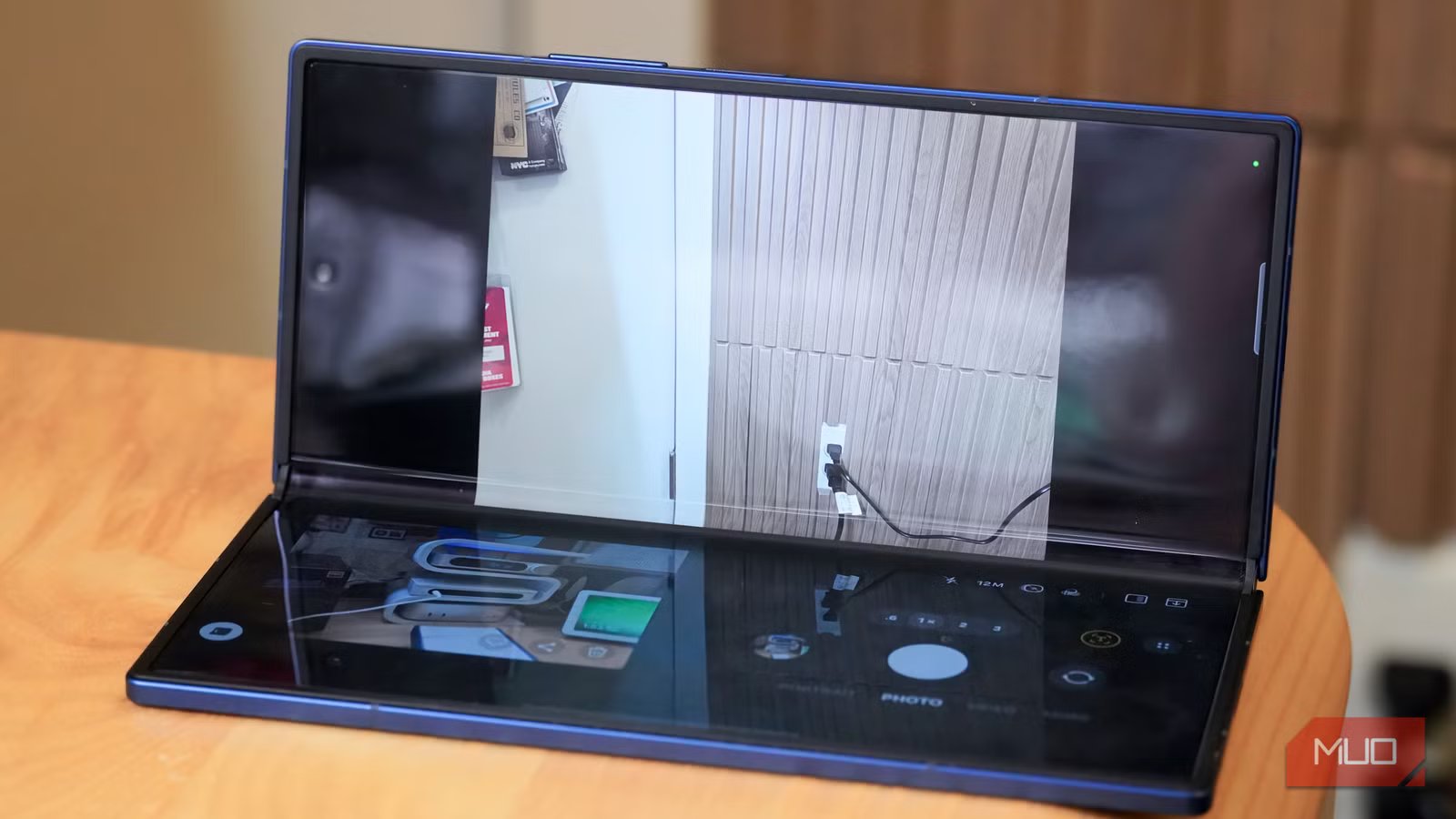
Flex mode on Samsung phones and the equivalent tabletop mode on Pixel phones are two of the most useful features on foldable phones. They’re available across the Android operating system in apps like YouTube. The feature works with the Camera app, using the top half of the screen as a viewfinder and the bottom half for photography controls. You can tap into other photography features while using flex mode or tabletop mode, like dual screen preview or the capture view.
The software versatility is unmatched, but the real benefits come from being able to use your phone as a physical tripod. With a foldable phone half-opened and the cameras facing outward, it stays propped up by itself. I’ve used it to record videos and take timed photos while covering tech events onsite, and it has been a lifesaver. I never seem to have a tripod accessory ready when I need it, but when using a foldable phone, there’s one built in.
Related
6 things to consider before buying your first foldable phone
They just aren’t for everyone.
Capture view
See your last shot on the big screen while taking photos
Credit: Brady Snyder / MakeUseOf
Foldable phones have a hidden feature that shows the output of your last capture alongside the camera interface. It’s called capture view on Galaxy foldables and instant view on Pixel foldables. The two features essentially work the same way — they show your last photo on the left half of the screen and leave the rest of the camera app accessible on the other side. This way, you can check to see how your last shot turned out without leaving the camera interface.
Unfortunately, the Google Pixel version of this tool is exclusive to the Pixel 10 Pro Fold, which is perplexing. The Samsung Galaxy alternative is better, too. It shows the number of photos you’ve taken in a particular session and lets you swipe between them.
Rear camera selfies
Use the cover screen to take a higher-quality selfie
Credit: Brady Snyder / MakeUseOf
Finally, the most obvious — and yet somehow underrated — advantage of using a foldable phone as a mobile camera is better selfie quality. You can always open the camera app on the cover screen of any foldable to use the rear cameras as a selfie camera. The clear advantage here is putting the larger and higher-quality primary camera to use.
On the Samsung Galaxy Z Fold 7, for example, you can use the 200MP rear shooter for selfie shots. I never use the actual selfie camera on foldables because the quality jump is massive when using the rear sensors instead.
Why I love using a foldable phone for photography
I’m harder to please when it comes to foldable phones. Often, I don’t see the benefit of carrying the extra bulk that comes with the form factor. The software camera features available on foldable phones are one of the few ways I truly view them as an upgrade over traditional flagships. They simply make the mobile photography and videography experiences more fun, and the quality increases are an added benefit.
