

3D printers don’t come with everything you need to get started or maintain the hobby. In addition to some filament, you’ll want to get your hands on a few extra tools and add-ons to set you up for success.
We’ve prepared a little shopping list.
Filament dryer
Credit: Tim Brookes / How-To Geek
Moisture is one of the biggest causes of failed prints. Since filament is hygroscopic, it absorbs moisture out of the air like a sponge. Unless you live in a desert, you’re going to need to get that moisture under control using a filament dryer.
These devices are designed to heat filament to a set temperature and hold it there, rotating the spool to evenly dry out the material and remove moisture. Certain filament types are more susceptible to moisture than others, notably TPU, PETG, and Nylon. Even PLA can have issues with stringing, adhesion, and finish if not properly dried.
To remedy the problem, get your hands on a decent filament dryer. These start from as little as around $40, with some multi-material filament dispensers like the Bambu Lab AMS 2 Pro now able to dry and hold filament. Just make sure that your filament dryer can reach the necessary temperature to dry out your preferred filaments.
Flush cutters
Credit: Arrow
Flush cutters, as the name may suggest, are perfectly flat on one side. Unlike regular wire cutters, which make V-shaped cuts, flush cutters make perfectly flat cuts. This has a range of benefits for 3D printing, particularly when cleanly removing supports from prints. They’re also great for sharp 45º cuts that make it easier to feed filament into PTFE tubes.
They’re the Swiss Army Knife of the 3D printer world, and make it easy to get into tight places that are potentially too hot to touch. You can find flush cutters at your local hardware store for a few dollars.
Build plate scraper
Credit: Hannah Stryker / How-To Geek
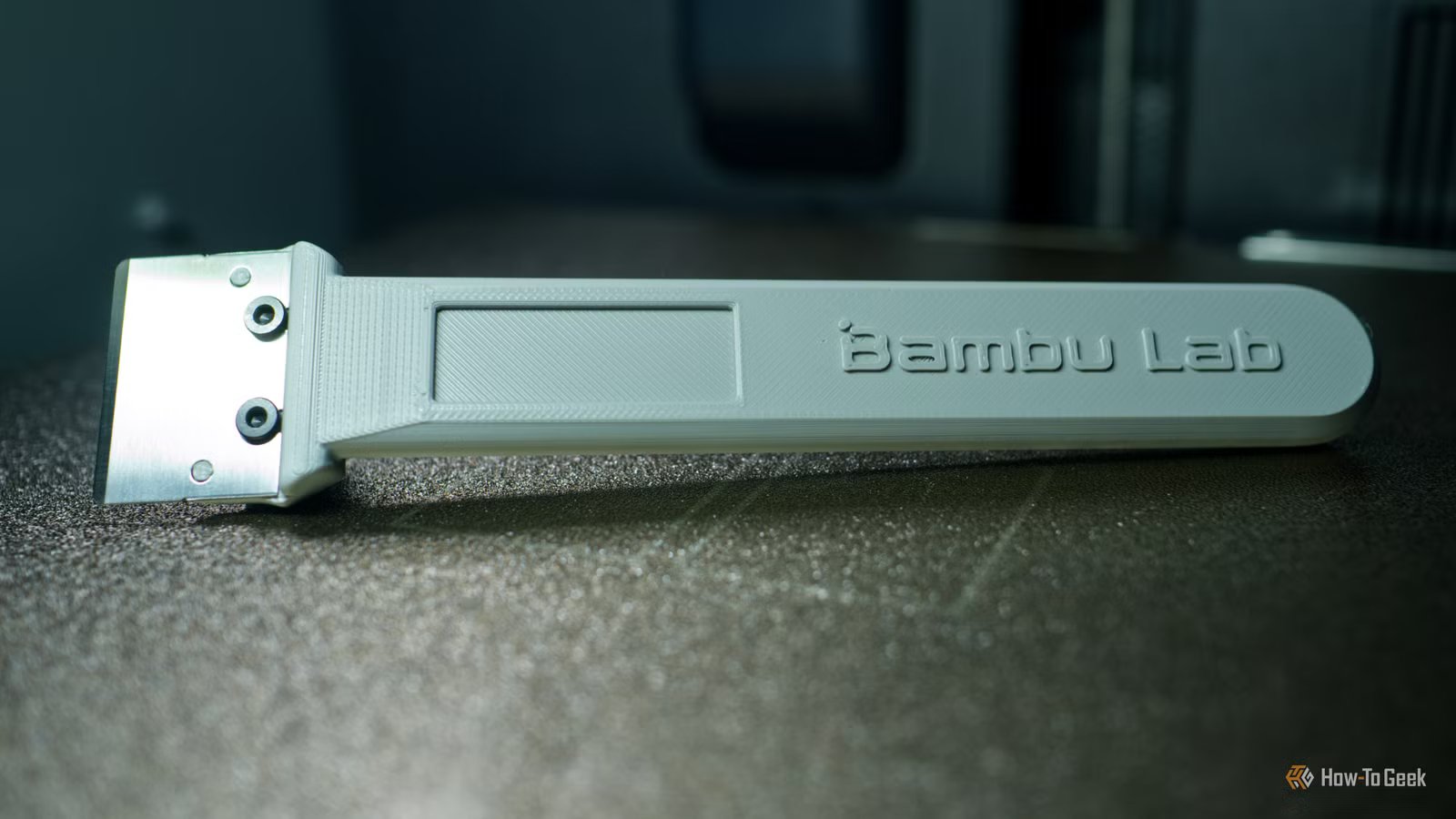
A build plate scraper is a thin piece of metal that helps you remove items from the build plate after printing. Some printers, particularly those from Bambu Lab, come with a scraper attachment, which you can then print a handle for (of which there are many designs to choose from).
The most important thing to keep in mind is that you follow your printer manufacturer’s instructions to avoid damaging the sensitive surface of the build plate. You can, for example, find very thin plastic scrapers in hardware stores for removing paint, which might be a better choice than metal for certain plates.
In addition to making it easy to free up prints, build plate scrapers can prevent you from having to touch the build surface with your fingers, which transfers oils and grease that can cause prints to slip and fail.
Digital calipers
Credit: Hardell
If you want to create your own 3D models rather than just printing those you find online, you’re going to want a set of digital calipers. These instruments allow you to measure gaps and report exact measurements. This makes it easier to design and print models that fit perfectly and don’t rely on you eyeballing a tape measure.
You don’t need to spend lots of money here, with cheap models costing a few dollars and more reputable brands sitting at around the $30 mark.
Air quality monitor
Credit: Tim Brookes / How-To Geek
Is your 3D printer inside your home or another enclosed space in which you spend a lot of time? An air quality monitor can tell you a lot about the way your hobby might be affecting your health. Sharing your living space with a 3D printer is risky, especially if you’re printing with ABS and Nylon filaments, which are considered more harmful than PLA.
Connect an air quality monitor to a smart home platform to log air quality changes as you use your printer. Many such monitors now include the full gamut of readings, including volatile organic compounds (VOCs), particulate matter (PM2.5 and PM10), carbon dioxide (CO2), carbon monoxide (CO), and formaldehyde (HCHO) in addition to temperature and humidity. You can buy them for cheap, spend more to get more readings, or even build your own.
If you’re from the “crack a window” school of ventilation, an air quality monitor can help you determine if more needs to be done.
Vent kit or filtration system
If your air quality monitor sounds alarm bells, you might want to think about better ventilation for your space. Personally, I’m in the process of doing this anyway because I don’t want to take any chances. I’m also not too fond of the melted plastic smell that overpowers the spare room when I’m printing with PLA.
How you go about this depends largely on your printer. There exist all manner of manufacturer-specific solutions. I have an official Bambu Lab P2S ventilation kit in the mail right now. An alternative for almost any enclosed printer is a makeshift ventilation system with a printable mount, an in-line extractor fan, and a length of tube leading to a nearby window. You can connect your printer to Home Assistant to automate such a solution.
For open printers, you might want to consider an enclosure that’s linked to some form of ventilation system. There are companies like FNATR that produce enclosures and filtration systems like the FNATR Ventilation System ($199), a small box that purifies the air.
Wire brushes
Credit: Tim Brookes / How-To Geek
Over time, the hotend and nozzle of your 3D printer will start to hold on to filament. Sometimes this takes the form of an unsightly blob that clogs and ruins a print. Other times, it’s only indicated by small flecks of filament in a print that shouldn’t be there.
Picking the right brush is important, with brass being a good choice for most users. Since many nozzles are made from brass, cleaning them with a brass brush is less likely to scratch and wear the nozzle. For hardened steel or tougher nozzles, a stainless steel brush can be used. Getting this wrong can damage the nozzle and make your prints less accurate.
A few quick scrubs of the nozzle while hot is usually enough to dislodge anything that shouldn’t be there. Make sure you turn the printer off before you do this.
A decent blade
Credit: Milwaukee
Sometimes, flush cutters aren’t enough to clean up your prints, especially if you’re printing with a brim. This optional thin layer extends beyond the boundary of your print in order to help it stick to the build plate, and it needs to be removed when the build is complete. A good, sharp blade, like a hobby or utility knife, should do the trick.
You can also use the same knife to clean up any stringing left on the model and help free up hinged parts with precision. You can even print your own utility knife (like this one) that’s compatible with common blades (like these), just search your favorite model repository for ideas.
It’s better to have these tools and not need them immediately than to realize you need them and not have them. While filament dryers and ventilation can cost a pretty penny, everything else can be found for relatively cheap.
