

Writing code on a touchscreen is usually an exercise in patience. Half the time, you are wrestling with autocorrect, and the other half, you are spelunking through menus to find a curly brace or a semicolon. It is the kind of experience that makes you want to close the app and promise yourself you will deal with it later, back at a real keyboard.
However, for those moments when you actually need to run a quick script in Termux or patch a line of code on the fly, the default Android keyboard does not hold up. I assumed that was simply the price of working on a phone until I stumbled upon Unexpected Keyboard. It is one of the best free and open-source Android keyboard apps.
OS
Android
Price model
Free (open-source)
Type code comfortably on your phone with Unexpected Keyboard. It adds programmer-friendly keys, shortcuts, and layouts that make mobile development far less frustrating.
This ingenious keyboard lets you type hundreds of characters without ever leaving the home row
Where other keyboards bury symbols, this one puts them at your fingertips
The biggest headache with most mobile keyboards is the endless layer hopping. To write even a simple line of Python or JavaScript, such as print(“Hello World”), you end up bouncing between letters, numbers, and symbols like you are playing a tiny game of whack-a-mole. Unexpected Keyboard sidesteps that whole mess by keeping almost every character on the main screen.
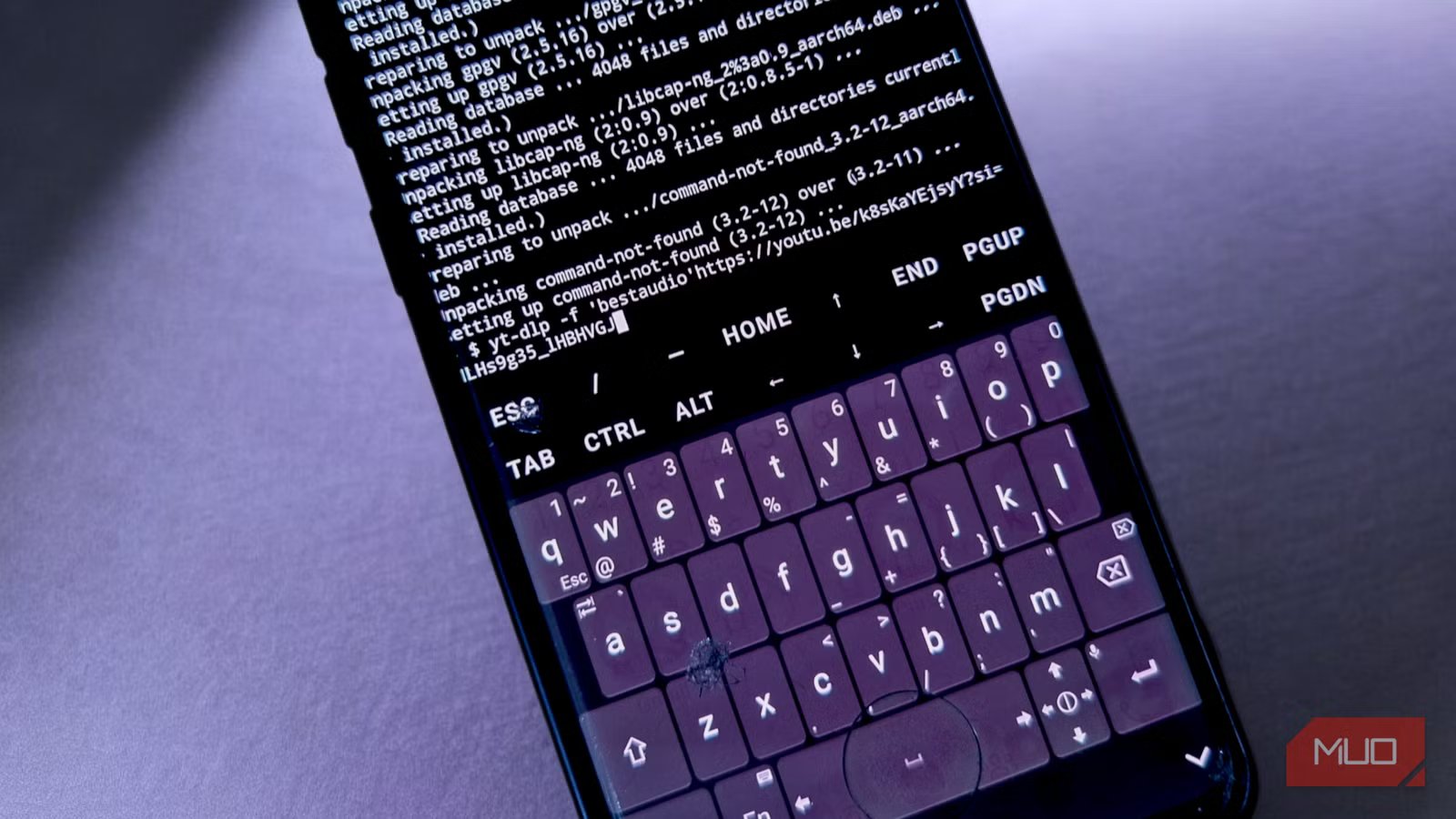
At first glance, it looks like a regular QWERTY layout. Look a little closer, though, and you will spot tiny symbols tucked into the corners of each key. The q key, for example, does not just give you a letter. It also hides a tilde in the top-left, a 1 in the top-right, and even the Esc key in the bottom-left. That kind of density means you rarely have to flip to another page. It is the same idea as using modifier keys on a mechanical keyboard, just reimagined for a slab of glass.
If you’re a programmer, you’ll find this very useful. While installing packages and running Python scripts on my phone during testing, I constantly needed dashes, brackets, slashes, dollar signs, quotes, and flags. With the Unexpected Keyboard, these were always within reach, so the command flows out without breaking my pace. Muscle memory takes a little time to settle in, but once it does, the flow feels closer to working on a physical keyboard than pecking at glass.
The app itself is pleasantly lean. It does not require internet access, so it cannot send your keystrokes to a distant server. These days, when “smart” keyboards are eager to learn your habits or push extras, this one stays focused on the task. It even brings back essentials that many mobile keyboards have abandoned. Along the bottom, you’ll find dedicated Ctrl, Fn, and Alt keys—not buried in submenus but prominently placed for quick access. Above the main keyboard sits a row containing Esc, forward slash, minus, Home, End, and Page Up/Page Down, all of which are indispensable in terminal environments like Termux.
Related
The 4 Best Terminal Emulator Apps for Android
Try these Android terminal apps to run Linux command line tools and much more on your phone.
The keyboard even includes an emoji panel and clipboard manager, though you access these through the function layer rather than cluttering the main interface. Long-press the emoji icon, and you’ll find your recently copied text, complete with pins for frequently used snippets. It’s these thoughtful details that reveal how carefully this keyboard was designed for actual workflow rather than theoretical use cases.
Unexpected Keyboard gives you granular control without overwhelming complexity
Tweak everything that matters, ignore everything that doesn’t
While the default layout is already polished, Unexpected Keyboard’s settings let you shape the keyboard to your device and your habits.
One of the first things I tweaked was the keyboard’s physical footprint. Screen space is precious when you are staring at terminal output, and an oversized keyboard can crowd out the very lines you are trying to read. You can fine-tune both Keyboard height and Label size with precision on this keyboard. I dialed the vertical spacing between keys down to 1.2% and the horizontal spacing to 1.6%, which gave me a cleaner and more compact board—an effect similar to when I changed an Android developer setting to fit 30% more on my screen.
The customization goes deeper than looks, too. Some default mobile behaviors can be a minefield for programmers. Automatic capitalization, for example, will happily turn a variable like download_speed into Download_speed, which is a good sneaky way to introduce a bug. Here, you can turn off auto-capitalization entirely, along with adjusting details like Key repeat on long press and the Key repeat interval. I set mine to a brisk 20ms, which makes zipping through a line with backspace or arrow keys feel instant. There’s also a circle gesture sensitivity setting that affects how the keyboard interprets curved swipe motions.
It even supports multiple layouts. If the standard setup doesn’t quite match your style, the Layout menu lets you add alternatives or toggle a dedicated number row if you prefer it over swipe gestures. There is even a NumPad option that lets you choose whether higher digits come first or last. It’s a small, thoughtful touch, but one that anyone who lives in spreadsheets or data entry will immediately appreciate.
Typing on mobile will never feel quite the same after using this keyboard
One thing I almost skipped over, but really deserves a mention, is how much Unexpected Keyboard trusts you to know what you want to type. It does not try to “fix” your variable names into real words. It does not throw suggestions at you that you never asked for. It does not guess whether you are typing a URL or an email address. Isn’t that lovely?
It is not going to replace a full desk setup with a hot-swappable mechanical keyboard and a big monitor. Mobile development is still a compromise, no matter how good the tools get. But Unexpected Keyboard meaningfully closes the gap. So, if you’re a programmer who occasionally needs to code on mobile, a system administrator who troubleshoots remotely, a writer who works in plain text formats, or just someone frustrated by the tyranny of keyboard switching, you really should give Unexpected Keyboard a try.
