

My wife doesn’t care much about the dozens of tech products I get in a month, but she insisted I set up Huawei’s Wi-Fi Mesh X3 Pro router as soon as it showed up. That’s because of the design of the router; most routers tend to be downright ugly, and while the best Wi-Fi 7 mesh systems like the Orbi 970 and Orbi 770 are designed with a modern aesthetic, they still end up looking like tech products, and don’t really mesh with the decor of a house.
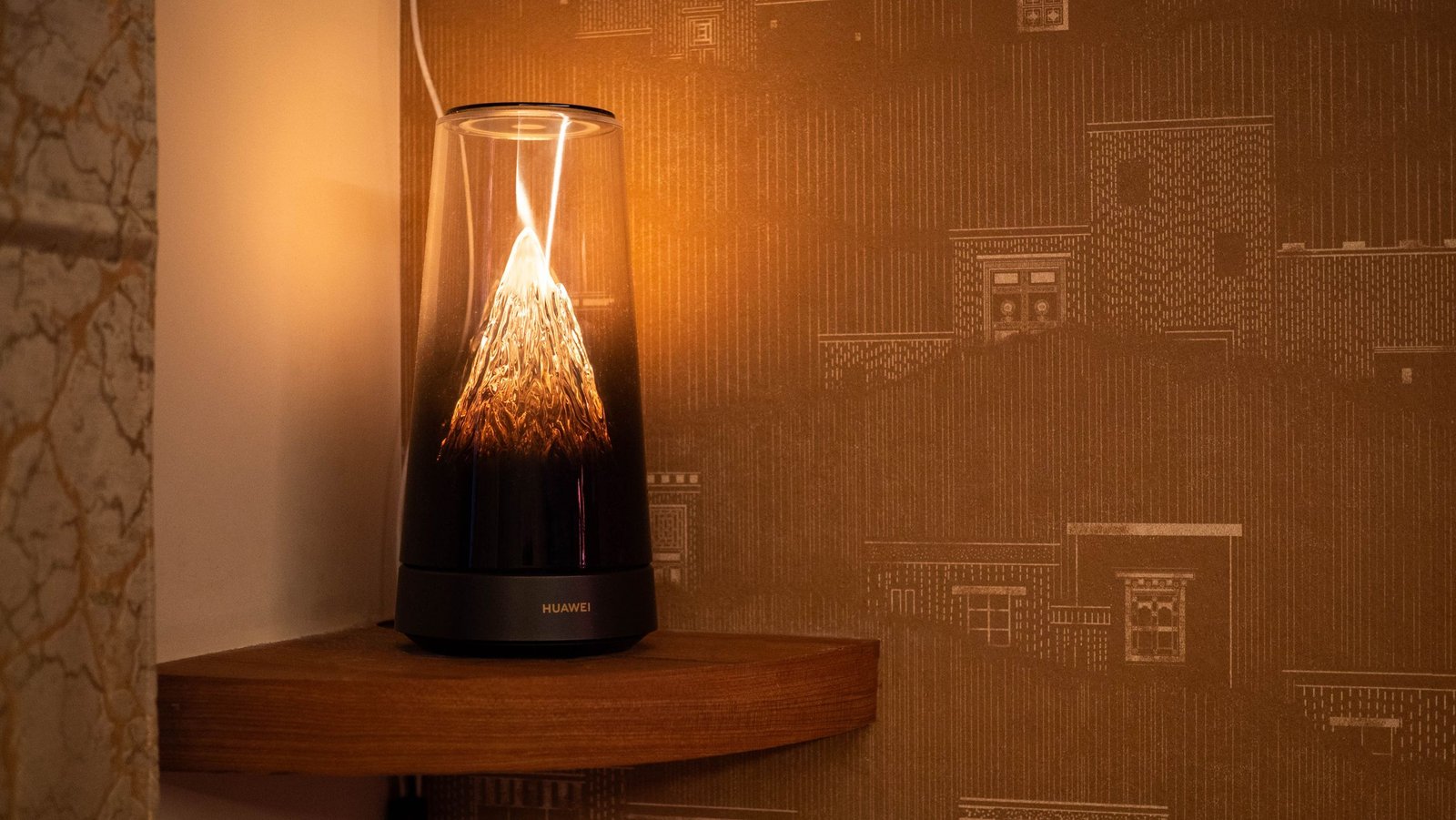
That isn’t the case with Huawei’s latest mesh router. The Wi-Fi Mesh X3 Pro looks exquisite, and honestly, you can’t tell that it is a router. My wife and I made a game out of asking guests visiting our house over the last month to guess where the router was, and no one was able to identify it correctly — if anything, almost everyone thought it was a smart lamp (we do have a lot of those in the house).
(Image credit: Apoorva Bhardwaj / Android Central)
The Mesh X3 Pro has a unique design that evokes the feel of a snow-covered mountain within a cylinder, and the built-in lighting is dazzling. It switches between warm and white hues, and you can easily adjust the lighting by pressing down on the top of the router. The mountain-like design isn’t just for show; Huawei somehow managed to integrate Wi-Fi antennae into the structure, and it looks fabulous. As this is a Wi-Fi 7 mesh system, you get a smaller satellite in the box that looks like a mood lamp.
You may like
Look, I tested dozens of routers over the course of the last decade, and I haven’t used anything that looks quite as striking as the Wi-Fi Mesh X3 Pro — not even close. Most of all, though, my wife likes the router, and that’s the biggest selling point of the Wi-Fi Mesh X3 Pro. The mesh router is now available globally, and it costs around the equivalent of $285, which is reasonable as you get the main node and a satellite.
(Image credit: Apoorva Bhardwaj / Android Central)
Coming to the connectivity part of the Wi-Fi Mesh X3 Pro, you get 2×2 dual-band radios with Wi-Fi 7 and MLO, and the 5GHz channel has a theoretical bandwidth of 2,882Mbps, with the 2.4GHz delivering 688Mbps. Annoyingly, the router gets just two 2.5 Gigabit Ethernet ports, and one of those is used for the WAN connection, so you get a solitary port to connect other devices.
Thankfully, I have a 24-port switch that I use with the router, so it wasn’t an issue, but even then, I had to reroute a few things — like the Pi 4 — to the switch before I was able to use the router. The satellite gets Ethernet connectivity as well, via a single Gigabit port.
(Image credit: Apoorva Bhardwaj / Android Central)
You can technically control the router via Huawei’s AI Life mobile app, but I wasn’t able to do so. No matter what I tried, it just wouldn’t pull up the router’s settings, but thankfully, you can easily configure all the settings via the web interface, and it has a decent list of settings. There’s the ability to change 2.4GHz and 5GHz settings, split both channels into distinct SSIDs, use a custom DNS server, configure WAN settings if you use a static IP like me, set up a guest Wi-Fi, and all the other settings you’d see on a standalone router.
Coverage via the main router is pretty good, but you’ll ideally need to use it with at least one satellite if you have a sizeable home. It delivered decent bandwidth considering it’s a budget mesh system, but it was nowhere as effective as a standalone router like the RT6600ax that I was using previously, and it doesn’t hold a candle to my UniFi network.
(Image credit: Apoorva Bhardwaj / Android Central)
The issue with using the Wi-Fi Mesh X3 Pro in my house is that we have too many devices connecting to it, and often enough, I see the router losing connection with my phones and tablets even if I’m in the next room. I tested it over the course of two months now, and whether it’s the Find X9 Pro, Vivo X300 Pro, iPad Pro M4, or the dozen or so Android phones I connected to it, the problem was the same — the 5GHz channel would lose connectivity whenever I moved between rooms, and it would wait a few seconds and switch to the 2.4GHz band or reconnect to the 5GHz SSID.
I get that my home is an outlier in the sheer number of smart home devices, phones, projectors, and other accessories that connect to the router, and if you don’t routinely have a hundred devices on your home network, this shouldn’t be an issue.
(Image credit: Apoorva Bhardwaj / Android Central)
Intermittent connectivity issues notwithstanding, I don’t have any problems with the Wi-Fi Mesh X3 Pro; it is better than most other mesh systems in the sub-$300 category, and the web interface gives you extensive configurability when it comes to tailoring the router to your network.
Ultimately, I will have to switch to a more powerful Wi-Fi 7 router, but I’m hesitant to do that because no other router I have in my house looks anywhere as good — nor blends in as well with my living room decor — as the Wi-Fi Mesh X3 Pro. Huawei really needs to make a higher-end variant of this router with quad-band connectivity and higher-gain antennae. Now I just need to convince my wife that we need to go back to a router that doesn’t look as elegant.
