

A well-built tracker in desperate need of a friendlier app
The Polar Loop (Gen 2) is a solid piece of hardware, but it’s by no means a straightforward subscription-free alternative to Whoop. That might be the case for some existing Polar watch users craving a comfier way to track sleep and recovery, since the Loop can tap into the brand’s novel insights. However, the experience is fundamentally held back by the Polar Flow app, which lacks the tailored, modern interface a screenless device demands. Plus, while the Loop is attractive enough, inconsistent tracking accuracy and the lack of accessories keep it from being a true class leader.
Premium, slim, and comfortable design
No monthly subscription required
Reliable sleep tracking insights
Polar Flow app feels dated and unoptimized for screenless use
Struggles in heart rate accuracy and workout detection
No bicep band option to improve accuracy
The screenless wearable category has undergone a notable renaissance in recent years. Led by the cult-like success of Whoop, more users are seeking a digital detox for their wrists—trading buzzing notifications and glowing displays for discreet bands that prioritize holistic data.
It is into this increasingly crowded space that the Polar Loop (Gen 2) arrives, marking the return of a nameplate we haven’t seen in years—and doing so with a design that is unapologetically aimed at the king of the mountain.
Positioned as a more affordable, subscription-free alternative to the Whoop 5.0 and Whoop MG, the Loop Gen 2 is Polar’s attempt to win over the recovery-first athlete. It strips away the complexities of its traditional sports watches, offering a knitted fabric band and a lightweight sensor module that disappear on the wrist.
But as rivals like Amazfit have proven, a screenless wearable is only as good as the app that interprets its data. For the Loop to succeed, it doesn’t just need to look the part; it needs to convince users that Polar’s legacy algorithms can feel at home in a modern, mobile-first world.
Price and competition
Advertisement
The Polar Loop Gen 2 is available for $199/£149.90, making it considerably cheaper than purchasing a Whoop 5.0 or Whoop MG.
With the Loop, you only pay for the hardware; access to the Polar Flow app to view your data is free. This differs from Whoop, which requires a subscription and costs $199 to $359 annually ($25 to $40 monthly).
Polar isn’t the only brand with a subscription-free alternative to Whoop. The Amazfit Helio Strap is another option, priced lower than both Whoop and Loop at just $99.99/£99.90.
It’s worth mentioning the Oura Ring 4 here, as well. Although it’s not worn on the wrist, it offers features similar to the Loop in a discreet form. It is more expensive, starting at $349/£349 for the hardware. And, like Whoop, a subscription is a requirement (and costs approximately an additional $70/£60 annually).
In the screen-free wearables space, the Loop Gen 2 is among the more affordable options. It’s just not the cheapest available.
Design and comfort
(Image credit: Wareable)
Advertisement
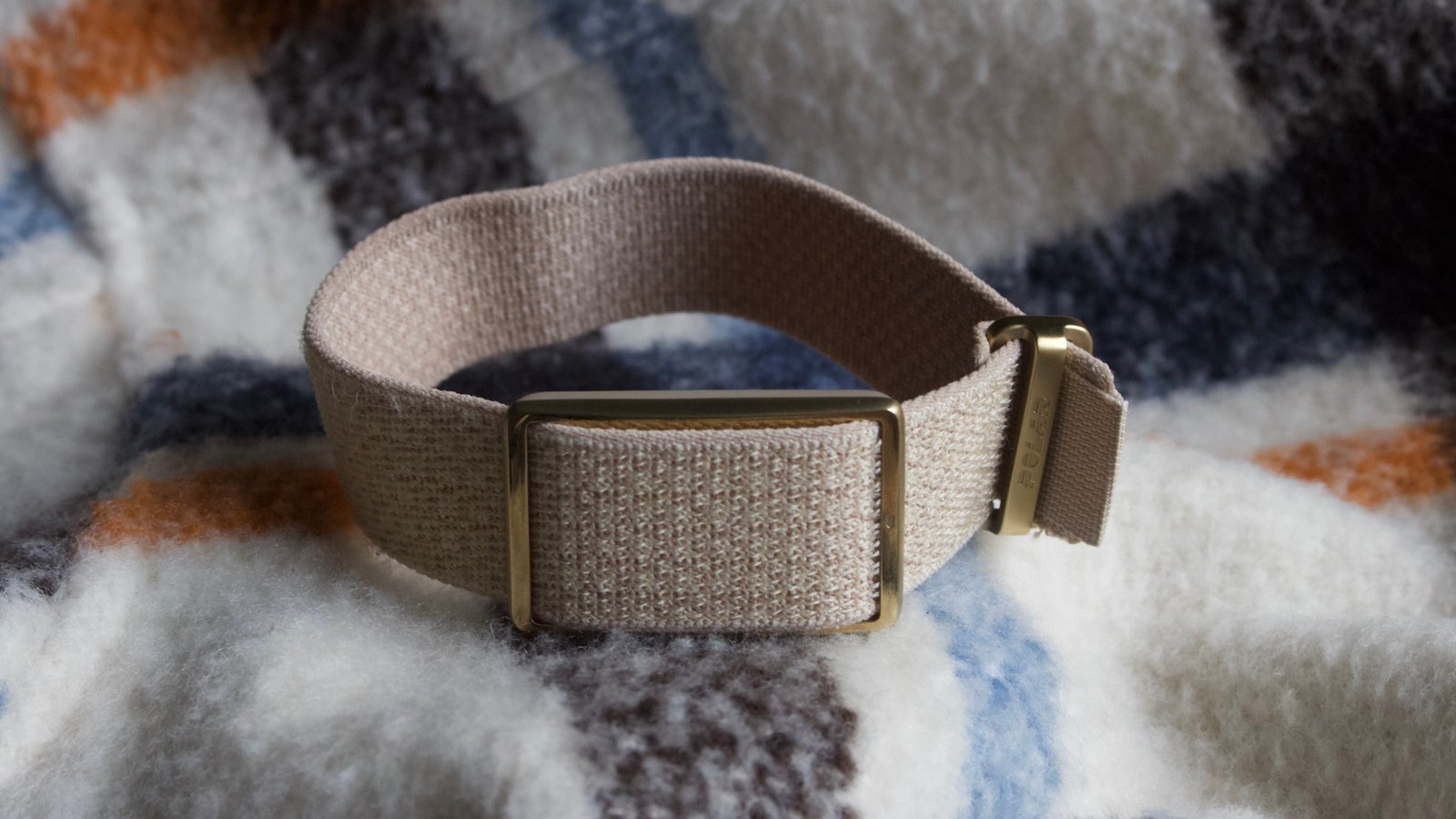
The Polar Loop resembles a Whoop quite closely. The fabric band and metal clasp strongly evoke the Whoop design, which the Boston brand has taken note of in its ongoing ‘trade dress’ lawsuit against Polar.
Although the Loop is slightly smaller and slimmer, it functions similarly on your wrist. You thread the knitted fabric band through a buckle and attach the Loop module, with Velcro at the band’s end to secure it. Fortunately, the package includes two band sizes to ensure the best fit.
It’s great that you don’t need to remove it when you shower or swim. With a WR30 rating, it’s safe for dips in the pool and bathing, allowing you to track your heart rate and calorie burn while in the water. However, it won’t track traditional swimming metrics such as stroke, pace, or distance.
(Image credit: Wareable)
The sensors monitoring your metrics are positioned behind the main Loop component, with an engraving on the front of the buckle indicating the correct side to wear for the most accurate data.
You’ll also find the charging port, which works with Polar’s proprietary charging cable. It’s actually the one used on most of its latest watches, so that’s good news if you own a new Polar watch as well.
Advertisement
Tracking on the down-low
The Loop looks discreet, feels very comfortable on the wrist, and is easy to forget you’re even wearing. As we’ve found with all designs derived from Whoop’s original model, it’s an excellent option for those who prefer to wear another wearable (such as a sports watch, smartwatch, or even a traditional watch) on the opposite wrist for different insights.
While we don’t want to turn this review into a full Polar Loop vs. Whoop comparison, it’s worth noting that the build quality, ease of use, and comfort are very similar. Ultimately, this is a screenless device, so there’s very little that should go wrong. But we’ll give Polar credit here nonetheless; it clears this hurdle with ease. The Loop is a great wearable from a pure design perspective.
Polar Flow app
(Image credit: Wareable)
The Polar Flow app is the primary tool for viewing the Loop’s monitoring data. If you mainly want to track heart rate, Polar also offers the Polar Beat app, but, for setup and configuration, you’ll need to download the Flow app on your Android phone or iPhone.
You can also share and view data from the likes of Apple Health, Google Health, TrainingPeaks, and Strava by simply linking services from the Flow app. And based on our experience, we think it’s very likely you will want to review the Loop’s data elsewhere.
That’s because the Flow app is in no way specifically designed for the Loop. We’ve criticized other entrants in the screen-free wearable space for similar reasons. Essentially, the Loop appears to be just another Polar device, which, to an extent, works fine when you have a screen as a reference for what you’re tracking.
Advertisement
But without a screen on the Loop itself, it’s incredibly important to have a strong reference point for what’s being tracked around the clock. And Flow is miles off the pace of rivals in this regard.
An open loop
We never felt it was genuinely customized to the tracking elements we cared about, as you would with dashboards like Oura or Whoop. That creates a strong sense of feeling disconnected from the device. Because there are no features like real-time stress tracking to keep you engaged, we often questioned the need to wear it outside of sleep tracking or workouts.
Plus, if you’re only interested in the pure basics, you’ll need to wade through screens and menu settings that are of no use to you. And some of the terminology and phrasing used for insights will no doubt be a little daunting for those at the start of their fitness journey.
And that’s without commenting on the app’s incredibly dated UI. Unfortunately, Flow still feels like it hasn’t had a fresh lick of paint in around a decade. And while Polar is planning changes, it’s agonizing that they didn’t coincide with the Loop’s launch, given how crucial a usable, engaging app is for a screenless device.
Activity tracking and heart rate accuracy
(Image credit: Wareable)
The Loop doesn’t introduce groundbreaking new features regarding what it tracks or which sensors it uses to monitor your data. Instead, it focuses on taking some of Polar’s existing metrics and insights and making them accessible to Loop users.
Advertisement
For example, the heart rate monitor continuously tracks your heart rate, even overnight, and measures heart rate variability during sleep. This helps provide more detailed insights into your rest and recovery.
However, Polar is not using its latest technology for this device. Instead, it utilizes its older Precision Prime sensor, which it claims is more cost-effective and lightweight. Although the hardware differs from the newer Elixr sensor, the data-processing algorithms are identical, so the results should be comparable.
Missing a crucial accessory
Yet we’ve had mixed experiences with both newer and older versions of Polar’s optical heart rate sensor systems. And, on the Loop, it’s certainly a mixed bag.
When continuously monitoring heart rate during the day and during sleep, the data has generally looked pretty good compared with other devices. We didn’t see any wild spikes or heart rate drops. The reliability of the fit plays a role here, and it’s encouraging to know it can keep up with steady sessions, as illustrated by the treadmill run below.
(Image credit: Wareable)
Where things start to falter is during intense exercises, especially explosive, HIIT-style workouts, where rapid heart rate changes are difficult to track. The perfect example of this appears below in an indoor cycling session with multiple sharp intervals, in which the Loop struggles to register the intervals clearly—in contrast to the Garmin Forerunner 970 worn on the opposite arm.
Advertisement
The Loop, frustratingly, faces the same challenge as Whoop’s latest hardware in this regard, which is why we recommend that brand’s bicep band (sold separately) to enhance accuracy.
However, Polar doesn’t offer this as an add-on, which means Loop users are stuck with the heart rate accuracy available out of the box. Interestingly, Amazfit provides this for its Helio Strap, and not producing any additional bands or sleeves (other than alternative wristbands) at all feels like a huge missed opportunity from Polar.
(Image credit: Wareable)
Keeping things basic—to a fault
In addition to more intense workouts, the Loop can also monitor basic activity. It uses accelerometer data to count steps, send inactivity alerts to the app to prompt movement, and track calorie burns and progress toward goals.
We have no issues with the data the Loop provides here. When worn alongside other step trackers, its data generally falls within similar ranges most days.
However, it doesn’t offer anything particularly new or unique in the tracking experience. There’s auto-workout detection, which tends to work well (once you turn down the sensitivity), but it feels like Polar, again, missed a trick here by not providing any novel features that work with the design, such as a start-stop tap or gesture control.
Advertisement
Sleep tracking and insights
Wearing the Loop instead of a bulky sports watch overnight is one of the most immediate benefits of the design, giving those already embedded in the ecosystem a much more comfortable night’s sleep while still accessing Polar’s own insights.
Polar’s sleep tracking has also been a standout feature of its platform in the last few years—and that naturally continues with the Loop. Although not perfect—and not quite able to beat out the best sleep tracker on the market—it tends to be more reliable than sleep tracking on Garmin, Suunto, and Coros sports watches.
We found the Loop very comfortable and unobtrusive to wear during sleep. In addition to basic sleep metrics, Polar offers Nightly Recharge and SleepWise insights that provide additional context on recovery and energy levels.
The core sleep data accuracy is generally consistent with other sleep trackers we’ve used, such as the gold-standard Oura Ring 4. The Nightly Recharge insight is especially useful, using analysis of how your autonomic nervous system responded in the first four hours of sleep to inform personalized training recommendations for the following day. Again, nothing new here, but undoubtedly a nice feature to have in such an easy-to-wear form factor.
However—like with fitness tracking—the app’s presentation diminishes its usefulness. This issue is part of a recurring pattern with the Loop, where the software doesn’t quite match the sleek hardware.
Advertisement
Training features and insights
(Image credit: Wareable)
Polar suggests the Loop can act as a training partner, but after extensive testing, we’re not convinced it performs well in this role. The company emphasizes two main aspects: enabling you to track workouts either manually or automatically, and providing some training insights (though not all).
If you want to track a workout manually, you’ll need to set it up from the Flow app. However, instead of suggesting your most common workouts, it often takes a long time to scroll through the workout library. That’s a simple thing Polar needs to change. Plus, unlike Polar’s Beat app, you’re not seeing real-time data in the app, so you’re essentially training blindly.
You can also track outdoor workouts using your phone’s GPS, though, like with competitors, there’s no built-in GPS here.
(Image credit: Wareable)
Tone it down
Instead, it’s often easier to rely on the automatic workout tracking, which detects when heart rate rises and uses data from the onboard accelerometer.
Advertisement
Mercifully, there’s an option to adjust recognition sensitivity based on workout intensity. If you stick to a light intensity, it essentially counts any movement as exercise. We initially had the Flow app linked to Strava, and it didn’t take long for our Strava feed to be littered with short walks or washing the dishes as workouts.
Adjusting the intensity in the app did improve things, though it still misidentified activities as workouts on the odd occasion—something we very rarely experience with devices like Whoop.
(Image credit: Wareable)
Polar emphasizes strain in its training insights, similar to Whoop, through its Training Load Pro metric. This metric is based on cardio or muscle load measured after workouts. It also demonstrates the benefits of your training session, such as improved aerobic fitness and endurance.
However, based on our experience with heart rate accuracy and workout tracking, we’re not fully convinced of the usefulness of these insights. It’s just hard to have faith in them if you know the data is patchy—and, again, the very basic presentation doesn’t help here.
Battery life
(Image credit: Wareable)
Advertisement
Battery life is a positive aspect of using the Loop—or any screenless wearable, frankly.
However, it doesn’t offer the longest battery life among screenless bands. The Whoop MG, for example, can last up to two weeks, which is the best we’ve seen. Plus, that device can stay on even while charging, thanks to the slide-on puck. The more affordable Amazfit Helio Strap also provides up to 10 days of quoted battery life, and it easily lasted a week during our intensive testing.
In contrast, the Loop promises up to 8 days of use, and in our experience over the last few months, it has almost always lasted at least a week between charges. It’s solid performance—particularly if you’re used to a smartwatch’s staying power—but it’s not anything that gets us too excited.
Still, we never observed inconsistent battery drop-off across use cases, which is encouraging for those who plan to track longer workouts. Overnight, it typically dipped by 6-7%, whereas tracking a workout for an hour resulted in a small decline of 2-3%.
You can configure battery notifications in the Polar Flow app to alert you on your phone when the battery is low. Although the band itself doesn’t notify you, this feature helps you remember to connect your charger before it runs out.
