

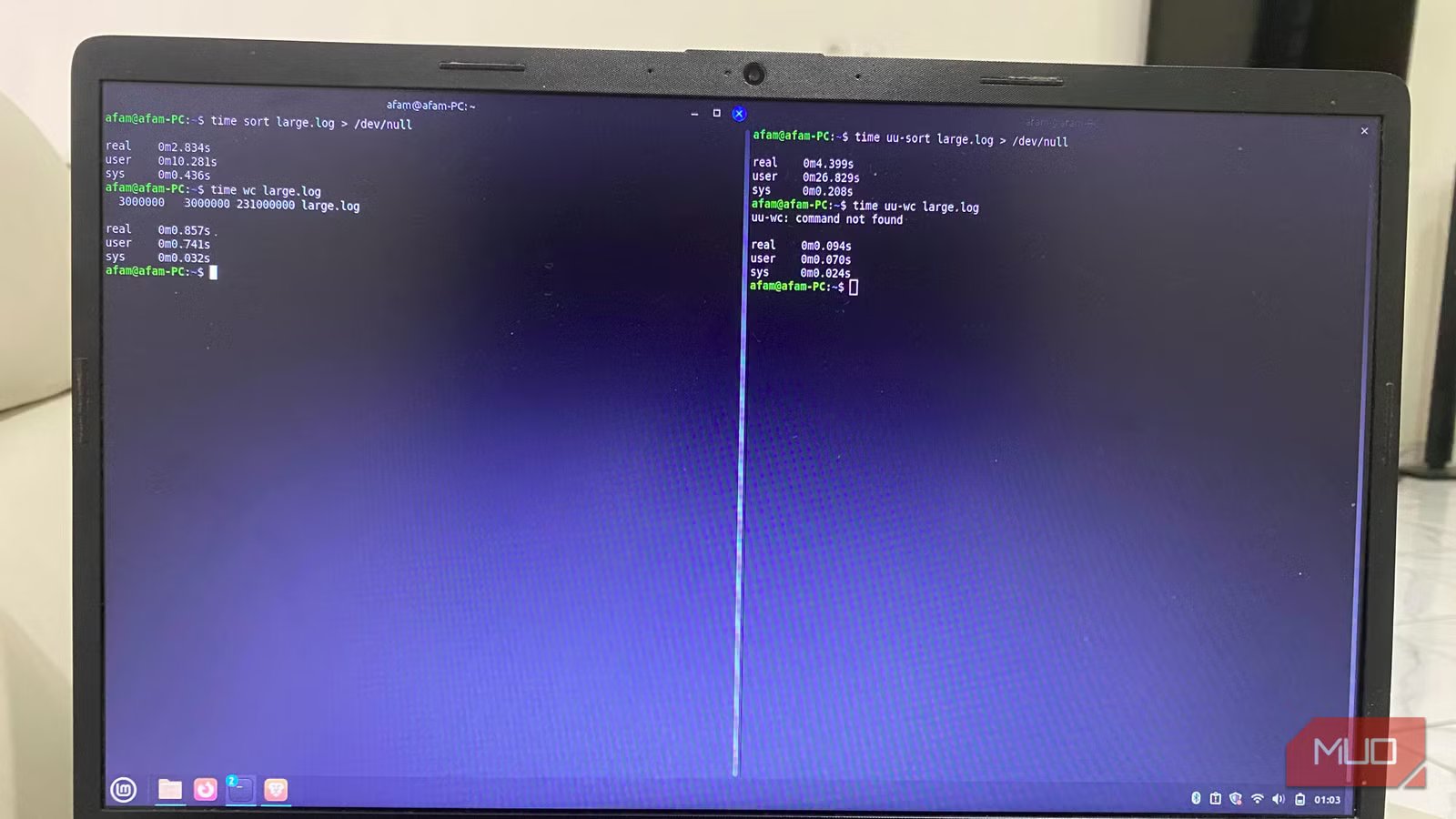
The first time that familiar pause caught my attention was while I was using the sort command to run through a few hundred megabytes of log text. Until now, I had always ignored it. It comes up when I use du -sh to crawl project directories or ls -la in folders packed with build artifacts.
GNU coreutils are as foundational as it gets on Linux, and they feel untouchable. But as soon as it dawned on me that reliable doesn’t always mean optimal, especially on modern hardware, I knew it was time to try something different. So, uutils, the Rust reimplementation of GNU coreutils, was my next stop. I started by swapping out one command, then another, and quite often, uutils was faster. If you spend meaningful time in the terminal, these are worth trying.
The friction you stopped noticing was hiding in plain sight
“Fast enough” only feels fast until you compare it
If you aren’t paying attention because something feels natural, you can start assuming that its limitations are normal. This is why I always ignored that pause that happens on a large directory listing before it prints. The delay you get if you sort logs while debugging can break your flow. You probably chalk it up to disk I/O.
On modern devices, it’s easier to see how outdated these assumptions are. These machines have extremely fast NVMe drives, and the CPU cores are usually underutilized by average userland tools. However, because we still use several tools from a different hardware era, they are single-threaded and conservative. Most of the constraints they were built around no longer hold.
No one benchmarks or questions coreutils because they always work. In fact, when we want better productivity, we’d rather tune our prompts and tweak the kernel. But comparing output side by side showed me the problem was the tool.
How uutils/coreutils behaves differently under load
Afam Onyimadu / MUO
With several years of effort and hundreds of contributors, uutils is aiming for near-complete GNU compatibility. It’s rebuilding the tools in Rust, and newer distributions like Ubuntu 25.10 now ship it by default.
The first command that really caught my attention was sort. On a 100s-of-MB log file, GNU sort took 2.819 seconds of real time (10.204s user CPU time), while the Rust implementation completed the same task in 0.092 seconds real time. The wc command felt snappier over several large logs. Bulk-copying many small files showed enough of a speed difference to be noticed. Not every command I tried was noticeably faster, but I found enough to make me keep replacing them.
The responsiveness is what stood out. It was the first time commands seemed to be completed when I expected them to be. This becomes a significant difference during debugging if you are quickly iterating or chaining tools in pipelines.
Certain tools performed on par, and a few edge cases are better suited to GNU’s mature optimizations. But the difference is that Rust implementations mainly feel more suited for modern multicore hardware.
The safety and consistency difference shows up when you stress it
Why a modern rewrite changes more than speed
Afam Onyimadu / MUO
Although I loved the speed, what kept me using the tools was consistency. Rust’s memory safety model prevents entire classes of bugs common in C-based tools — buffer overflows, use-after-free, null pointer dereferences — without requiring manual guards. Even though you do not directly see these, predictability is an essential element if you feed massive input into a command-line tool.
I typically experienced cleaner behavior, including explicit errors and predictable failures on larger datasets, malformed text, or unusual input patterns. For example, piping malformed UTF-8 text into uu-cut displayed an explicit error immediately, whereas GNU cut produced unexpected output. This doesn’t imply GNU coreutils are unstable, but it’s even more reassuring to have foundational tools built with modern safety guarantees from scratch.
Uutils also maintains an elaborate testing culture that includes continuous integration across its entire toolset. This is an important factor that translates into confidence if you rely heavily on scripts and automation.
Replacing system core utilities sounds reckless — it isn’t
How to test uutils safely without touching your base system
Afam Onyimadu / MUO
GNU coreutils feels like one of the Linux components that now has better modern alternatives. You may think replacing it is dangerous, but that’s only because you don’t understand how reversible it is. When uutils is installed, nothing is overwritten because it installs by default with a uu- prefix. So, for instance, you have uu-sort and uu-ls. You can compare both versions side by side. It’s a form of A/B testing for commands.
You can even take it a step further by temporarily adjusting your PATH. This way, you don’t have to delete any GNU files before prioritizing Rust binaries. By simply reverting the PATH, you return to the original setup.
There is a small compatibility gap with uutils, but this mainly has to do with obscure flag combinations. Sometimes, it could also be due to legacy POSIX behaviors that you wouldn’t normally trigger. If you are running a personal workstation, you can easily undo any changes, and experimentation is low risk.
The commands you never questioned deserve a second look
I don’t think everyone should replace GNU instantly. However, the more significant point is that this layer of Linux that we never question is not frozen. None of the commands you use daily is sacred. The reality is that by swapping them out, you may be saving a few minutes daily and becoming more productive.
Related
Sorry, Linux fans: This OS is actually the better Windows replacement
Not Linux, not Windows. Something better.
