

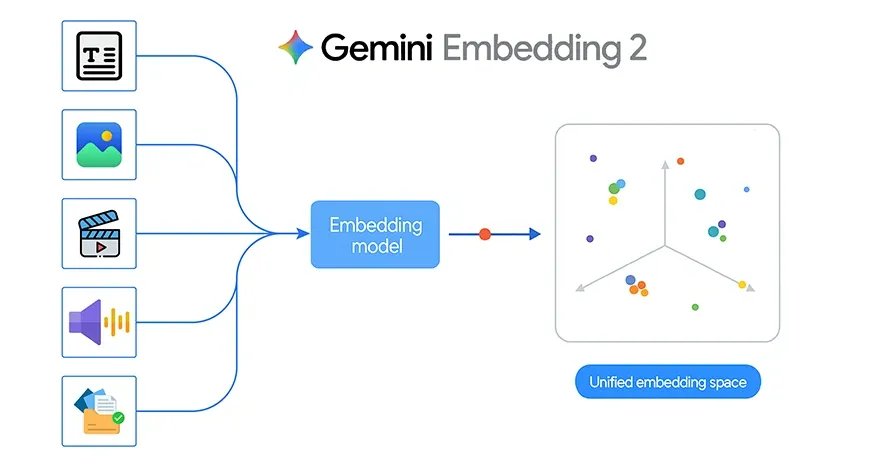
Google recently introduced Gemini Embedding 2, its first natively multimodal embedding model. This is an important step forward because it brings text, images, video, audio, and documents into a single shared embedding space. Instead of working with separate models for each type of data, developers can now use one embedding model across multiple modalities for retrieval, search, clustering, and classification.
That shift is powerful in theory, but it becomes even more interesting when applied to a real project. To explore what Gemini Embedding 2 can do in practice, I built a simple image-matching system that identifies which person in a query image is most similar to the stored images.
Gemini Embedding 2 Key Features
Traditional embedding systems are often designed for text alone. If you wanted to build a system that worked across images, audio, or documents, you usually had to stitch together multiple pipelines. Gemini Embedding 2 changes by mapping different types of content into one unified vector space.
According to Google, Gemini Embedding 2 supports:
- Text with up to 8192 input tokens
- Images, with up to 6 images per request in PNG and JPEG format
- Video up to 120 seconds in mp4 and mov
- Audio without needing transcription first
- PDF documents up to 6 pages long
It also supports interleaved multimodal input, such as image plus text in a single request. This allows the model to capture richer relationships between different kinds of data.
Another important feature is flexible output dimensionality through Matryoshka Representation Learning. The default size is 3072 dimensions, but it can scale down to smaller sizes such as 1536 or 768. This helps developers balance quality, storage, and retrieval speed depending on the application.
Also Read: 14 Powerful Techniques Defining the Evolution of Embedding
Building an Image Matching System Using Gemini Embedding 2
The project uses three folders inside a dataset directory:
dataset/
nitika/
vasu/
janvi/
Each folder contains multiple images of one person. The goal is straightforward:
- Read all images from the dataset
- Generate an embedding for each image using Gemini Embedding 2
- Store those embeddings in memory and cache them locally
- Take a query image
- Generate its embedding
- Compare it with all stored image embeddings using cosine similarity
- Return the top matching images and predict the person name
This is a strong example of how Gemini Embedding 2 can be used for image-based retrieval and lightweight classification.
The best part of this project is that it does not require a full deep learning training pipeline. There is no custom CNN training, no fine-tuning, and no annotation-heavy workflow. Instead, the system relies on the embedding model as a semantic feature extractor.
That makes development much faster.
Since Gemini Embedding 2 is natively multimodal, the same project design can later be extended beyond images. For example:
- Matching a spoken audio clip to a person profile
- Searching for a relevant PDF from an image
- Retrieving a video segment from a text query
- Comparing mixed image and text descriptions in a single embedding space
In this sense, the current project is a simple entry point into a much broader multimodal retrieval architecture.
Gemini Embedding 2 API Usage
Google provides the Gemini Embedding 2 model through the Gemini API and Vertex AI. The embedding call is made through the embed_content method.
A multimodal example from Google looks like this:
from google import genai
from google.genai import types
client = genai.Client()
with open(“example.png”, “rb”) as f:
image_bytes = f.read()
with open(“sample.mp3”, “rb”) as f:
audio_bytes = f.read()
result = client.models.embed_content(
model=”gemini-embedding-2-preview”,
contents=[
“What is the meaning of life?”,
types.Part.from_bytes(
data=image_bytes,
mime_type=”image/png”,
),
types.Part.from_bytes(
data=audio_bytes,
mime_type=”audio/mpeg”,
),
],
)
print(result.embeddings)
For my project, I only needed the image part of this workflow. Instead of sending text, image, and audio together, I used a single image per request and generated its embedding.
Project Implementation
The project begins by loading the Gemini API key from a .env file and creating a client:
from dotenv import load_dotenv
import os
from google import genai
load_dotenv()
GEMINI_API_KEY = os.getenv(“GEMINI_API_KEY”)
client = genai.Client(api_key=GEMINI_API_KEY)
Then I defined helper functions for image validation, MIME type detection, normalization, cosine similarity, and image display.
The main embedding function reads the image bytes and sends them to Gemini Embedding 2:
def embed_image(image_path):
image_path = Path(image_path)
mime_type = guess_mime_type(image_path)
with open(image_path, “rb”) as f:
image_bytes = f.read()
result = client.models.embed_content(
model=”gemini-embedding-2-preview”,
contents=[
types.Part.from_bytes(
data=image_bytes,
mime_type=mime_type,
)
],
config=types.EmbedContentConfig(
output_dimensionality=3072
)
)
emb = np.array(result.embeddings[0].values, dtype=np.float32)
return normalize(emb)
This function is the core of the entire pipeline. It turns each image into a 3072-dimensional vector representation.
Building the Dataset Embedding Database
The next step is to walk through the dataset folder, read all images for each person, and embed them one by one.
Each embedded image is stored as a dictionary containing:
- the person label
- the file path
- the embedding vector
To avoid recomputing embeddings every time, I cached them into a local pickle file:
def build_embeddings_db(dataset, cache_file=”image_embeddings_cache.pkl”, force_rebuild=False):
cache_path = Path(cache_file)
if cache_path.exists() and not force_rebuild:
with open(cache_path, “rb”) as f:
embeddings_db = pickle.load(f)
return embeddings_db
embeddings_db = []
for item in dataset:
emb = embed_image(item[“path”])
embeddings_db.append({
“label”: item[“label”],
“path”: item[“path”],
“embedding”: emb
})
with open(cache_path, “wb”) as f:
pickle.dump(embeddings_db, f)
return embeddings_db
This makes the notebook much more efficient because embeddings are only generated once unless the dataset changes.
Matching a Query Image
Once the dataset embeddings are ready, the next step is to test the system with a new query image.
The query image is embedded using the same function. Then its embedding is compared to all stored embeddings using cosine similarity.
def find_best_matches(query_image_path, top_k=5):
query_emb = embed_image(query_image_path)
results = []
for item in embeddings_db:
score = cosine_similarity(query_emb, item[“embedding”])
results.append({
“label”: item[“label”],
“path”: item[“path”],
“score”: score
})
results.sort(key=lambda x: x[“score”], reverse=True)
return results[:top_k]
This function returns the top matching dataset images.
To predict the final person label, I used top-k voting:
def predict_person(query_image_path, top_k=5):
matches = find_best_matches(query_image_path, top_k=top_k)
labels = [m[“label”] for m in matches]
predicted_label = Counter(labels).most_common(1)[0][0]
return predicted_label, matches
This is more stable than relying on a single nearest image.
Testing the Project
In the project, I tested query images such as:
Example 1:
query_image = “Nitika_Test_Image.jpeg”
predicted_person, matches = predict_person(query_image, top_k=2)
print(“\nQuery image:”)
show_image(query_image, title=”Query Image”)
print(“Predicted person:”, predicted_person)
print(“\nTop matches:”)
for i, match in enumerate(matches, 1):
print(f”{i}. {match[‘label’]} | score={match[‘score’]:.4f} | path={match[‘path’]}”)
show_image(match[“path”], title=f”Rank {i} | {match[‘label’]} | score={match[‘score’]:.4f}”)
print(“\nBest match:”)
print(matches[0])
Example 2:
query_image = “/Users/janvi/Downloads/Him.jpeg” # change this
predicted_person, matches = predict_person(query_image, top_k=2)
print(“\nQuery image:”) show_image(query_image, title=”Query Image”)
print(“Predicted person:”, predicted_person) print(“\nTop matches:”)
for i, match in enumerate(matches, 1):
print(f”{i}. {match[‘label’]} | score={match[‘score’]:.4f} | path={match[‘path’]}”) show_image(match[“path”], title=f”Rank {i} | {match[‘label’]} | score={match[‘score’]:.4f}”)
print(“\nBest match:”) print(matches[0])
3rd Example:
query_image = “/Users/janvi/Downloads/Nerd.jpeg” # change this
predicted_person, matches = predict_person(query_image, top_k=5)
print(“\nQuery image:”)
show_image(query_image, title=”Query Image”)
print(“Predicted person:”, predicted_person)
print(“\nTop matches:”)
for i, match in enumerate(matches, 1):
print(f”{i}. {match[‘label’]} | score={match[‘score’]:.4f} | path={match[‘path’]}”)
show_image(match[“path”], title=f”Rank {i} | {match[‘label’]} | score={match[‘score’]:.4f}”)
print(“\nBest match:”)
print(matches[0])
The notebook then displayed:
- the query image
- the predicted person label
- the top matching images from the dataset
- the cosine similarity score for each match
This makes the system easy to inspect visually and helps verify whether the embedding-based retrieval is working correctly.
My Experience of Using Gemini Embedding 2
This project may be simple, but it clearly demonstrates the practical value of Gemini Embedding 2.
First, it shows that embeddings can be used directly for image retrieval without training a separate classification model.
Second, it shows how a shared embedding space can simplify real applications. Even though this version only uses images, the same architecture can later be extended to text, audio, video, and document retrieval.
Third, it highlights how modern multimodal embeddings reduce the need for complex preprocessing pipelines. Instead of manually extracting handcrafted features or building a model from scratch, developers can use the embedding model as a general-purpose semantic backbone.
Strengths of This Approach
There are several reasons this approach works well for a prototype:
- Very little training overhead
- Simple implementation in a notebook
- Easy to extend
- Fast experimentation
- Human-readable results through top match visualization
- Works naturally with similarity search
It is especially useful for small-scale image matching tasks where you want a clean proof of concept.
Limitations
At the same time, this is still a lightweight demo and not a production biometric system.
A few limitations are worth noting:
- Performance depends on image quality, lighting, background, and pose
- More images per person usually improve robustness
- Similar-looking people may produce closer embeddings
- The current pipeline does not include an unknown-person threshold
- A full evaluation set would be needed for serious benchmarking
These are not failures of Gemini Embedding 2. They are normal considerations for any image matching system.
Conclusion
Gemini Embedding 2 marks an important shift in how developers can work with multimodal data. Instead of building separate pipelines for text, image, audio, video, and documents, we now have a model designed to represent all of them in a unified semantic space.
My image-matching project is a small but useful example of this idea in practice. By embedding images of three known people and comparing a query image through cosine similarity, I was able to build a clean retrieval and classification workflow with very little code.
That is the real promise of Gemini Embedding 2. It is not only a new model announcement. It is a practical building block for multimodal systems that are easier to design, easier to scale, and much closer to real-world data.
Frequently Asked Questions
Q1. What is Gemini Embedding 2 and why is it important?
A. It is Google’s multimodal embedding model that maps text, images, audio, video, and documents into one shared vector space for search, retrieval, clustering, and classification.
Q2. How does the image matching system in the project work?
A. It embeds dataset images, compares a query image using cosine similarity, and predicts the person based on the closest matching embeddings.
Q3. Why use Gemini Embedding 2 instead of training a custom model?
A. It acts as a semantic feature extractor, allowing image matching without building or training a separate deep learning classification model.
Hi, I am Janvi, a passionate data science enthusiast currently working at Analytics Vidhya. My journey into the world of data began with a deep curiosity about how we can extract meaningful insights from complex datasets.
Login to continue reading and enjoy expert-curated content.
Keep Reading for Free
