

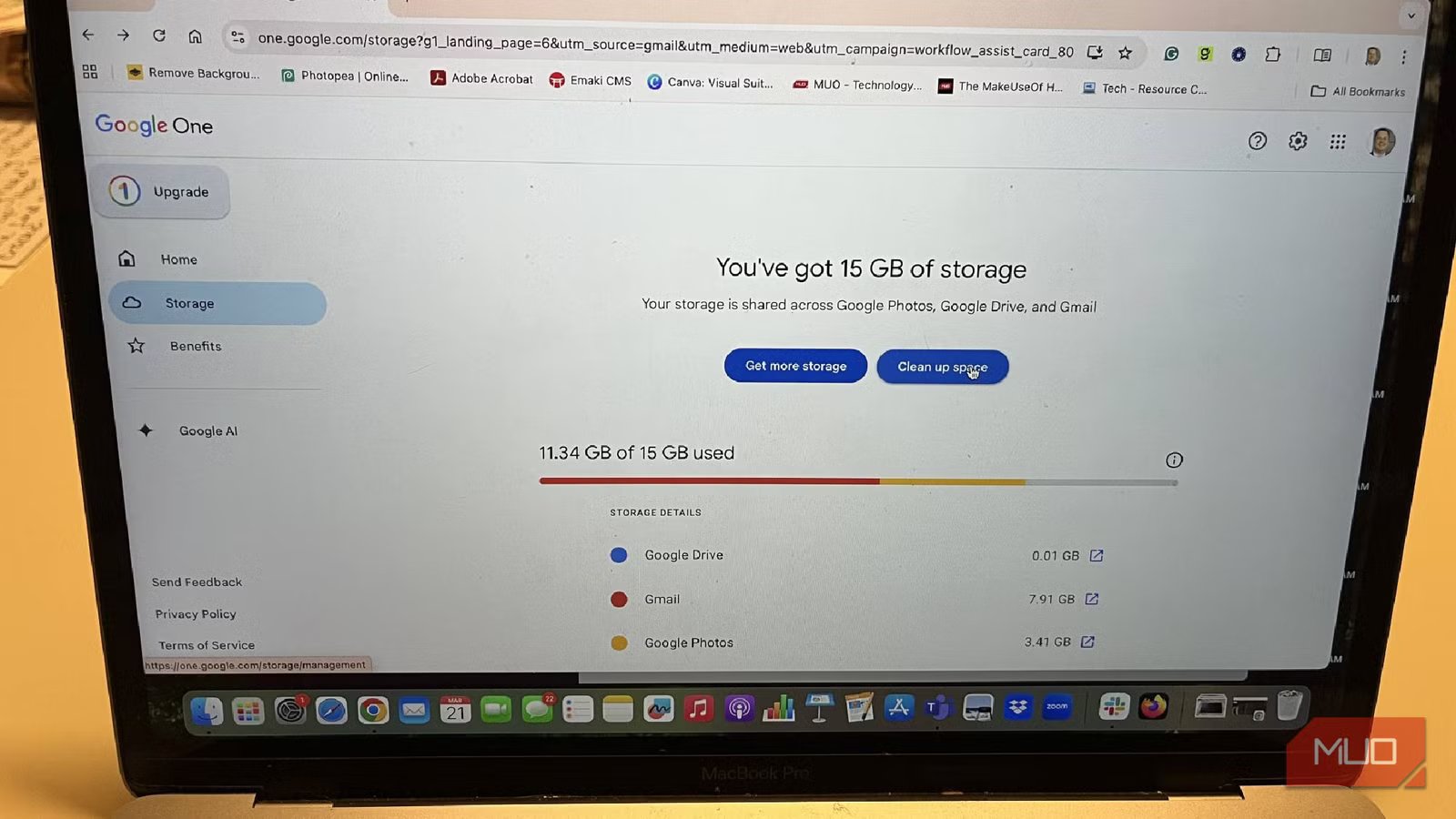
If you’re like me, you don’t even think about how much storage you have until it’s too late. Whether it’s on your phone, your computer, or in your email account, you probably are snapping away to take pictures, recording videos, storing emails from years ago, and saving media files that you think you “might need some day.” Then, one day, you go to save a video you just took and your phone says it doesn’t have enough storage for it.
If you use Google Drive or a Gmail account, you get 15GB of storage for free. You can do what you want with it. But as you’re getting close to the end of your storage, Google lets you know well in advance. If you choose not to do anything about it, they’ll keep reminding you that you can buy more storage. You should do what you can first to eliminate having to spend more money on storage. Searching around, I found the jackpot on how to free up more storage.
Related
Don’t Cancel Your Google One Subscription Until You Read This
Your Google One benefits are far-reaching, so make sure you know what you’re losing before you give them up.
Check out Google One for storage management
It has everything for your account
Google One is a subscription service that will let you expand your Google storage capacity. There are multiple tiers you can sign up for, giving you access to larger quantities of storage. You can opt for 100GB for $1.99/mo, 200GB for $2.99/mo, or the premium 2TB for $9.99/mo.
Google is currently running a promo for the 200GB and 2TB tiers. You can try both of them for $1.99/mo for three months before committing to the actual costs.
With the premium account, you also get the Gemini app, Gemini in your Gmail, Calendar, and Meet, Flow with higher access to Veo 3.1, Whisk with Veo 3, 200 monthly AI credits, more access in NotebookLM, and more. All the plans give you the ability to share storage with up to five family members.
Some plans are specifically for Google AI. The Gemini plan is $7.99 per month and gives you the ability to create AI videos with Veo 3 and use Deep Research, which expands Gemini’s abilities. The Flow plan is $7.99 per month as well and is ideal for content creators looking to make AI videos. The Google AI Plus plan, which includes both the Gemini and Flow plans, offers 200GB of storage.
While Google One offers expanded storage options for your Google account, it can also help you manage the 15GB of free storage Google provides. Don’t worry about all the suggestions to buy more storage, when Google One can get to the bottom of your capacity issues.
Look through your hidden folders with ease
It’s all about finding the big attachments
Google One will actually show you what is taking up so much of your storage capacity and help you sort through it all. For me, the bulk of my storage was being spent on emails with large attachments and large photos and videos. I have three different services within Google that I use: Gmail, Google Photos, and Google Drive. There was a lot hiding in all of them.
Google Drive was easy to go through, as I mainly just had items in Google Sheets and Google Docs. Being a writer, I had plenty of random drafts in Google Docs that I was able to toss in the trash. Most of them had either been published or abandoned, so there was no need to keep them in my Drive anymore. Over the years, I’ve had work projects shared with me as well in Sheets and Docs that weren’t important anymore, so I was able to get rid of them as well.
The warning notes about my storage being filled gave me the excuse I needed to tackle my large photo and email backlog.
Not only was I able to go through my Drive, but I also went through my Google Photos. While I have an iPhone and use iCloud for my storage, I was using Google Photos as a backup as well. I went through a number of old videos that I no longer needed or pictures I thought were cool at the time that really don’t mean anything to me anymore and got rid of them.
I looked at my Gmail account and I had a little over 15,000 emails saved. I’ve had Gmail for about 15 years as my primary email provider, so I have emails dating back a long time. Rather than go back through every email that I have in my inbox, Google One showed me the very large email attachments that I had in specific emails. What’s nice is that it brings up the email and, if you click on one, it opens up Gmail and that email specifically. It also does the same with any videos or photos, in case they are named something like “Photo 1” or another non-descriptive title.
I was able to go through emails that were taking up a ton of storage and decide which ones I no longer needed. There were plenty of emails that needed to remain in my email. But others I hadn’t thought about in years and were ripe for the trash. The warning notes about my storage being filled gave me the excuse I needed to tackle my large photo and email backlog.
Spam can be tricky if you don’t remember to go through it
You can wait 30 days or just get rid of them now
I always forget about my spam and junk email folders. These can build up over time and, if you don’t pay attention to them, they can eat away at your storage. Your designated spam folder automatically gets deleted after 30 days when you have Gmail.
There’s an easy way to clear that out in Google One, as it shows you what you have in that folder. It’s an easy way to clear up even a few KBs of storage. But, you should remember to go through your junk folder.
While you may not consider it as a serious option in terms of your storage, if you haven’t looked at it in a while, it could be eating it up. Go through Google One and delete your spam and junk emails. It’s an easy way to clear up space that you probably forgot was being taken up.
Google One can help you organize your Google account
No matter what is taking up the largest amount of your storage, Google One can help you find it and take care of it easily. I don’t pay for Google One. But I still use it because I use it to help me stay within the 15GB of free storage Google provides. Rather than going through all my emails and photos, I let Google One show me which are taking up the most amount of storage and I remove what is necessary in order to free up space. It’s a simple way to stay ahead of the curve.
OS
Android, iOS, macOS, Windows
Developer
Price model
Subscription
Google Drive offers 15GB of storage for free. It includes Docs, Sheets, Slides, Vids, and Forms.
