

None of us wants to wait for minutes for a song or video to complete, right? Given how the average internet speeds are at an all-time high, you would expect downloads to be swift, too. However, have you noticed that your Android device takes a long time to download files even with a Gigabit internet connection?
For instance, I may have a 400Mbps internet connection at home, but downloads on my Android device are almost always stuck at around 50 or 100Mbps. This pattern persists even when you switch between third-party web browsers like Brave, Edge, or Opera. Turns out, the problem isn’t with your Android smartphone or internet speeds; it’s more about the app you use for downloads.
Related
Windows was throttling my internet until I found these 5 settings
Your internet might already be fast, Windows just isn’t letting it feel that way.
Your default downloader is doing the bare minimum
Honestly? It shows
Credit: Abhijith N Arjunan/MakeUseOf
Most Android web browsers ship with a built-in downloader. This element also lets you download a variety of files from the internet. Depending on your Android smartphone, it may also have a dedicated Downloader utility. While these tools are built into the browser and optimized for battery life, they rarely prioritize speed or performance. You also miss out on many convenience-centric features.
The most common reason built-in download managers do the bare minimum is that they operate in a single thread. It establishes a single connection to the server and downloads the file sequentially. In most cases, you won’t get a pause/resume option either. Moreover, built-in downloaders often struggle with larger (over 100MB) files. And don’t even think about advanced options for queue management, scheduling, or speed management.
Fortunately, you can escape this situation by using a third-party downloader app.
1DM hits 5x download speeds when everything else lags
It’s not magic. It’s multi-threading
1DM is one of the many download managers available for Android, but it does something unique. The app offers a free, quick way to download files on your Android device, 500% faster than with a typical web browser. For over half a decade, 1DM (free up to 16 threads; pro for 32+) has been my go-to option for downloads on Android, both large and small.
I first came across this app when I got a 4G mobile data connection. Even though the connection supported up to 200Mbps, my download speeds were stuck at 50Mbps or lower. It felt like magic to see my total network bandwidth actually used for downloading files. However, as I eventually found out, it wasn’t magic: it was the power of multi-threading.
Multithreaded downloads work by splitting a file into multiple segments and using separate threads for each segment. As a result, your device can download all these segments at once and combine them after the download is finished. Because there are more connections, a multithreaded downloader can use the maximum throughput of your connection.
Multithreaded downloads require the web server to allow simultaneous connections. Otherwise, download managers will resort to single-threaded downloads. Some servers may also limit the number of current connections to avoid bandwidth hogging.
1DM does this effectively, ensuring that your downloads can use the maximum speed your connection supports. While other apps for this purpose exist, 1DM is a recommended choice for many reasons.
OS
Android
Price model
Free, Subscription available
1DM is a free download manager that brings multithreaded downloads to Android
Setting up 1DM for best results
Two minutes now, faster downloads forever
It may not have the most modern UI design, but 1DM is a user-friendly way to enable high-speed downloads. Installing and setting up 1DM on your Android smartphone takes only a few seconds.
Once you install the app from the Play Store, 1DM will ask you to select the language and the download location. 1DM may also ask if you want to set up a shortcut for 1DM Browser (more on this later). After these steps, you can use 1DM to download files from the Internet. However, if you are looking for that 500% faster download speed, you need to do a couple of extra steps.
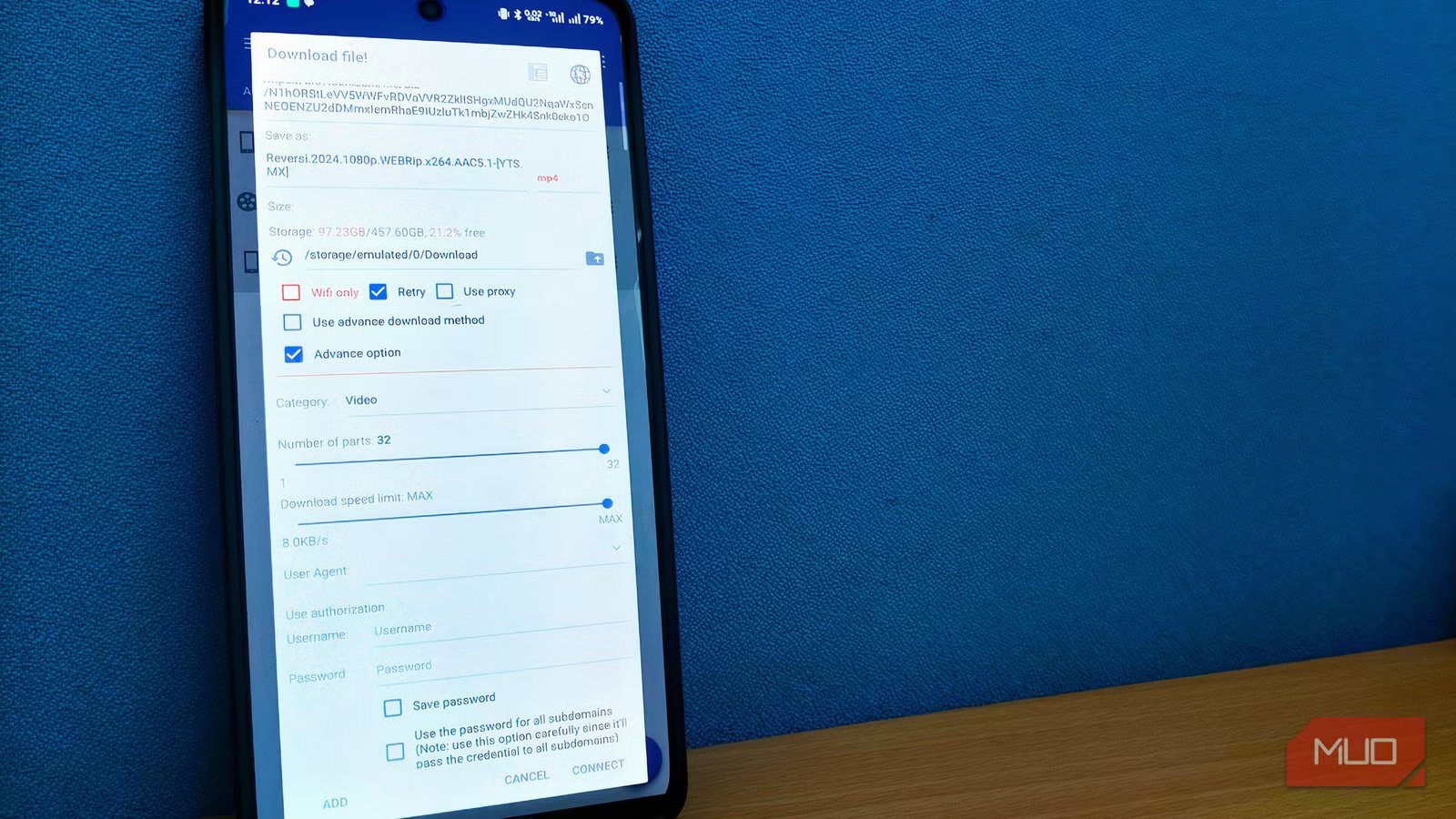
Open the Settings panel on the left and set the number of parts to the maximum. The free version of 1DM allows up to 16 connections, whereas the paid version, 1DM+, allows up to 32. You can also decide the number of connections you want to allow at a time.
From this point, 1DM will try to split all downloads into 16 (or 32) connections and download them at the fullest speed your connection supports. Now, that’s one way to ensure you have the best download experience on your Android device. You can change these settings at any time or customize them for individual tasks.
1DM packs many additional features
Spoiler: it’s a lot
While multithreaded downloads are the core feature of 1DM, the app offers much more. For starters, you can use 1DM to download an incredible variety of stuff from the web, including documents, videos, audio, and torrents. You can use the Pause/Resume function with most types as well. Compared to built-in download utilities, 1DM does a better job of error handling and resolution. Compatibility isn’t something I have to worry about while using the app.
However, the best feature of 1DM is its built-in browser, which makes it effortless to download files from the internet. Instead of the slow-dancing of copying and pasting download URLs (which has caveats), you can use 1DM Browser to access the web page. This allows you to download from websites that may not allow you to copy the download URL. Instead, you can let 1DM grab the download file. This browser comes with a built-in ad blocker, which simplifies the download process by a long shot. The browser makes it easy to download videos from web-based players as well. However, as you can guess, 1DM cannot download YouTube videos.
The app also offers plenty of customization options. For instance, you can decide whether to download files over cellular networks or schedule actions to run when a download finishes. In short, the feature set from 1DM appears quite rich and well-curated.
Why 1DM won’t always hit 5x speeds (and when it will)
While 1DM can offer the best speeds you’ve seen on Android, it cannot always do so. As I said, the real-life speed depends on a few factors, such as whether the server supports simultaneous connections. I have also encountered situations where a browser downloads a file at the same speed as 1DM.
However, these outliers do not undermine the advantages 1DM offers. Given that the app is free, setting up 1DM on your Android device will definitely save you time. While at it, make sure you get the most out of the download manager experience, especially with 1DM Browser.
Related
This open-source Android app is the cleanest way to download videos
I found an app that downloads videos better than any other paid Android app.
