

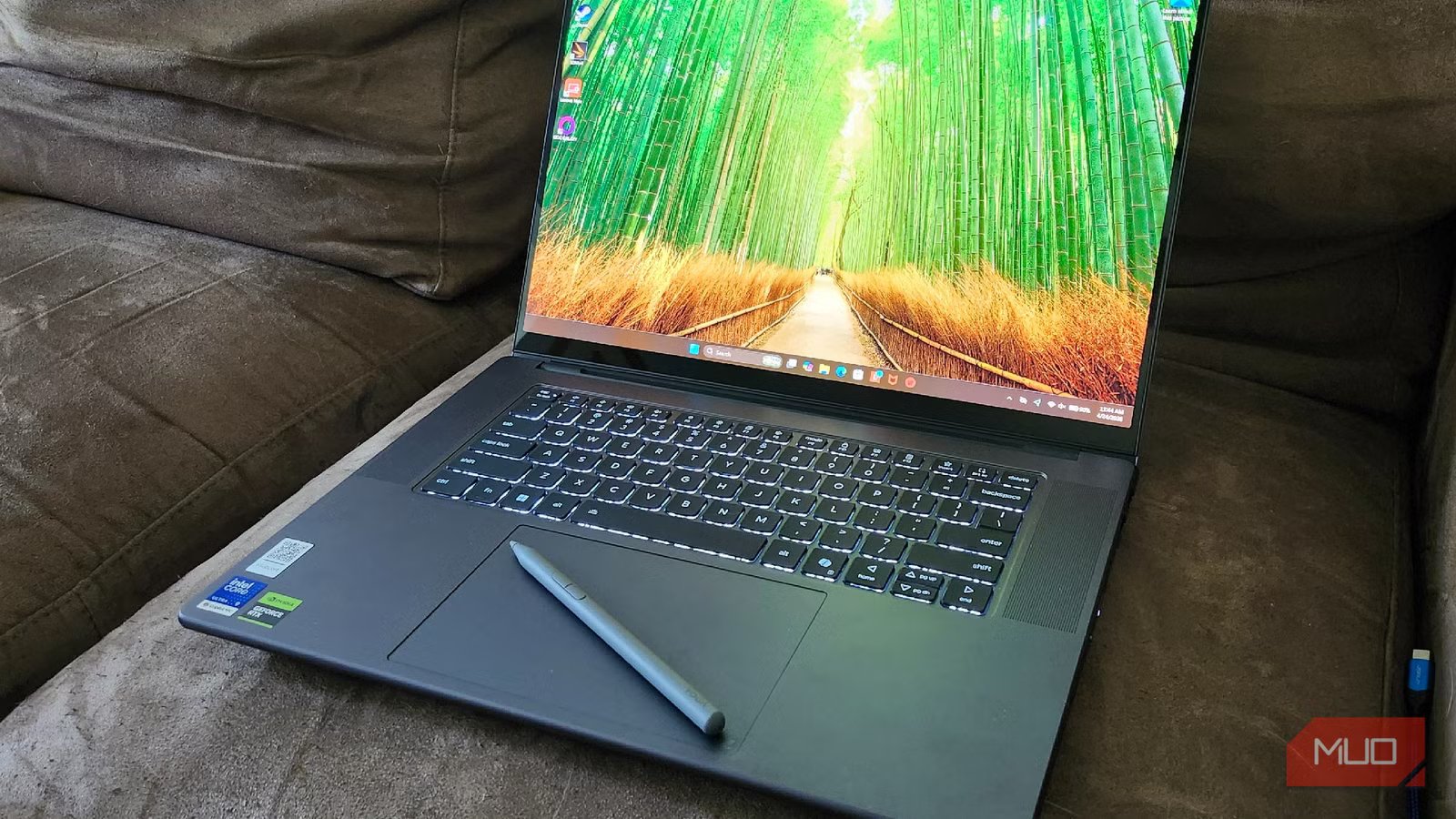
Content creation has undergone a massive change over the past decade. What once may have been a hobby for someone who wanted to post videos on a YouTube channel has suddenly become a genuine career, and the tools needed have evolved since those early days. Portability and power are a must, and Apple has been the company to beat for the longest time in that regard. For serious creators, however, the Lenovo Pro 9i AE Gen 11 is worth keeping an eye on, as it delivers incredible performance in a rather portable form factor.
Equipped with an Intel Core Ultra 9 386H, a gorgeous 16-inch 3.2K (3200×2000) OLED touch screen display, and an NVIDIA RTX 5060, there’s a reason why Lenovo decided to land on the “Aura Edition” branding. While the overall design of this laptop plays it safe, rather than leaning into the more bombastic “gamer” centric flair that some may expect with the specifications, the Aura that this device exudes comes from the inside. It’s an investment, for sure, but it’s also a laptop I could see creatives using for the foreseeable future, thanks to its future-proofed specs and plenty of punch.
9/10
Operating System
Windows 11
CPU
Intel Core Ultra 9 386H
GPU
NVIDIA GeForce RTX 5060 Laptop GPU with 8GB GDDR7 and an 85W TGP
RAM
32GB of LPDDR5X-7467 dual-channel memory
The Lenovo Pro 9i Aura Edition is a portable 16-inch laptop featuring a 3.2K Tandem OLED touchscreen display designed for professional, color-critical work. It’s powered by an Intel Core Ultra 9 386H processor, includes 32GB of RAM, and comes with two Thunderbolt 4 ports, two USB-A ports, a full-sized SD card reader, HDMI 2.1, and a headphone jack. The Thunder Grey aluminum chassis is both durable and carbon-neutral certified, and the device features a unique haptic Force Pad that acts as a dedicated drawing surface when used with the Yoga Pen Gen 2.
Pros & Cons
- Yoga Pen Gen 2 is included & works great
- Beautiful screen and impressive specs
- Surprisingly capable for gaming
- Aura is inside, as the outside is rather plain
- It’s an investment
- Screen does have glare in bright rooms
Lenovo provided a loaner Lenovo Pro 9i AE Gen 11 for the sake of review. The company had no input in this article and did not see it before publishing.
Lenovo Pro 9i AE Gen 11 Price and Availability
How much is something like this going to cost?
The Lenovo Pro 9i AE Gen 11 starts at $2,799 with a 2.8K display, NVIDIA GeForce 5050, and a 170W Slim power adapter. The provided model features a 3.2K OLED display, NVIDIA GeForce 5060 GPU, and a 245W Slim AC adapter, which would raise the price to $3,099. All models include an Intel Core Ultra 9 386H, with no option to upgrade the CPU or RAM. As with most new laptops, there is also a Copilot key that can be remapped, along with an NPU 5.0 AI Engine that delivers up to 50 TOPS for AI-centric creation. Pairing a Panther Lake processor with a powerful laptop GPU and NPU, it’s capable of tackling complex AI tasks while maintaining efficiency and power, without causing a massive drain on the 92.5Wh Li-ion battery. You can get this laptop directly from Lenovo, or from big-box stores like Best Buy.
The Aura comes from within, not from the exterior
The exterior is rather plain, but the innards are beastly
Credit: Shaun Cichacki/MUO
Imitation is the sincerest form of flattery, and the Lenovo Pro 9i AE draws heavily on the MacBook line of PCs in its design philosophy. Rounded edges, an incredibly thin design, and a modest overall look make it less flashy than some of its contemporaries, but the “Aura” moniker doesn’t really fit how the device looks. Instead, the Aura it claims comes from within, alongside additional features this laptop supports for the more creative-minded among us.
Credit: Shaun Cichacki/MUO
If you’ve used a laptop keyboard, you’ll be familiar with what this laptop has to offer. It’s got 1.5mm of travel when pressing on the keys, offering a satisfying typing feel. Backlit keys make writing, creating, or gaming in a darker room as easy as you’d expect. The Force Pad is quite incredible to experience, ditching the more “mechanical” feel of previous Yoga laptops and instead replacing it with haptics that would feel right at home in the Apple ecosystem. Pair that with the included Lenovo Pen Gen 2, and you’ve got yourself a 95 x 150mm pad that can be used as a pressure-sensitive pad for signing documents, drawing, or anything in between.
Credit: Shaun Cichacki/MUO
While not incredibly flashy, the power within comes from an absurdly thin and overall compact package. The 9i AE is roughly 14.20 x 9.80 x 0.68 inches overall, making it easy to carry wherever you go with an overall weight of 4.19 lbs, thanks to the Aluminum construction. It only comes in one color, Thunder Gray, but it does look admittedly very nice.
It also features 2 Thunderbolt 4 ports with support for DP 2.1 and Power Delivery, 2 USB-A (10Gbps, one is Always On), an HDMI 2.1 output that supports up to 8K/60Hz, alongside an SD card reader/writer and a 3.5mm headphone/microphone combo jack. While this doesn’t feature the tablet mode that other Lenovo laptops offer, the 3.2K OLED display also doubles as a touchscreen. One thing to keep in mind, however, is that the screen can be prone to glare in brighter rooms, and is a bit of a fingerprint magnet if you plan on utilizing touch.
Credit: Shaun Cichacki/MUO
While a 92.5Wh battery doesn’t sound like much on paper, it takes a lot to put this laptop out of business. Even while running 3D Mark benchmarks unplugged and on battery, watching 4K videos on YouTube, it took what felt like forever for the battery to finally wind down to nothing. Even more impressive, with the 245W charger, I was able to get from 0 to 80% battery in one hour and seven minutes. Lenovo states that the charger can provide up to 3 hours of use in 15 minutes, but that would be if I were running it on Power Efficiency mode.
Operating System
Windows 11
CPU
Intel Core Ultra 9 386H
GPU
NVIDIA GeForce RTX 5060 Laptop GPU with 8GB GDDR7 and an 85W TGP
RAM
32GB of LPDDR5X-7467 dual-channel memory
Storage
1TB SSD M.2 2242 PCIe 4.0×4 NVMe
Battery
92.5Wh Li-ion battery
Display (Size, Resolution)
16-inch Tandem OLED touch screen with a 16:10 aspect ratio and a 120Hz maximum refresh rate
Camera
5.0MP + IR camera
Speakers
four 2W dual-side woofers and two 2W tweeters
Colors
Thunder Grey
Ports
2x Thunderbolt 4, 2x USB-A, 1x HDMI 2.1, 1x SD card reader, 1x 3.5mm headphone/microphone combo jack
Network
Wi-Fi 7 (802.11be 2×2) and Bluetooth 5.4
Dimensions
360.8 x 248.9 x 17.3 mm
Weight
4.19 lbs
A dazzling screen and great speakers make it great for content
Credit: Shaun Cichacki/MUO
I’ve grown accustomed to using an OLED display daily, as my desktop sports a 27-inch screen as my main display. But even after treating myself to the inky blacks and vibrant colors of my main display, I was utterly shocked at how crisp and beautiful the 16-inch 16:10 3.2K display on the Pro 9i AE is. For those who prefer to work in the dark, as I do, the display is also Eyesafe Certified 2.0, meaning it is designed to reduce overall blue light emissions. It’s also flicker-free to avoid additional eye strain during long creative sessions. Pair this with Dolby Vision and HDR support, and you’ve got one of, if not the best, displays on the market currently. It’s also VESA Certified DisplayHDR True Black 1,000, ensuring proper contrast and professional-level color accuracy for photo and video editing.
Audio, on the other hand, was just as surprising. Maybe it’s because I’m not used to using higher-end laptops, but the sound quality was genuinely shocking here. Meaty bass, great treble and tone all around, and a total of 6 speakers inside this thin chassis all sounded fantastic. Four dual-sided 2W woofers and two 2W tweeters, powered by a smart amplifier, make the case for using the system sound instead of a pair of headphones, whether I’m listening to benchmarks or pumping my favorite music through it. Dolby Atmos provides professional-grade audio, and a slew of customization options via Aura Edition Smart Modes or Dolby Atmos profiles will allow audiophiles to tweak things as they see fit.
For the price, the camera was a touch disappointing. It’s a 5MP sensor with a fixed-focus lens, providing a picture that can be summarized as “good enough”. It’s not great by any means, especially if you’ve used a standalone webcam in the past, but it gets the job done for a quick meeting or two. A physical slider on the side of the chassis allowed me to block the camera when I wanted, which is great for privacy-minded individuals who don’t want their laptop to always be watching.
Related
OLED Burn-In Hits Laptops Hard—Here’s How to Avoid It
Your gorgeous laptop display is at risk of losing its shine.
A genuine gaming and content creation beast
For something meant as a content creation suite, it’s no slouch for gaming
Now, when I think about what a laptop is capable of on the gaming front, I think about RGB-infused laptops that look, sound, and feel like a battle tank ready to roll into battle. However, the Lenovo Pro 9i AE doesn’t fit that bill at all. Instead, this shockingly thin laptop took my expectations for a 3D Mark and Geekbench benchmark and threw them against the wall. It’s a small and mighty little laptop with a surprisingly punchy pairing of power and portability, and something that can run even modern games well enough to shock most prospective purchasers. While not as impressive in Power Efficiency Mode, the Pro 9i AE shines when untethered and running in Power modes.
I decided to boot up Cyberpunk 2077 to run a general benchmark, as well. Seeing as I wanted to push the internal NVIDIA 5060 to its limits, I ran the benchmark at 3200 x 2000, windowed borderless with the Ray-tracing Low preset. Running the Transformer model of DLSS upscaling, I averaged 38FPS with a minimum FPS of 33 and a max of 45. Running at roughly 4K on a laptop that is not dedicated to gaming, I’m incredibly impressed with this level of performance, and dipping down to 1440p or lower would result in even better FPS. This helps solidify it as a fantastic option for creators and gamers alike.
Geekbench 6, 3D Mark, and CrystalDiskMark Benchmarks
The tech specs that matter to you
Credit: Shaun Cichacki/MUO
Now, it’s time for the technical jargon. If you’re going to be spending this much money on a laptop, I wanted to ensure that I was testing it under any type of stress possible. On the battery, I kept the Battery Efficiency option to get the most time out of the battery as possible. While plugged in, I wanted it to go as hard as possible. You’ll find my results below, and the changes are rather astounding.
Geekbench 6 Benchmark
Category
On Battery (Results)
Plugged In (Results)
% Gain (Plugged In)
Single-Core CPU
1,193
2,806
+135.2%
Multi-Core CPU
9,702
16,571
+70.8%
GPU (OpenCL)
25,321
112,715
+345.1%
3DMark Time Spy Results
Metric
Battery (Power Efficiency)
Plugged In (High Power)
% Change (Gain)
Overall Score
2,285
11,242
+392.0%
Graphics Score
2,017
10,817
+436.3%
CPU Score
9,350
14,471
+54.8%
3DMark Fire Strike Results
Metric
Battery (Power Efficiency)
Plugged In (High Power)
% Change (Gain)
Overall Score
5,901
25,765
+336.6%
Graphics Score
6,181
29,917
+384.0%
Physics Score
18,447
28,553
+54.8%
Combined Score
2,501
11,761
+370.3%
CrystalDiskMark Benchmarks
Test Category
Metric
Battery (Results)
Plugged In (Results)
% Gain (Plugged In)
SEQ1M Q8T1
Read (MB/s)
6,514.67
6,602.83
+1.4%
(Large File Transfer)
Write (MB/s)
2,943.81
5,817.56
+97.6%
SEQ1M Q1T1
Read (MB/s)
995.57
3,677.41
+269.4%
(Single Thread Seq)
Write (MB/s)
716.95
2,069.65
+188.7%
RND4K Q32T1
Read (MB/s)
387.05
554.48
+43.3%
(Deep Queue Random)
Write (MB/s)
73.97
429.29
+480.4%
RND4K Q1T1
Read (MB/s)
40.46
77.90
+92.5%
(System Snappiness)
Write (MB/s)
5.73
143.54
+2,405.1%
Is this the laptop for you?
You should buy the Lenovo Pro 9i AE Gen 11 if:
- Content creation is a part of your daily life
- You want a durable, future-proofed rig for creating
- You enjoy the idea of plenty of pluggable USB spots
You should not buy the Lenovo Pro 9i AE Gen 11 if:
-
You’re primarily focused on gaming
- It does it well, but does content creation/AI tasks better
- You’re looking for something flashy
While the Lenovo Pro 9i AE Gen 11 may cost as much as a used car, it at least has the oomph to back up the price that it demands. Content creators have often struggled to find a good Windows laptop that can handle complex video editing and proper photo editing, and that struggle may finally come to an end here. The Lenovo Pro 9i AE Gen 11 is an incredible addition to the Lenovo lineup and should be on the radar of anyone hoping to take their content creation dreams to the next level.
The gorgeous screen, paired with the Lenovo Pen Gen 2 and its drawing pad capabilities, makes this a compelling argument against Apple and its lineup of creation tools. It’s absurdly powerful, portable, but also absurdly expensive. That being said, though? It’s an investment I would be happy to make if content creation as a major part of my daily life.
Operating System
Windows 11
CPU
Intel Core Ultra 9 386H
GPU
NVIDIA GeForce RTX 5060 Laptop GPU with 8GB GDDR7 and an 85W TGP
RAM
32GB of LPDDR5X-7467 dual-channel memory
