

My garage runs entirely on Ryobi ONE+ batteries, and for most of what I build and maintain, the platform covers the job. But every time Milwaukee ONE-KEY comes up in a tool forum, I feel it — a specific kind of tech envy. Milwaukee has been shipping Bluetooth-connected power tools since 2015, and the app that pairs with them does things most tool owners would never think to ask for.
The frustrating part is that most Milwaukee owners never download it. It’s free, available on iOS and Android, and the drill sitting in your garage almost certainly qualifies. Search ONE-KEY in the App Store, and you’ll see what’s been sitting dormant in your tool all along.
What Milwaukee ONE-KEY actually is
A free app sitting on top of a decade-old platform
ONE-KEY launched in 2015 as Milwaukee’s answer to a question nobody in the tool industry had thought to ask yet: what happens when a power tool has Bluetooth built in? The app has been free since day one, runs on iOS, Android, and the web, and now covers more than 120 tools in Milwaukee’s M18 FUEL lineup — drills, impact drivers, impact wrenches, circular saws, and more.
If you own a ONE-KEY compatible tool and have never downloaded the app, your drill is essentially running in dumb mode. It’ll work fine. But it’s leaving a layer of functionality completely untouched. Tools that aren’t ONE-KEY compatible can still join the ecosystem through Milwaukee’s TICK Bluetooth trackers — small devices that attach to anything and bring non-smart tools into the same app.
You can reprogram your drill from your phone
Speed and torque profiles that live in the tool’s memory
Credit: Source: milwaukeetool.com
This is the feature that gets the most attention, and it earns it. Through ONE-KEY, you dial in custom speed and torque profiles for your drill or impact driver — max RPM per gear, torque cutoffs, trigger ramp-up — and push them to the tool over Bluetooth. Setup takes maybe ten minutes.
After that, the phone stays in your pocket. The profiles live in the tool’s memory, and it runs them on its own from there. If you understand why a drill and an impact driver handle fasteners so differently, you can appreciate what this unlocks: one profile dialed back for finish work, another set loose for anything going into framing or decking.
Others have verified this in testing — a ONE-KEY hammer drill held within a single RPM of the configured target across modes. That’s not an approximation. That’s precision most cordless tools can’t claim without custom tuning.
Bluetooth tracking with honest caveats
Credit: Source: milwaukeetool.com
ONE-KEY tools can be locked remotely through the app. A locked tool won’t operate — it’s inoperable until the registered owner unlocks it. The idea is that a stolen Milwaukee drill has almost no resale value if buyers know it can be rendered useless. I read one App Store review from a contractor about recovering a $30,000 cache of stolen tools after police traced them through ONE-KEY location data.The tracking itself is worth understanding clearly. There’s no GPS chip in any Milwaukee tool. What ONE-KEY actually does is use the Bluetooth signal from your tool to log a “last seen” location — the GPS coordinates of whatever phone running the ONE-KEY app happened to come within about 100 feet of your tool. The larger the ONE-KEY user community around you, the more useful this gets. On a busy job site where your whole crew runs the app, it works well. For homeowners in a neighborhood where no one else has ONE-KEY on their phone, it’s a thinner safety net.
Inventory and service reminders — more useful than they sound
A digital paper trail for every tool you own
Credit: Chris Hachey / MakeUseOf
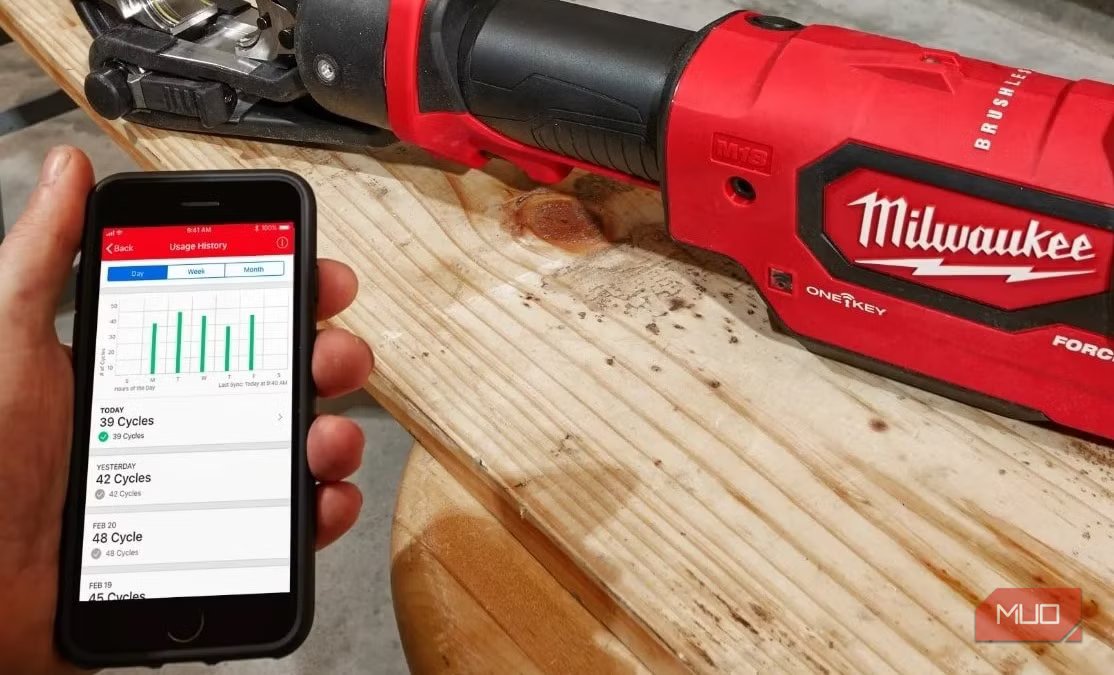
The inventory side of ONE-KEY is where it starts to feel more contractor than homeowner — but only until you’ve had to dig through receipts for a warranty claim or forgotten when a tool last needed service. The app lets you log purchase dates, snap receipts, record serial numbers (which auto-populate for ONE-KEY tools), and assign tools to specific locations or people. Service reminders round it out.
If battery care is already part of your tool routine — most cordless packs degrade faster than they should because of a few fixable storage habits — ONE-KEY’s service reminders slot into the same mindset, keeping the whole setup on a maintenance schedule, not just the packs. For anyone with more than a handful of tools in rotation, having purchase history in one place is genuinely useful.
The Ryobi app envy is real
Ryobi does have an app, but as of now, it’s limited to generators and select mowers — nowhere near what ONE-KEY offers across drills, drivers, and the broader M18 lineup. If you’re a Milwaukee owner, you have something most cordless tool platforms haven’t built. A free app, a Bluetooth-connected drill, and a set of features that most owners leave completely dormant. Download ONE-KEY, connect your tool, and spend twenty minutes setting up a custom profile. The drill you already own will start behaving like one you paid more for.
