

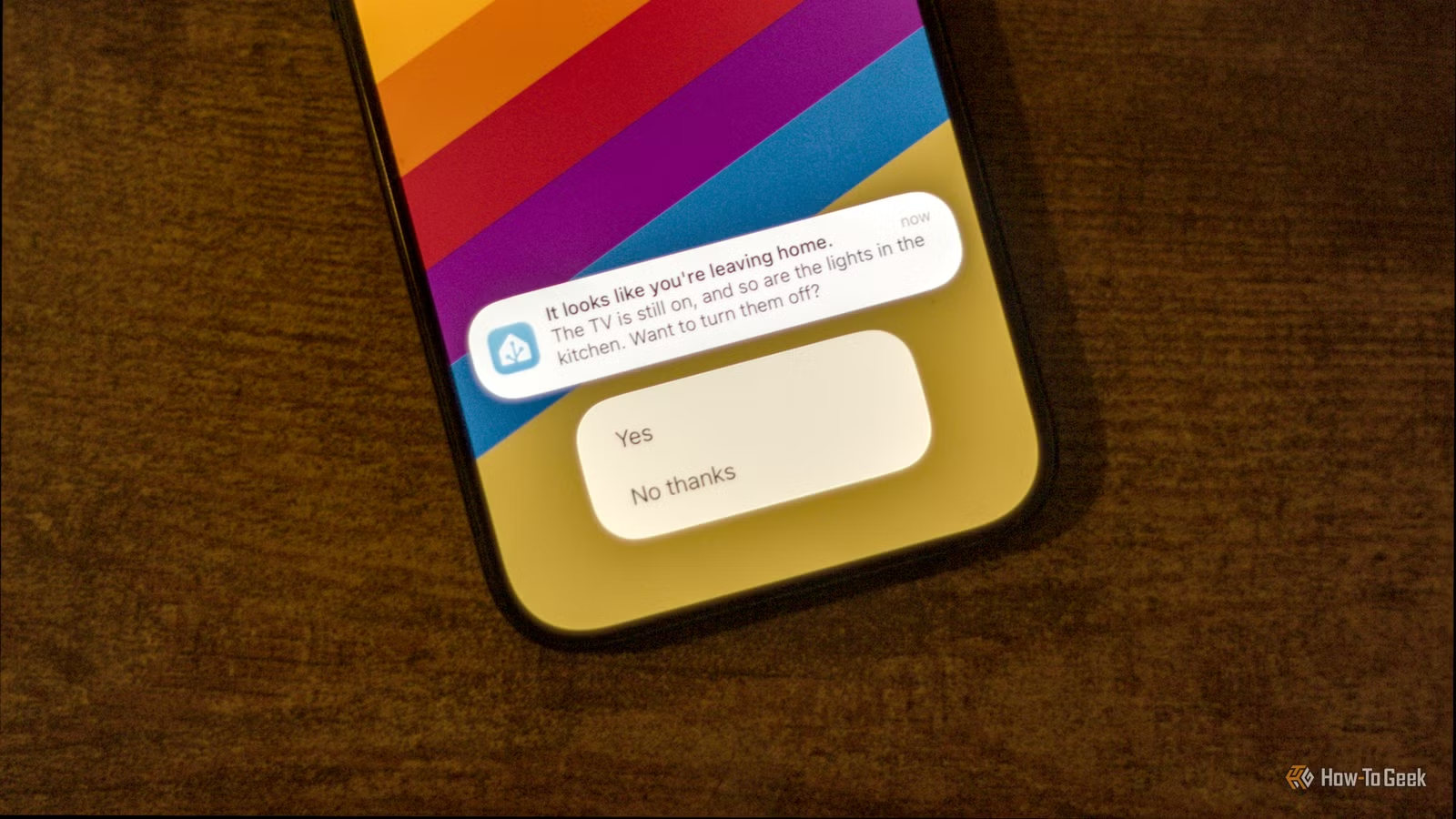
When you install the Home Assistant companion app on your phone, you can allow Home Assistant to track your location. By default, you get a device tracker entity that will toggle between home and not_home based on the Home location that you set up. There are plenty of useful automations you can trigger using the location of your phone.
Turn off the heating when you leave
Turn it back up again before you get home
Credit: Adam Davidson/How-To Geek
This is one of the most useful ways to use your phone’s location. Many standard heating systems will heat your home whether you’re in it or not. Since they may have no way of knowing if someone is in the house, the heating or cooling can keep running until it’s told to turn off.
If you’re not at home, heating or cooling an empty home is just a waste of money. With Home Assistant, you can use your phone’s location to determine when everyone is out and turn down the heating accordingly.
The best part is that the Proximity integration in Home Assistant can determine whether you’re moving toward or away_from home. You can use this to turn the heating back on before you get back, so you don’t return to a cold house.
Integrations
Google Assistant, Apple HomeKit, Amazon Alexa
Connectivity
C, R, G/PEK, Y1, OB*, W1 (* accepts heat pump OB wire, W2, or Y2)
The Ecobee Smart Thermostat Essential provides built-in energy savings and easy temperature control on its sleek touchscreen and convenient app.
Clean your house when there’s no one in it
You need never see your robot vacuum in action
Credit: Adam Davidson / How-To Geek
This is something I set up in my home, and it’s incredibly satisfying. Robot vacuum cleaners are really useful, but when they’re running, they can be relatively noisy and often get in the way.
Using your phone’s location to determine when everyone is away from home, you can get your robot vacuum to come out only when the house is empty. Using the Proximity integration, you can have your automation send your robot vacuum back to its dock when you’re on your way back. By the time you get home, your robot has hidden itself away again, and your floors are beautifully clean.
Dimensions
17.7 x 14.2 x 20.9 in
Battery Life
7,000mAh
Narwal’s Flow 2 is a new robot vacuum that utilizes AI to clean surfaces more efficiently. It features the NarMind™ Pro Autonomous System, which takes images from the vacuum’s cameras and analyzes them to plan out a smarter way to clean. This features the FlowWash Mopping System, which continuously uses clean water to get rid of stubborn stains.
Adjust the lighting and other scenes based on who is at home
I like the lights a little warmer
Credit: Singled
Living with other people is all about compromise. Some people like the house nice and warm, others like it a little cooler. My wife likes the lights to be full brightness and cool; I prefer them a little warmer.
A smart home can make compromise easier. When my wife’s location is away from home, the lights change to a warmer hue, and when she’s home, and I’m out, they’re bright and cool. When we’re both home, they sit somewhere in the middle.
Related
How to Create Smart Home Automations That Are Personal to You and Your Family
Use this simple approach to identify what you can automate around your home
Lock your doors when no one is home
Your smart home can remember even if you forget
Credit: Patrick Campanale / How-To Geek
We’ve all been there. You’re an hour into your road trip when you suddenly start to wonder whether you’ve locked the door or not. Without a smart home, the only way to know for sure is to turn around and drive home again.
Smart locks make it easy to check the state of your lock from wherever you are, but you still have to remember to check. By using your phone’s location, you can set up an automation to automatically lock the door when everyone is away. You can also have Home Assistant send you an alert with an actionable notification so you can choose whether to lock it or not in case you have guests in your home that your smart home doesn’t know about.
Your phone can notify you about other issues, too, such as lights you’ve left on or other devices that are still running. You can then decide whether to turn them off or not.
Automatically mute your phone at the movie theater
No more embarrassing ringtones
Credit: Mr.Music / Shutterstock.com
There’s nothing more embarrassing than sitting in the middle of a movie theater and your phone rings, letting everyone in the theater know that your ringtone is the theme music from Airwolf. The movie is ruined for you and everyone else.
The beauty of location tracking in Home Assistant is that you can set up multiple zones. I have zones set up for my local theater and nearby movie theaters. When I’m detected in these zones, I get a notification on my phone that I can tap to set my iPhone to Do Not Disturb.
The same automation also pauses any critical alerts from my smart home, other than the most important ones, such as water leaks or the smoke alarm going off. When I leave the location, another notification returns my phone to the previous focus mode.
A personalized welcome home
At least your smart home is glad to see you
Credit: Patrick Campanale / How-To Geek
Working from home means that I’m usually home when my kids get back from school. I don’t have the TV moment of getting back from work and my kids rushing to the door in excitement.
My smart home can still be glad to see me, however. When my phone arrives back in the Home zone, and the contact sensor on the front door opens, my smart speaker speaks warm greetings generated by a local LLM.
Never forget the milk again
This is another really useful automation that I wish I’d set up sooner. I have a zone set up for the local grocery store that’s in the middle of town. When I enter the zone, if there are any items on the Home Assistant shopping list, a notification pops up, telling me to buy the milk, or peanut butter, or whatever it is we need.
It’s a real game-changer. Running out of peanut butter is a serious emergency in our home, but it rarely happens thanks to Home Assistant and my phone’s location.
You can become a smart home sensor
Since I carry my phone around with me almost everywhere, its location is effectively my location. Location tracking isn’t perfect, so you may want to add additional logic to determine when you’re home and away more accurately. When it’s set up well, however, your location can become a really powerful trigger. Now I’m off to buy some peanut butter.
