

Amazfit Balance 3
Use of information
8.0/10
Pros
- Large display makes data easy to read
- Useful three button plus crown controls
- Thin despite its size
- Dual-band GPS does not kill battery too quickly
- Built-in flashlight is genuinely practical
Cons
- Large case size may not suit everyone
- Controls take time to learn
Amazfit Balance 3: Quick verdict
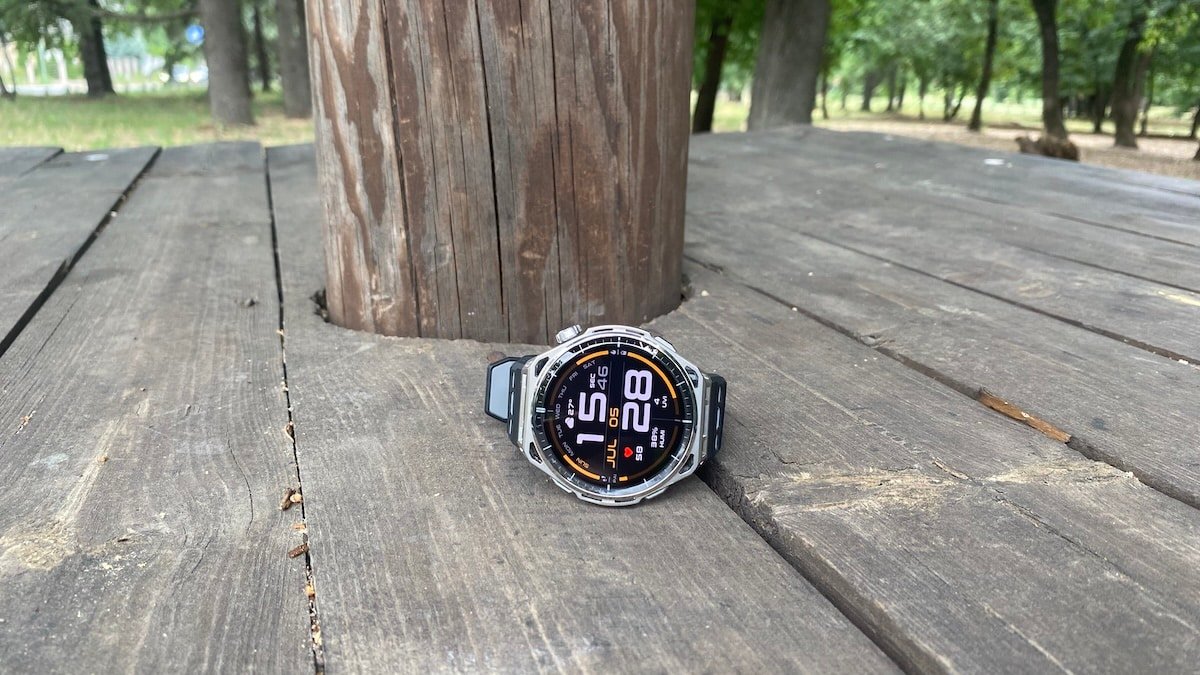
Amazfit Balance 3 is a big watch, but it does not feel like a clumsy one. The large, bright display is the main attraction, especially for maps, workout screens and outdoor use, while the thin case helps it sit better on the wrist than the size suggests.
It also feels like a more serious sports watch than earlier Balance models. The updated button and crown setup takes a bit of adjusting, but it works well. GPS performance and heart rate tracking is accurate, battery life remains one of the series’ biggest advantages and Zepp OS 6 adds a bit more depth.
This is not a small, subtle smartwatch and it is not a cheap upgrade from the Balance 2. But if you want a large-screen fitness watch with proper battery life, good outdoor visibility, maps, external sensor support and a growing training platform – and/or are into HYROX – Balance 3 makes a strong case for itself.
View on Zepp Health or Amazon*
Jump to
Design, hardware
Look & feel
The Amazfit Balance 3 is a large watch. There’s no denying that. But it is a good-looking one.
The 51.4mm case gives it real wrist presence, especially if you are coming from an earlier Balance model or a smaller Garmin. You buy it because you want a big, readable screen in a more premium case. So yes, the size will not be to everyone’s taste. If you have small wrists, you might want to look elsewhere.
I was worried it might look awkward. But the Balance 3 case is quite thin, so it spreads across the wrist rather than sitting like a tall block on top of it. That makes a bigger difference than the case diameter suggests. The low profile also helps the watch stay planted during exercise, which can only help with optical heart rate tracking. It does not feel heavy on the wrist either. So I was pleasantly surprised.
The 1.5-inch AMOLED panel sits under sapphire glass and reaches up to 3,000 nits of peak brightness. Which is a boost from the previous generation.
That brightness means workout data stays readable even in strong sunlight. The extra screen space also makes pace, heart rate, distance and lap information easier to glance at while moving. Maps benefit from the larger panel too, since route lines and surrounding detail have more room to breathe.
The build moves the Balance line away from its old lifestyle watch image. The sapphire glass helps, and the case has a more robust feel than previous Balance models without going full chunky outdoor T-Rex.
The updated button and crown layout is one of the biggest changes in daily use. It is three buttons plus a fully functioning rotating crown, an upgrade from the previous crown and one-button layout. The physical controls work well and it’s good to be able to choose between the crown, physical buttons and touch-screen.
Many people have become fans of the LED smartwatch flashlights. So it is no surprise Zepp Health has decided to include it on Balance 3. It offers different intensities of white light for early starts, plus a red light that does not blast your eyes at night. There is also an SOS option. This is one of those features you do not miss until you have tried it, then suddenly it makes obvious sense.
Rounding everything off is the standard 22mm silicone strap. It keeps things comfortable enough for workouts, and because it is a standard size, swapping it out is easy.
Worth mentioning, I am reviewing the Stainless Steel version of Balance 3. Zepp Health has also announced a Titanium Black edition. But at the time of writing this review, that one is still not available for purchase.
Under the hood
Amazfit Balance 3 does not bring a major internal reset over Balance 2. The core sensor and GPS setup are familiar, so the hardware difference is not very exciting.
The watch uses BioTracker 6.0 for heart rate, blood oxygen, stress, HRV, skin temperature and sleep tracking. That is the same sensor generation used on Balance 2, and I did not see anything that made this feel like a big sensor upgrade.
GPS is familiar too. Balance 3 sticks with dual-band positioning across six satellite systems and a circularly polarised antenna. That was already one of the stronger parts of Balance 2, so any difference in real-world tracking is more likely to come from firmware tuning than a completely new GPS setup.
The one clear internal upgrade is storage. Balance 3 moves to 64GB, giving it more room for offline maps, music and local files. That is useful if you plan to use maps and keep media on the watch.
Connectivity is where you would expect it to be. There is Wi-Fi, Bluetooth 5.2, microphone and speaker support, plus compatibility with external accessories such as heart rate belts, running power meters, cycling power meters, speed sensors and cadence sensors.
Battery life
Real-world battery drain depends entirely on how often you activate the bright 1.5-inch screen and the dual-band GPS. Enabling the always-on display, tracking outdoor workouts, and keeping continuous health metrics active will naturally pull the runtime below the headline three-week mark.
The most important metrics center on GPS tracking endurance. Balance 3 offers up to 41 hours in accuracy GPS mode and hits up to 84 hours in the power-saving configuration. This provides enough headroom for long trail runs, weekend hikes, and travel without constant charging anxiety.
This longevity ensures you can utilize the tracking features without daily trips to the power outlet. Continuous sleep tracking, recovery statistics, and training history remain useful because the watch stays on your wrist rather than sitting on a charger every night.
Compared to the Balance 2, the standard daily battery figures remain relatively similar. The tangible upgrade shows up in active GPS tracking longevity, aligning with the shift toward detailed mapping and longer outdoor sessions.
Tech specs
Feature
Amazfit Balance 3
Amazfit Balance 2
Case size
51.4 x 51.4mm
47.4 x 47.4 x 12.3mm
Weight without strap
62g stainless steel, 55g titanium
43g
Case material
Stainless steel or Grade 5 titanium, depending on version
Aluminium alloy frame, fibre-reinforced polymer case
Display
1.5-inch AMOLED, 480 x 480 pixels, sapphire glass
1.5-inch AMOLED, 480 x 480 pixels, sapphire glass
Peak brightness
Up to 3,000 nits
Up to 2,000 nits
Controls
Three buttons plus rotating crown
Crown plus one button
Battery life
Up to 21 days typical use, 10 days heavy use, 7 days AOD, 41 hours accuracy GPS, 84 hours power-saving GPS
Up to 21 days typical use, 10 days heavy use, 33 hours accuracy GPS, 67 hours power-saving GPS
Health sensor
BioTracker 6.0, 5PD + 2LED
BioTracker 6.0, 5PD + 2LED
GPS
Dual-band, six satellite systems, circularly polarised antenna
Dual-band, six satellite systems, circularly polarised antenna
Storage
64GB
32GB
Connectivity
Bluetooth 5.2, BLE, Wi-Fi 2.4GHz
Bluetooth 5.2, BLE, Wi-Fi 2.4GHz
Water resistance
10 ATM
10 ATM
Diving
Freediving, recreational diving, spearfishing
Scuba diving support, certified up to 45 metres
Flashlight
Red and white flashlight
No built-in flashlight
Sports modes
180+
170+
Launch price
$369.99
$299.99
Health & fitness tracking
Health tracking on the Balance 3 feels familiar if you have used any recent Amazfit watch. There is no big shake-up here, and honestly that is fine. You get heart rate, blood oxygen, stress, HRV, skin temperature, sleep, breathing quality and the usual one-tap health check.
For everyday use, it just works. Resting heart rate, HRV, sleep duration and stress trends are all easy to glance at in the Zepp Health app. I would still treat trends as more useful than any single score on any given day. That is not really an Amazfit thing either. It is true of pretty much every wrist wearable out there.
Sleep tracking is part of the same familiar package. The Balance 3 is a big watch, but the case is thin enough that it does not get in the way overnight. The app breaks down sleep stages, breathing quality, heart rate and HRV, while also giving you some recovery-style feedback. It gives you enough to work with without turning your sleep into a spreadsheet project.
Zepp OS 6 does not change the health tracking itself, but it does change how some of this information is reached on the watch. BioCharge, movement, heart rate and other daily stats now live in the swipe-up card stack from the watch face. I found the change easy enough to adjust to, but not a dramatic upgrade.
That is probably the right way to look at the health side too. Balance 3 is not throwing a new set of health metrics at you. It is taking the familiar Amazfit package and moving some daily data into the new card layout. That makes the watch feel reorganised rather than completely different.
The broader recovery picture comes from BioCharge, LifeLoad and HybridCharge. These are meant to pull sleep, stress, recovery and daily effort into something more connected. I still treat that kind of guidance as a nudge rather than gospel, but it is more useful than another isolated score.
The Zepp Health app still has its rough edges. There is a lot going on in there, and some of it could use a cleaner layout. The data is useful, but the presentation still needs polish, especially now that Zepp Health is asking users to pay attention to more recovery, readiness and daily load signals.
Sports tracking
The big screen of Balance 3 makes a difference for sports tracking. Workout fields are easy to read on the move, and maps actually feel usable instead of squinting at a tiny display.
HYROX is not just another of the 180+ workout modes here. Balance 3 arrived alongside Zepp Health’s bigger HYROX push in Stockholm, where the company showed how the watch, Zepp Health app and hybrid training tools fit together. The watch supports HYROX Training and HYROX Race modes, plus race strategy features such as Virtual Pace, so you can see whether you are ahead or behind your target during each run and station.
I mostly ran with it, and the GPS held up well. On my 7.5km run against a Garmin watch, the Balance 3 tracked pretty closely overall. Around a 30 meter difference in the total distance tracked.
Heart rate surprised me too, in a good way. The first kilometre was a bit off, though that was partly me still fumbling with the controls at the start, but after that the track looked solid enough for normal training runs. Overall, the Forerunner recorded an average heart rate of 146 bpm and a max of 162 bpm. The Amazfit recorded 144 bpm average and the same 162 bpm max.
I still would not call wrist-based optical heart rate perfect, especially during intervals or anything with sharp changes in effort. But for steady running, the Balance 3 gave me numbers close enough to trust. If I wanted tighter data for harder sessions, I would just pair a chest strap or arm strap and not think twice about it.
Garmin data for same run
Just to make sure, I did a second 7.5K run. This time in more challenging conditions – half the run was done in a heavily wooded area. This time, the GPS tracking difference was 40 meters – still close enough. As far as heart rate, Garmin clocked me at an average of 133bpm and a max of 147. The Amazfit came in at 132bpm and 147 bpm – so remarkably close.
As far as the new button setup, it makes way more sense once you are actually working out than it does poking around the menus. As most things that change – it takes a bit of getting used to. Touchscreens are great until your hands get sweaty, it starts raining, or you just need to pause a workout in a hurry. That is where this setup earns its sports watch label.
Maps and navigation are a big part of the appeal here too. The Balance 3 has enough screen real estate to keep routes readable, and the extra storage means more room for offline maps and music.
One thing I am keeping an eye on is altitude data. Zepp Health recently pushed an update claiming it optimized the accuracy of workout altitude data, which caught my attention because I did notice an altitude discrepancy comparing the Balance 3 with my Garmin. It was not enough to throw off the test, but it is exactly the kind of thing that can bite you on a hilly route.
The sports mode list is enormous, but honestly the useful stuff is a lot more specific than that. Running, cycling, swimming, strength training, HYROX tools, external sensor support and structured training features are what actually move the needle. I would rather have those working properly than another endless list of niche modes I am never going to open.
Smartwatch features
I see Amazfit Balance 3 as a fitness watch first and a smartwatch second. That works for me. I get notifications, calls, voice control and everyday tools, but without turning it into another device that needs charging every night.
Notifications are easy to read on the large display. Bluetooth calls are supported, although I only really see myself using them for quick chats. Zepp Flow is more useful day to day. It lets me handle basic commands and replies without digging through menus, even if it is not something I would call essential.
The usual tools are here too. I used alarms, timers, weather, music controls, voice memo and find my phone. iPhone users get camera control, while Android users get quick replies, so the experience is slightly better on Android.
The LED flashlight is just as useful as I expected. It has white and red light modes, and I used it around the house, at night and on early starts. Now when I test a watch without this feature, I do miss it.
The main limitation is app depth. I would not buy Balance 3 expecting an Apple Watch or Wear OS experience. It handles the useful smartwatch stuff well enough, but the real reason to buy it is still the fitness package, battery life and large screen.
Amazfit Balance 3 can be purchased from Zepp Health or Amazon*
*We are a review site that receives a small commission from sales of certain items, but the price is the same for you. Purchasing items by clicking on links in this article allows us to run this website. We are independently owned and all opinions expressed here are our own. See our affiliate disclosure page for more details.
Like this article? Subscribe to our monthly newsletter and never miss out!
