

When I first started making music digitally, I poured everything into Fruity Loops—a digital audio workstation (DAW) made by Image-Line that was later renamed FL Studio to avoid getting sued into oblivion by Kellogg’s. It wasn’t the most sophisticated music software of my generation (far from it), but I loved it all the same.
One of my favorite tools in FL Studio was a sampler called Edison. As a dumb kid trying to make hip-hop beats, everything I did started with Edison since it had the ability to apply low-pass and high-pass filters on old songs, turning them into bite-sized samples. I could spend hours just tweaking those, both out of passion and necessity—Edison was a good filter, but not the best, and isolating basslines or drum tracks took finesse and patience.
The thing about being a kid making music back then is that you took what you could get, and what I could get was a DAW I pirated on the internet. What you can get now, though, are gadgets like JBL’s Bandbox Solo, and let me tell you what, folks: things have changed.
JBL Bandbox Solo
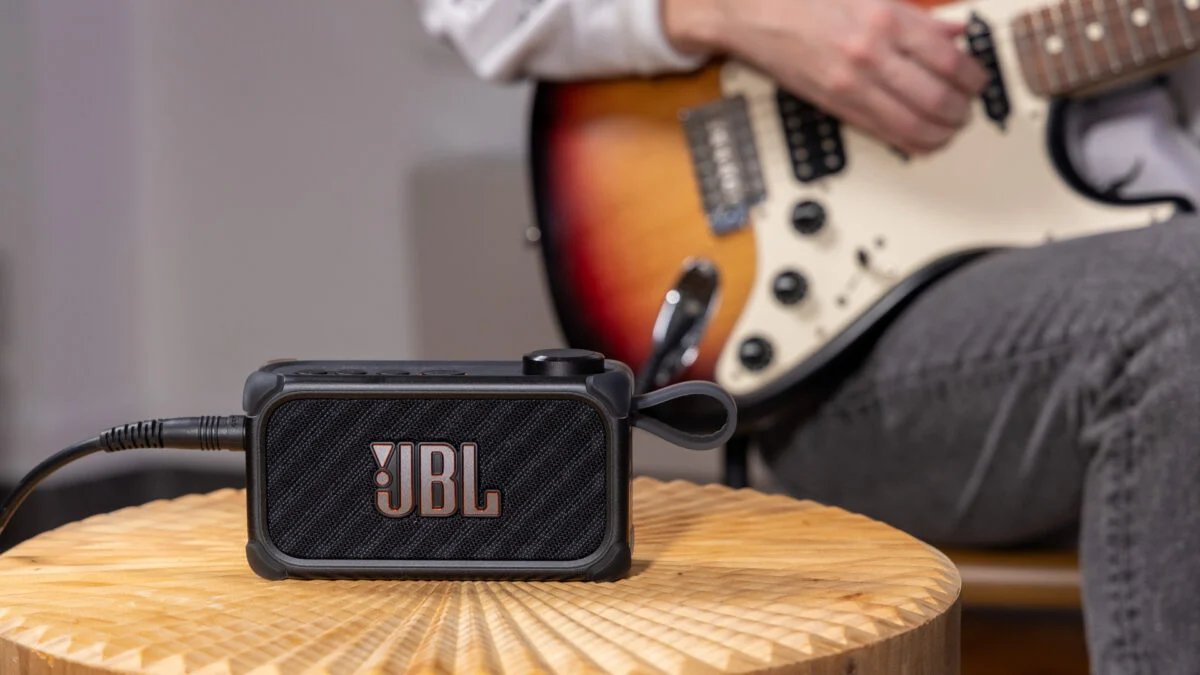
A JBL Bandbox Solo is a great practice amp and speaker with actually impressive AI features and a functional, formidable app.
- AI Stem feature actually works in creating stems from Bluetooth music
- Loads of presets and effects customization
- Small but loud for a reasonable price
- Way more features than you’d expect
- Battery life is just okay
- Exporting stems is a little confusing
I think we’ve got a hit on our hands
I don’t review music gear often, but when I saw the $250 Bandbox Solo, I knew I had to try it. JBL’s newest piece of audio hardware is multipurpose. The Bandbox Solo, a smaller, personal version of the Bandbox Trio, which is meant for groups, is part Bluetooth speaker and part practice amp, meaning you can plug in a guitar or mic via its quarter-inch jack.
© Raymond Wong / Gizmodo
The Bandbox Solo’s standout feature is an AI tool that creates “stems,” which is audio speak for the individual tracks in a song. That means you can play a song (any song) through Bluetooth and then select a few aspects to filter out. Right now, there are three options. You can filter out vocals, guitars, or select “other” to get rid of most everything other than vocals.
My biggest question when I wrote about the Bandbox Solo in January was: does it actually work? I’m here to tell you that it definitely, for sure, does. I would venture as far as to say I’m genuinely impressed with how well it works.
Once you connect the Bandbox Solo up to a device like your phone and start playing music, all you have to do is mash the “AI Stem” button on the top to begin filtering. When AI Stem is activated, you’re presented with three different options: a “G,” a “V,” and an “O,” which stand for guitar, vocals, and other, respectively. To navigate those options, which appear on a very cool dot matrix readout on top of the Bandbox Solo, you just use the speaker’s wheel to spin and then push to select. You can also select either taking the full frequency out or just half.
© Raymond Wong / Gizmodo
To start filtering any of those options, you press down the wheel/button on the right side of the device, wait a moment, and the Bandbox Solo will remove your selected aspect. It’s not instantaneous, but it’s fast, and the most I’ve waited for songs to be filtered is a couple of seconds—maybe three max. Trust me, it’s worth the three-second wait.
The Bandbox Solo filters the majority of your selected frequency range and does it well. The results are usually imperfect, so if you select vocals, you’ll get pops of voice here and there, but in most songs, the broad strokes are taken care of. Largely, it will depend on what kind of song you’re listening to and whether the AI can effectively filter out the frequency ranges JBL has targeted, but it’s clear that the Bandbox Solo is geared toward more traditional “band” genres like rock, jazz, and the like.
This is a guitar/vocal practice amp/speaker, after all, so that makes sense. Ultimately, not every song will be filtered at the same level of precision, but you can apply Stem AI to any song, unlike similar karaoke features in Apple Music, which work with most songs and can only filter out vocals. For that versatility and acumen, I have to give the BandBox Solo serious props.
Using AI to create stems has even more utility when you think about the Bandbox Solo in its intended light—as an at-home/practice amp. By removing guitars or vocals from songs, you can more effectively play along with parts you’re trying to learn. As an exercise, I subtracted the guitar parts from a few songs I know on guitar and attempted to play along, and it was loads of fun. It’s not that playing along with the existing tracks isn’t possible—it totally is—but actually trying to hear what you’re playing and whether you’re playing it proficiently is leaps and bounds easier when you’re not being drowned out.
© Raymond Wong / Gizmodo
You’re also actually able to export the stems you create to another device, but I couldn’t quite figure out how to make that feature work. I referenced the manual, which instructs you to connect the Bandbox Solo to a DAW-equipped device like a laptop (which I did), but I couldn’t get GarageBand to recognize the speaker despite tweaking the input settings in the app. I’m probably missing something here, to be fair, so maybe you’ll have better luck exporting your stems, or maybe JBL will devise a different way to do so. Either way, the ability does exist if, unlike me, you can figure out how to use it.
Either way, with the Stem AI feature, the Bandbox Solo feels unlike any other practice amp or Bluetooth speaker I’ve used in a good way, and it’s even more impressive when you consider that it’s not creating music slop like generative music apps from companies like Suno. To me, the Bandbox Solo is proof that AI can actually do something useful and fun when it’s used well, especially if it’s sitting back and letting you do the parts you love, like—ya know—actually making music. Imagine that!
Better yet? The Bandbox Solo is just as great beyond the AI of it all.
I’m a baaand in a box (Alice in Chains voice)
Like any modern amp, the Bandbox Solo also comes with preset effects that you can apply over vocals or guitar, including clean, overdrive, and distorted effects. At any given point, there are just 6 altogether, but in practice, there are actually a lot more. By using the free JBL One app, you can actually select from dozens of effects tailored for different genres like rock, pop, or jazz. All you have to do is select the one you want and then download it to the Bandbox Solo, and you’re ready to go.
© Raymond Wong / Gizmodo
Beyond that, you can also use the JBL One app to tweak preset sounds to your liking by adding several digital “pedals” to the sound. Those virtual pedals include gate, drive, phasers, echo, reverb, and even a compressor. You can also tweak amp simulations for things like “vintage drive” or a bass amp. It’s way beyond what I pictured JBL’s app doing, and on top of that, the simulations and effects are solid. Dedicated pedals (at least good ones) are still preferable for most serious musicians, but if you’re using GarageBand to record, there’s no reason why you wouldn’t be satisfied using this instead. And if you wanted to just mess around and experiment with different sounds or match the sound of a guitar you’re trying to emulate for practice, you’d be hard-pressed not to find something here that will get you close.
© Raymond Wong / Gizmodo
There are loads of other features, too. You can adjust EQ, pitch, use a tuner, and also add drum tracks to play along with. I love the last one. Even if the drum beats aren’t the most varied in the world, it’s nice to simulate playing a riff with a rhythm section. These are things you can do in any DAW, obviously, but having them in a portable device and an app on your phone—a device most people have with them at all times—really opens up the possibilities to playing or creating anywhere and makes it ridiculously easy.
It’s still a speaker!
Let’s not forget, this is still a speaker. If you’re not practicing with the Bandbox Solo, it also doubles as a portable way to listen to Bluetooth audio. JBL is known in the Bluetooth speaker space for consistently good quality for the price, and the Bandbox Solo is no different. I wouldn’t hesitate to use the Bandbox Solo for listening to music when I’m out and about. Vocals are present and distortion-free, there’s a decent amount of low end, and despite only having one speaker, mid, high, and low frequencies still have room to breathe.
While the battery life isn’t stellar (it gets 6 hours total for either playback or using it as an amp), it’s not bad in a pinch. One thing I was impressed by was the volume. Just like the JBL Grip, the company’s beer can-sized Bluetooth speaker, the Bandbox Solo is small (1.2 pounds), but it’s mighty, with 30W of output power. It’s meant to be used as a practice amp (something you play with by yourself), but to be honest, it might be able to hold its own in a small practice room if everyone is at a reasonable volume.
© Raymond Wong / Gizmodo
When it comes to ports, the Bandbox Solo also has what you need with a quarter-inch jack, which I mentioned before, a 3.5mm jack, which could be useful if you want to monitor the amp in a pair of headphones, and a USB-C for charging and transferring data. If you’re just listening to music, there are still Bluetooth speakers that I would spring for before the Bandbox Solo (I still love the Bose SoundLink Plus), but that doesn’t mean it’s slacking.
A no-brainer
To me, the JBL Bandbox Solo makes an easy case for itself. It’s not the practice amp/speaker you want in a band setting (JBL sells the bigger, louder Bandbox Trio for that), but it’s an ideal at-home amp for practicing, noodling around, and creating. The Bandbox Solo is great for people who live in small spaces, it has fun/useful AI features, and a companion app provides you with a much richer experience than you’d expect. To be honest, I would have killed for a practice amp like this back in high school or college when I was trying to wrap my head around MIDI and whatever Pete Rock did in the ’90s.
© Raymond Wong / Gizmodo
At $250, I think the JBL Bandbox Solo is a steal, especially for musicians who just need something that works in a smaller space, or want to begin their exploration into DAWs and making music digitally. If you’re like me, you probably never really think of JBL when you think of music gear, but if the Bandbox Solo is any indication, you might want to.
