

Whether you’re choosing between them or tempted by an upgrade, use this guide to weigh up the differences
After two years at the top of Apple’s smartwatch lineup, the Ultra 2 was replaced by the Ultra in September 2025.
And with our initial extensive Apple Watch Ultra 3 testing now complete, we can move past the on-paper specs and definitively answer the most crucial questions: What has actually changed? And are those changes worth the upgrade?
In that Ultra 3 review, we concluded that the 2025 iteration is typical of most Apple updates: it focuses on a few key hardware upgrades while letting the new watchOS 26 software do much of the heavy lifting.
As such, the decision of which is best for you depends entirely on which watch you currently own.
This is our final, tested breakdown of how the Apple Watch Ultra 3 compares to the Ultra 2, helping you understand which is the better value and whether to make the jump.
Advertisement
Price and availability
The Ultra 3 launches at the same $799 price point in the US as its predecessor did in 2023. In some regions, like the UK, it’s actually launching at a slightly lower price (£749 compared to the Ultra 2’s £799 launch price), which is a welcome surprise.
As is often the case with Apple’s previous-generation devices, the Ultra 2 is no longer officially sold by the brand. However, there are still likely many third-party retailers with stock to clear in the coming months—and, of course, it’s almost certain to be offered at a lower price than the Ultra 3’s MSRP.
We’ve included the live widgets above and below to help you find the best prices quickly.
Design and display
Advertisement
The size, shape, thickness, materials, and colors of the Ultra 3’s cases are the same as those of its predecessor, so there are no major changes here. And since this was also true of the original Ultra (except for the black titanium color option), you’re unlikely to tell which generation someone is wearing at first glance.
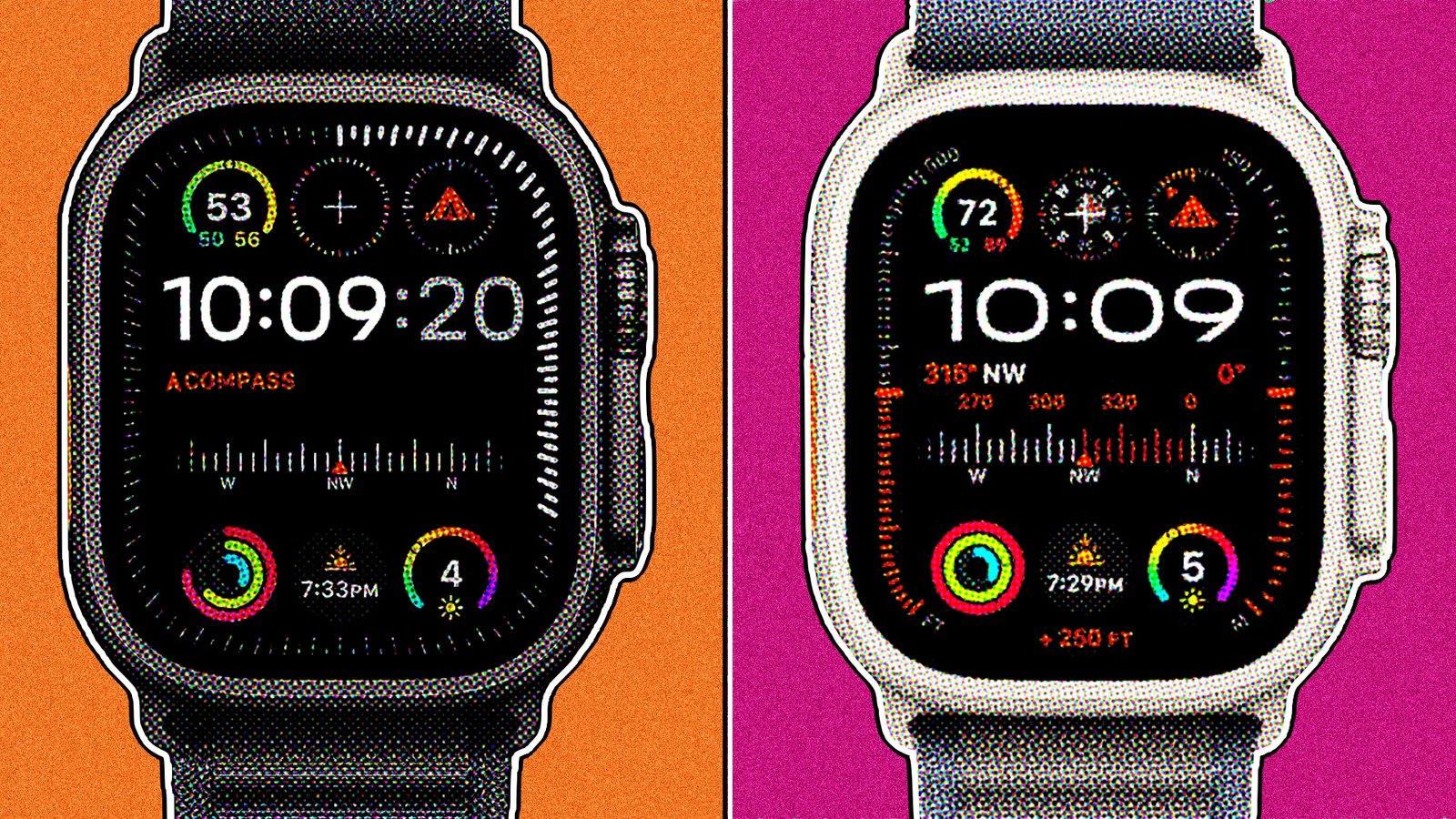
However, Apple did announce that the display on the latest generation is the ‘largest ever on an Apple Watch’, with borders that are 24% thinner than on the Ultra 2.
And in side-by-side testing, we found that the experience of using the watch has changed considerably, thanks to that change (as shown above in the Apple Maps comparison).
(Image credit: Wareable)
As long-term Ultra 2 users, we found the extra real estate makes text clearer and data-rich faces (like Modular Ultra) feel far more expansive. It’s the kind of subtle but impactful change that makes the Ultra 2’s bezel look dated.
The Ultra 3 also features an updated LTPO3 panel and wide-angle OLEDs. This is less about peak brightness (which remains the same) and more about off-axis viewing angles and efficiency. Our testing confirmed this is a subtle but handy improvement, making the dimmed always-on workout screen clearer to read at a glance. But, unlike the display size increase, it’s not a massively noticeable difference between generations.
Advertisement
- Winner: Apple Watch Ultra 3
Smartwatch features and watchOS 26
(Image credit: Wareable)
This section defines the entire upgrade dilemma. The core software experience is a tie, as both the Ultra 3 and Ultra 2 run the excellent watchOS 26. This is great news for Ultra 2 owners, as it means you get the new Liquid Glass design, the more intelligent Smart Stack, and the new ticking-second-hand watch faces without paying for an upgrade.
The one, enormous exception is satellite connectivity. This is the headline hardware feature of the Ultra 3, and, since it’s hardware-related, won’t not roll back to the Ultra 2.
This new system enables three key off-grid functions:
- Emergency SOS: Connect directly with emergency services (free for two years)
- Satellite Text Messaging: Send iMessage/SMS texts to contacts (requires an active cellular plan).
- Find My Location Sharing: Manually ping your location to the Find My network.
Advertisement
In our testing, some of these features were unavailable due to regional rollouts. However, what we could test proved to be a powerful and accessible safety net for those who are routinely out on trails, in the mountains, or who like the idea of a satellite backup device on their wrist.
While something like Garmin’s inReach system is more comprehensive, it comes with a hefty subscription fee. And though smartwatch rival Google is also offering satellite features via the Pixel Watch 4, they’re nowhere near as comprehensive.
Apple’s integration, especially the free SOS component, is a massive value-add for anyone who hikes, runs, or ventures into areas with unreliable signal.
- Winner: Apple Watch Ultra 3
Health and sleep tracking
(Image credit: Wareable)
This is an area of almost total parity, which is excellent news for Ultra 2 owners.
Advertisement
Both watches share the exact same advanced sensor array: the multi-path optical heart rate sensor, the ECG app for AFib assessment, the SpO2 sensor, and the skin temperature sensor for cycle and health tracking. Both are also capable of Fall Detection, Crash Detection, and monitoring for signs of sleep apnea.
Because the hardware is identical, the biggest new health features of the year—passive hypertension notifications and the new native Sleep Score—are part of the watchOS 26 update that rolls out to both devices.
This means that whether you have an Ultra 2 or an Ultra 3, you’re getting Apple’s latest, most powerful health-monitoring tools.
Sports tracking performance
(Image credit: Wareable)
This is a core pillar of the Ultra experience, and the key takeaway from our extensive testing is that both watches are identical, top-tier performers. Yet, as with the health monitoring, the Ultra 3 doesn’t introduce any new sports sensors or tracking features over the Ultra 2.
Advertisement
GPS accuracy: The same excellent performance
Both the Ultra 2 and Ultra 3 feature Apple’s excellent dual-frequency GPS. Our in-depth testing of the Ultra 3 confirmed it’s still outstanding in terms of precision, often plotting cleaner tracks than even Garmin’s Multi-Band system. Since this hardware is unchanged, Ultra 2 owners have the exact same best-in-class GPS performance.
Heart rate monitoring: Still the best around
It’s the same story for heart rate. The optical sensor in both watches is still the most reliable on the market. Our review of the Ultra 3 confirmed it virtually matches a chest strap beat-for-beat on race day, in interval sessions, and for all the steady base sessions in between. Again, that just told us what we already experienced from our time with the OG Ultra and the Ultra 2.
When we performed more direct tests with the watches side by side, the performance was also comparable. However, pairing the AirPods Pro 3 and its new heart rate sensing can also boost performance considerably here. We found much more stable performance (with none of the admittedly rare signal drop-outs due to poor fit or weather) when an Ultra was paired with the earbuds—on par, if not better, than the combination of a watch and chest strap.
Battery life and performance
(Image credit: Wareable)
When the Ultra 3 was first announced, we were hopeful that the updated battery estimate of 42 hours (up from 36) would help the Apple Watch become a device comfortably capable of three days of solid outdoor training.
Advertisement
However, after some digging around into the fine print and testing these two watches side by side, this isn’t as game-changing as it first appeared on paper.
The Ultra 3’s new battery estimate is essentially a marketing correction, not a revolutionary hardware improvement. Apple’s new estimate now includes six hours of power-efficient sleep tracking in its protocol, which the previous estimate didn’t.
In our real-world, side-by-side testing, the Ultra 3’s battery life was only slightly better than the Ultra 2’s, if at all. Both are exceptional two-to-three-day performers if you use them moderately each day (for example, a routine that includes the always-on display enabled, sleep tracking, daily outdoor GPS with music streaming, and push notifications).
And on some days, the Ultra 3 really surprised us, like when it handled a 10-hour GPS hike and still had 50% left. So it, like the Ultra 2, can definitely go the distance into a second day if you keep an eye on things.
However, ultimately, we didn’t see anything new here that warrants an upgrade or selection over the other.
Advertisement
Final verdict: Which is best—and should you upgrade?
(Image credit: Wareable)
The Apple Watch Ultra 3 is a superb update and tops our overall rankings as the best smartwatch you can buy. Even factoring in most potential price drops for the Ultra 2, we would recommend picking up the Ultra 3 in almost all circumstances.
However, the decision to upgrade is different, so here’s what we recommend after spending considerable time with each smartwatch:
If you own an Apple Watch Series device
Yes. If you’re an older Series user craving more battery life, greater durability, and pro-level features, the Ultra 3 is the ultimate upgrade. It fundamentally changes how you use your watch, freeing you from daily charging anxiety while delivering a top-tier sports tracking experience.
If you own an Apple Watch Ultra 2
No. You’re getting all the most important software updates (watchOS 26, Hypertension Notifications, Sleep Score) for free. Your watch has the same class-leading GPS, heart rate sensors, and virtually identical real-world battery life. The only reason to upgrade is if you desperately need the new satellite SOS features.
If you own an original Apple Watch Ultra
Yes. This is admittedly less straightforward than upgrading from an Apple Watch Series device, but the cumulative updates are now beginning to feel significant. You’ll get a much brighter screen (3000 nits vs 2000 nits), the larger and more immersive display, a faster processor, the Double Tap gesture, the newer health sensor suite (that enables sleep apnea alerts), and the new satellite safety features. This will feel like a brand-new, far more capable device.
Advertisement
