

Pros
- Very impressive integrated GPU
- Strong, sustainable performance
- Compact footprint
Cons
- Less upgradeable than most desktop PCs
- Kind of cheap-feeling case
The Framework Desktop is an interesting machine. It offers surprising performance on all fronts with even more surprising sustain for such a small, 4.5-liter footprint. The price tag starts to make sense when considering both those aspects.
However, the Desktop desktop also misses something. It’s partly a pre-built Mini-ITX PC, lacking not only some of the user upgradability that desktop PCs in general, and Framework specifically, are known for. Integrating the CPU, GPU, NPU and memory onto one package may have its advantages, but those advantages might only be fully realized in AI workloads since the Desktop’s ability to re-allocate its memory can help avoid the need to buy an expensive separate GPU. For everyone else, a Mini-ITX gaming PC build or even a full-size desktop could prove more effective, not to mention mini PCs like the Minisforum AI X1 Pro for folks who can get by with lower-end graphics at a lower price.
Framework Desktop
Price as reviewed $1,987Size 4.5 liter (8.1×3.8×8.9 inches/205.5 x 96.8 x 226.1 millimeters)Motherboard Framework custom Mini-ITXCPU 3,000MHz AMD Ryzen AI Max Plus 395Memory 64GB LPDDR5x-8000Graphics Radeon 8060S (integrated)Storage 1TB NVMe M.2 PCIe Gen 4 SSD (boot) (WD_BLACK SN7100)Networking 5GbE, AMD RZ717 Wi-Fi 7 802.11be, Bluetooth 5.4Connections USB 3.2 Gen 2 Type-A (x2 rear), USB4 Type-C (x2 rear), 3.5mm audio connector (x1 rear), 5Gb Ethernet, HDMI 2.1 (x1 on GPU), DisplayPort 2.1 (x2 rear, up to 10Gb/s), USB-C Expansion slots (x2 front, up to USB 3.2 Gen 2)Operating system Windows 11 Home (tested)
The Framework desktop starts at $1,139 for a model with the AMD Ryzen AI Max 385 and 32GB of memory. This bumps up to $1,639 to get to the model tested here, which includes an upgraded Ryzen AI Max Plus 395 CPU, boosted integrated graphics and 64GB of memory. You can get up to 128GB of memory, bringing the system price up to $2,459.
These prices aren’t for a ready-to-run computer, though. Storage, an operating system, the CPU fan, expansion cards, front tiles and even the power cord are priced as additions. These can really add up. For instance, our test configuration’s base price jumps to $1,987 to get 1TB of storage, a Windows 11 license, a power cable, the Noctua fan and the $40 clear side panel. That’s before choosing some of the aesthetic front panel tiles and the two expansion cards that serve as front I/O (bringing the total to $2,039).
Framework also offers the mainboards on their own, which start at $839, indicating that the cost of the case and power supply adds $300 to the price of the system.
Strong for its size, but still no desktop
In its squat little case, the Framework Desktop hides away an impressively capable hardware setup. The AMD Ryzen AI Max Plus 395 is the beating heart of this system, with the CPU, GPU, NPU and memory all integrated. There’s plenty of performance too, with the system managing a truly impressive PCMark10 score of 8,715, a lofty level that’s often reserved for beefy gaming PCs. This is a strong indication that the Framework has more than enough muscle for a wide range of office tasks.
The CPU performance by itself isn’t earth-shattering, but it offers high performance. Its single-core speeds are very strong, rivaling recent entries from Intel like the Intel Core i9-14900HX and Intel Core Ultra 7 255H, though it lags behind well-cooled desktop chips like the Intel Core Ultra 9 285K and even AMD’s Ryzen 9 9950X3D. Apple’s M4 also still has a single-core performance lead.
Multicore speeds shift back over in the Framework Desktop’s favor, with the chip not only getting out ahead of most mobile chips but also leading Apple’s M4 in the Mac Mini and iMac. It even gets into the ballpark of the AMD Ryzen 7 9800X3D or Intel Core i7-14700K when they’re installed in beefy gaming desktops (with robust liquid cooling in one case). The Framework Desktop manages this with a single-fan air-cooling setup that runs quietly even under a heavy load. As impressive as that is, the big gaming desktops running other top-of-the-line CPUs still have the lead.
While high-end CPU performance was expected, the integrated GPU’s capabilities were a surprise. It’s a huge step up from prior AMD integrated graphics and leaves Intel Arc integrated graphics in the dust. Across graphical benchmarks, the Radeon 8060S iGPU performed on a level between the mobile variant of an Nvidia RTX 4060 and RTX 4070, though higher-wattage RTX 4070 laptops tended to still prove superior. It was enough that I had to check out its gaming chops, and it managed to run Shadow of the Tomb Raider at 1080p with the highest graphics preset at an average of 111 frames per second.
With the small stature of the system and low-profile cooler, sustained performance was a worry, but the Framework Desktop proved itself capable of maintaining its speed under sustained loads. A single pass of Cinebench R24 yielded results similar to a 10-minute run, and the system maintained over 99% consistency in 3DMark’s Steel Nomad Light stress test.
Just one giant fan to help air cool this desktop.
Since the 64GB of LPDDR5x-8000 system memory is shared, it’s possible to allocate a large amount of memory to the CPU, GPU, or NPU as needed. Part of the system’s promise is AI performance, and having a huge pile of memory available to whichever component you want to run an AI model on can be handy. While it can be hard to directly compare AMD, Intel and Nvidia in the benchmarks we run, there’s certainly some promise for the Framework Desktop. Running UL’s Procyon Stable Diffusion XL image generation benchmark, the Framework Desktop held its own against the Minisforum AtomMan G7 Ti, which had a mobile RTX 4070 Ti but was likely hampered by only 8GB of VRAM.
Less upgradable than you’d expect from Framework
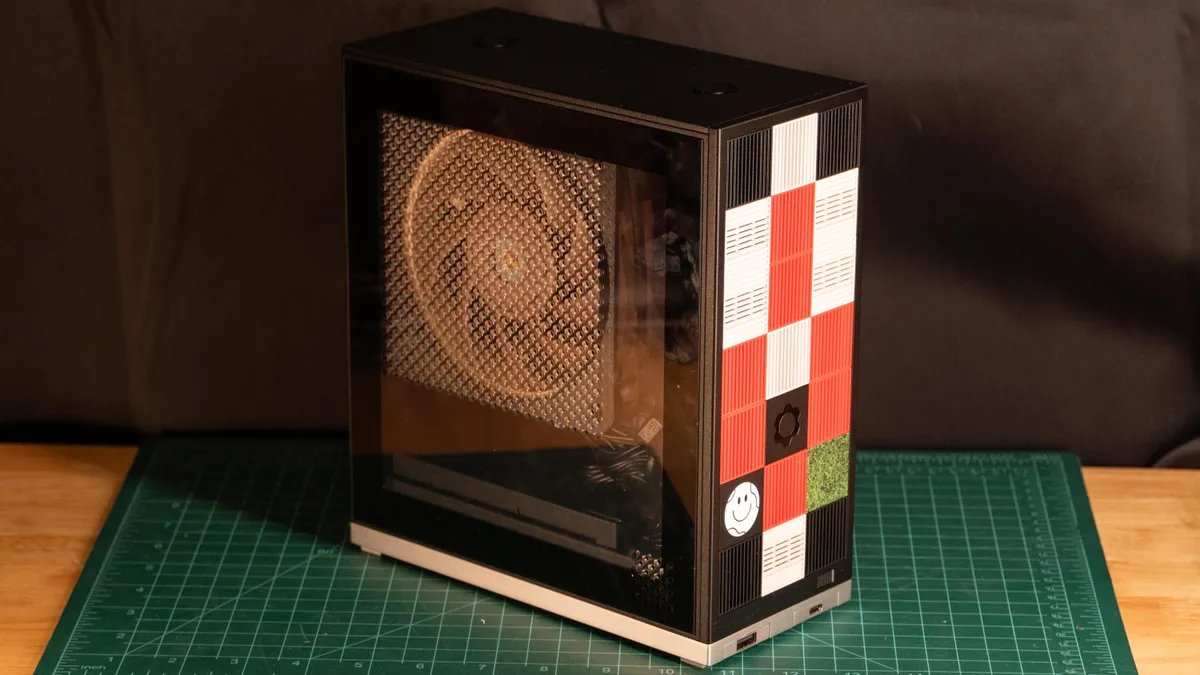
The tiles on front can be ordered in multiple colors, or you can 3D print your own to customize the look.
Into a small, 4.5-liter case, Framework packed a tiny mini-ITX motherboard that’s almost entirely covered by the CPU cooler. Wedged alongside is a very small power supply, all framed into a metal skeleton and a mostly plastic exterior.
Even with its cramped interior, there are still some expansion options. There’s an open PCIe 4.0×4 slot just south of the cooling fan, though it would require a very thin add-in card that doesn’t extend out the back of the case. The motherboard has two M.2 slots, one on the front and one on the back. Each has a built-in heat shield. That’s it for future expansion, though. This almost sets the Framework Desktop at odds with Framework’s ethos so far. Its laptops are upgradable to a level few laptops are. Here we have a desktop PC, a form factor known for its modularity and upgradability, with little to upgrade without buying an entirely new mainboard.
Getting back to the outside, the Framework Desktop feels a bit cheap, with lots of uninspiring plastic. You can decorate the front panel with 21 small plastic tiles that give a sort of Lego-like effect, but, curiously, they also restrict case airflow.
My test unit came with a clear side panel, and it’s not a $40 upgrade I could recommend. The clear plastic doesn’t look great, especially when most of it is drilled with ventilation holes for the CPU cooler, plus a little section in the corner for the power supply. It’s almost surprising the Framework Desktop runs as effectively as it does, given its airflow design is just sucking fresh air in through the side panel and pushing it out every available hole in the case.
The I/O assortment is also somewhat bare. I can understand Framework wanting to include its tile-based ports on its desktop, but they end up being rather limiting. You get just two front ports on the case, maxing out at just USB 3.2 Gen 2. The rear is also surprisingly sparse, with just two 10Gbps USB-A ports and USB4 ports. Surprisingly, there are three dedicated display outputs: one HDMI 2.1 and two DisplayPort 2.1. There’s also a 3.5mm headphone jack and a 5Gbps Ethernet jack. The much smaller Minisforum AI X1 Pro offered similar I/O but put more of it conveniently at the front of the system (not to mention its extra M.2 slot and user-upgradeable memory).
While the individual upgradability may not be so exciting, Framework has noted that the system can slot into server racks and multiple mainboards can be linked together using the 5GbE or USB4 ports, though that kind of thing is more for professional or prosumer setups.
So overall, the Framework Desktop does better than you might expect given its size, but that size also means it has very limited upgrade/expansion options, and it can get pricey quickly with its various (and often not really optional) add-ons. Still, for a tiny desktop, the performance is satisfyingly good.
Geekbench 6 (multicore)
Mac Mini M2 (2023) 10,152Lenovo Yoga AIO 32i (32ILL19) 10,866Apple Mac Mini M4 (2025) 14,908Minisforum AI X1 Pro 15,358Lenovo Yoga AIO 27i (27IAH10) 15,496Minisforum AtomMan G7 Ti 16,959Framework Desktop 17,389
Note: Longer bars indicate better performance
Cinebench 2024 CPU (multicore)
Lenovo Yoga AIO 32i (32ILL19) 577Mac Mini M2 (2023) 601Apple Mac Mini M4 (2025) 958Lenovo Yoga AIO 27i (27IAH10) 999Minisforum AI X1 Pro 1,225Minisforum AtomMan G7 Ti 1,413Framework Desktop 1,829
Note: Longer bars indicate better performance
3DMark Steel Nomad
Minisforum AI X1 Pro 529Lenovo Yoga AIO 27i (27IAH10) 742Asus Zenbook S 14 882Lenovo Yoga AIO 32i (32ILL19) 1,504Framework Desktop 2053
Note: NOTE: Longer bars indicate better performance
Procyon Stable Diffusion 1.5
Asus ZenBook S 16 150Minisforum AI X1 Pro 222Framework Desktop 248Lenovo Yoga AIO 27i (27IAH10) 383Lenovo Yoga AIO 32i (32ILL19) 393
Note: Longer bars indicate better performance
Configurations
Apple Mac Mini M4 Apple MacOS Sequoia 15.1, M4 chip 10‑core CPU with 10-core GPU; 16GB LPDDR5 unified memory; 512GB SSDApple Mac Mini 2023 Apple MacOS Ventura 13.2; M2 chip 8-core CPU with 10-core GPU; 8GB unified memory; 256GB SSDFramework Desktop Windows 11 Home; 3GHz AMD Ryzen AI MAX+ 395; Radeon 8060S GPU (integrated); 64GB LPDDR5x-8000 RAM (shared); 1TB NVMe M.2 PCIe Gen 4 SSDLenovo LOQ Tower 17IRR9 (90WY0000US) Microsoft Windows 11 Home; 2.5GHz Intel Core i5-14400F; 16GB RAM; 8GB Nvidia RTX 4060 graphics; SSDLenovo Yoga AIO 32i (32ILL19) Microsoft Windows 11 Home; 2200MHz Intel Core Ultra 7 258V; 32GB LPDDR5X-8533; Nvidia RTX 4050 graphics; 1TB NVMe M.2 PCIe Gen 4 SSDLenovo Yoga AIO 27i (27IAH10) Microsoft Windows 11 Home; 2000MHz Intel Core Ultra 7 255H; 16GB LPDDR5x-7467; Intel Arc Graphics 140T; 1TB NVMe M.2 PCIe Gen 4 SSDMinisforum AI X1 Pro Microsoft Windows 11 Pro; 2GHz AMD Ryzen AI 9HX 370; 64GB DDR5 5,600MHz RAM; 2GB AMD Radeon 890M intergrated graphics; 1TB SSDMinisforum AtomMan G7 Ti Microsoft Windows 11 Home; 2.2GHz Intel Core i9-14900HX; 32GB DDR5 5,600MHz RAM; 8GB Nvidia RTX 4070 graphics; 1TB SSD
