

My phone has slowly become more distracting than I would like it to be. Not in an “addictive” way exactly, but it was starting to feel too noisy. I wanted it to be cleaner and quieter, without constantly pulling my attention in different directions.
So when I kept seeing people swear by digital minimalism, I decided to give it a shot. I already knew there are ways to convert your phone into a dumb phone, and I figured this might be another step in that direction. I thought it would help get things under control, but I ended up walking away feeling like the whole idea was far less useful than it’s made out to be.
Related
I Finally Found an Android Launcher Worth Switching To
Stock feels outdated next to this launcher.
I made my phone as boring as possible
If it looks dull enough, maybe I’ll stop opening it
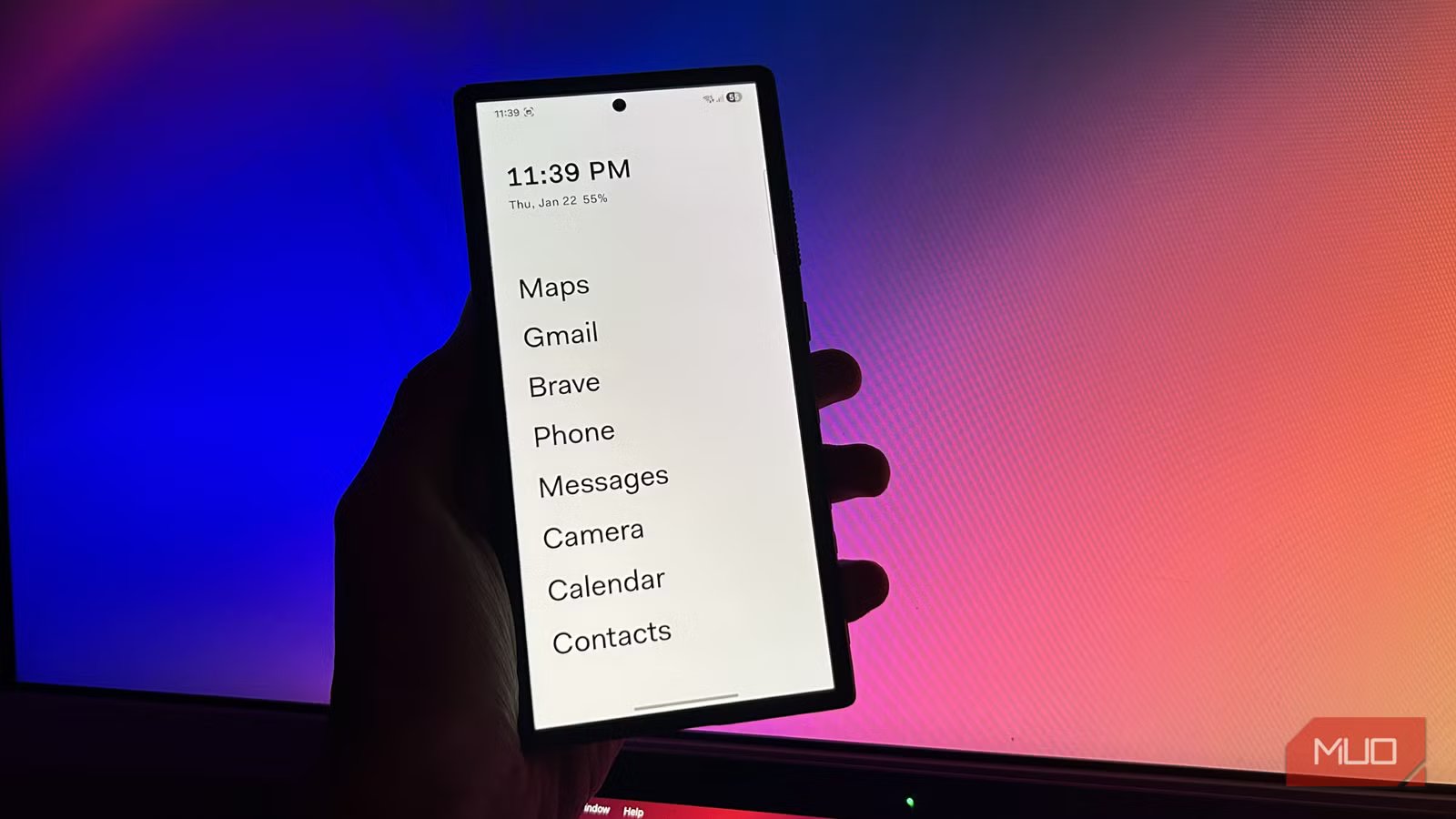
The first step to getting this so-called “distraction-free” setup was, obviously, changing my launcher. I was already using Niagra Launcher, which is fairly minimal to begin with, but I figured there was still room to go even simpler. What I wanted was something without icons entirely. After a bit of searching, I settled on Before Launcher.
As you can see in the screenshots above, it replaces all the app icons on your home screen with simple, boring text. You get a clock at the top, a short list of apps, and a few basic stats underneath. That’s pretty much it.
It’s actually eerily similar to the launcher used on the Minimal Phone, so I was definitely getting somewhere. I picked the apps I wanted easy access to and added them to the main screen. But obviously, I left out all social media apps like Instagram.
Digvijay Kumar / MakeUseOfCredit: Digvijay Kumar / MakeUseOf
Of course, switching launchers alone was never going to be enough for this experiment, so I took things a step further. I’ve heard people talk endlessly about how enabling grayscale and turning your phone black and white makes it less appealing to use, so that was the next thing I tried.
I thought setting up Digital Wellbeing would be a good idea, so I created a few focus modes, just to keep interruptions under control. The goal here wasn’t to aggressively manage screen time or treat this like an addiction intervention. I wanted the phone to feel less distracting overall, not something I had to constantly fight against.
It’s not as good of an idea as it sounds
This felt smarter in my head
Raghav Sethi/MakeUseOfCredit: Raghav Sethi/MakeUseOf
Once I had everything set up, I gave it a full week and tried to be honest with myself about how it felt. At the end of it, I realized it didn’t really change much, at least not for me. I couldn’t immediately explain why, but after sitting with it for a bit, a pattern started to emerge.
Think about how you actually use your phone. Do you spend most of your time staring at your home screen, or are you almost always inside apps? Obviously, it’s the latter. That’s what phones are built for. And that’s where this whole idea started falling apart for me.
I can make my home screen as boring I want, but the places — the apps themselves — don’t really change. I can’t apply a launcher or a new design language to individual apps, and I definitely can’t control how they’re structured. Every app on my phone is actively designed to grab as much attention as possible, and there’s only so much I can do about that.
Related
Personalize Your Android Home Screen With These 5 Great Apps
Don’t settle for a generic Android home screen. Here are the best apps for customizing every aspect to make the home screen yours.
Take Instagram as an example. I use it for some group chats and DMs, which are pretty active daily. But the only way to get to those messages is by opening the app. And there you go, the first thing you see isn’t your chats, but stories and posts instead.
As much as I dislike that, it’s very clearly intentional. That’s how Meta wants the app to work, and I can’t do anything about it. I know apps like Beeper exist, but in my experience they’ve been semi-reliable at best.
Even things like the grayscale screen started irritating me after a while. At that point, it stopped being about reducing distractions and turned into a willpower test. And as long as there is a toggle to turn it off, I know I’m eventually going to use it. Some people might be able to stick with it, and that’s great. But for others, it just becomes a hassle.
You need to make some compromises to make it work
Minimalism isn’t cheap
Screenshot by Raghav
https://minimalcompany.com/collections/frontpage/products/minimal-phone
I really wanted this setup to work, but it clearly wasn’t for me. While looking for alternatives, I ended up browsing r/digitalminimalism, and one pattern kept coming up: people weren’t fixing their phone usage with software tweaks alone. They were separating devices.
You still keep a regular smartphone, but you also use a simpler second device as a physical barrier. I mentioned the Minimal Phone earlier, and it fits this role perfectly. Lately, there’s been a flood of similar products trying to do the same thing. If the Minimal Phone feels too minimal, something like the Clicks Communicator sits in a more comfortable middle ground.
Of course, this means spending extra money on another device, which is the main compromise here. But realistically, even a cheap sub-$100 phone with the same boring setup can get the job done, as long as you completely separate it from your primary phone.
Related
Despite having a smartphone, I always carry a dumb phone—here’s why
My iPhone does it all, but I still need my dumb phone.
It was worth trying… but it’s not for me
In the end, it just becomes a game of how to segregate your digital life between the two devices. When you don’t want distractions, just chuck your main phone in a drawer and get to work. I guess this is one of those things that can vary a lot from person to person.
I clearly wasn’t able to fully commit to it, and maybe I’m just someone who needs a physical barrier to actually stick with something like this. I can’t speak for you. You might try the same setup and find that it works perfectly. The only real way to know is to try it for yourself.
