

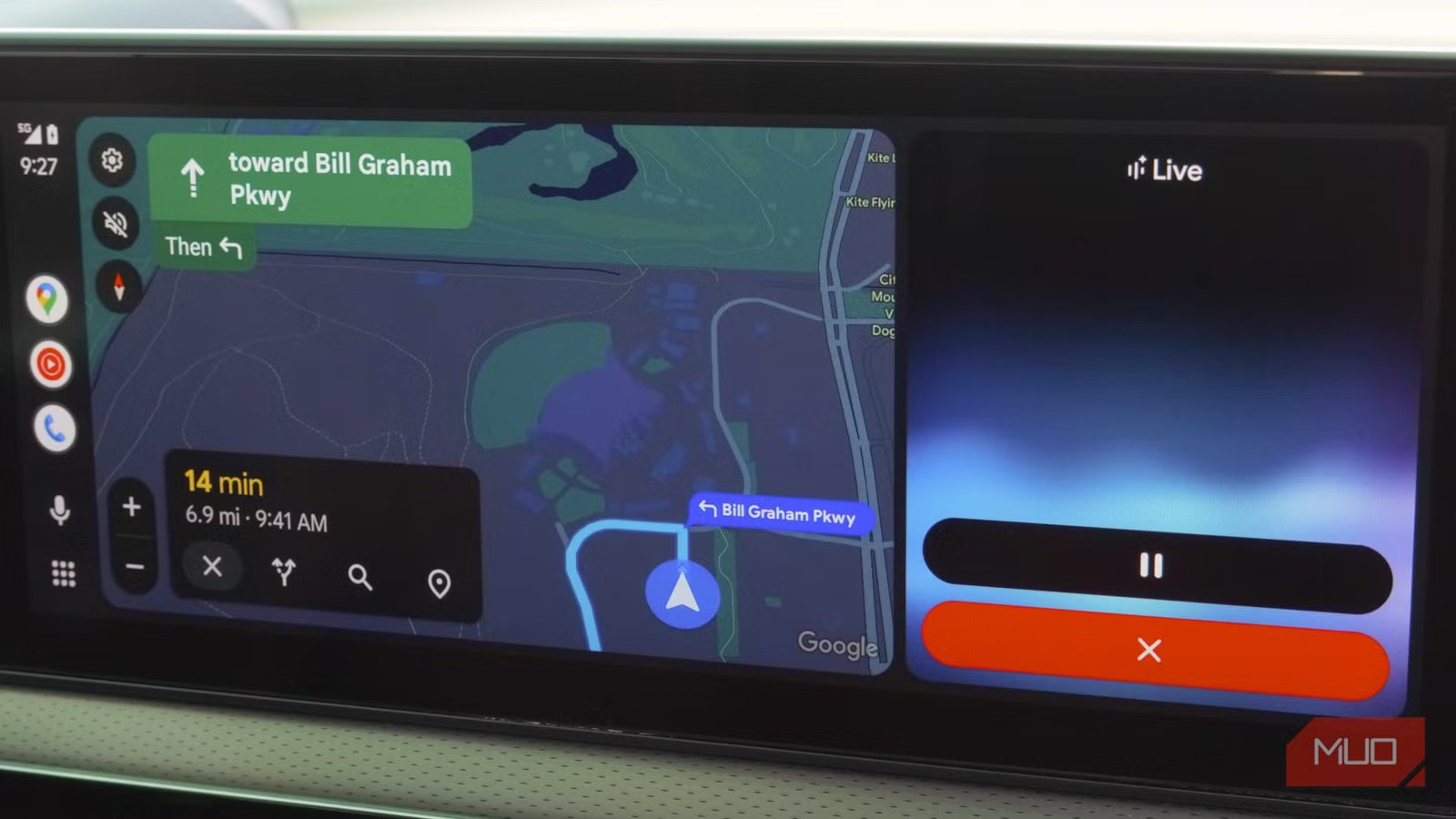
Whether you use Android Auto, Apple CarPlay, or something else usually comes down to which car and phone model you own — and if they play nice together. I own a Tesla, and that (unfortunately) means I can’t use Android Auto or CarPlay without janky third-party solutions. Every once in a while, I get to try Android Auto while borrowing cars or participating in demos, and it’s interesting to see how far the user interface has come. Most recently, I tried the new-look Android Auto experience at last year’s Google I/O developer showcase, complete with the Gemini virtual assistant and a fresh media player interface.
Although we’re already gearing up for this year’s Google I/O event, some features have just recently made their way to Android Auto users. Gemini, for instance, began rolling out to Android Auto drivers at the end of last year. However, it proved to be a slow rollout that finally picked up the pace last month. The redesigned media player UI debuted earlier this year as part of the Android Auto 16 release. So, if you’re just now seeing the Gemini assistant or the new media controls in Android Auto, that’s a good thing — the changes are an upgrade over the Google Assistant and put important controls within the driver’s reach.
Related
I stopped using Google Maps on Android Auto and switched to an app that actually works
Google Maps isn’t the only fish in the pond.
Media controls are now easier to reach while driving
Credit: Google
The old Android Auto interface was symmetrical and visually satisfying, placing media controls toward the center of the screen. You’d have the play/pause button in the middle, the previous track button on the left, and the next track button on the right. This is a pretty standard media control layout, but it doesn’t make sense in your car. The buttons were spread out on the Android Auto screen, and only the previous track button felt well within the driver’s reach. Everything else was too far away, and this could cause distractions while driving.
To fix this problem, Google came up with the MediaPlaybackTemplate. It’s a standardized media playback information layout that media apps can easily implement for their Android Auto version. There is still room for customization, like how developers can set their own header and custom buttons near the top of the user interface. However, the media playback controls are populated automatically, and they have a new home toward the left of the window.
Credit: Google
Specifically, the cluster of Android Auto playback controls are condensed in the bottom-left corner of the app’s user interface. They’re no longer spaced out and centered in the Android Auto window. The play/pause button lives all the way on the left, with previous and next track buttons finding a home on the right. I don’t think it’s as visually satisfying as the symmetrical central button layout, but it’s undoubtedly more functional. Sure, it’ll mess up your Android Auto muscle memory for the first few weeks, but it’ll be better in the long run.
You’ll be able to change songs, podcasts, and other media types in Android Auto easily from the driver’s seat without having to stretch across a large screen. Since the template is standardized, you can expect Spotify, Amazon Music, and YouTube Music — as well as others in the future — to offer roughly the same visual interface.
Gemini is genuinely useful in your car
It’s an upgrade over Google Assistant, and Gemini Live is brand new
Gemini should finally be available on your Android Auto car after a lengthy rollout period, and it’s a worthy upgrade over the Google Assistant. To be fair, that’s partly because it feels like feature deprecations had made Assistant a shell of its former version before the Gemini transition began. Regardless of the circumstances, the important thing to know is that Gemini is better with Android Auto. It’s better at understanding context, completing multistep actions, and continuing conversations.
For example, you can give Gemini in Android Auto instructions that it will then store as saved context for future conversation. If you always text a certain person in your phone’s contacts in Spanish or another language, Gemini can remember that. Simple instructions, like asking your car to navigate to a destination, are upgraded thanks to Gemini’s ability to handle follow-up questions. You could tell Gemini to take you to a restaurant, then quickly confirm the place will still be open when you get there. This all happens in real time, without Gemini in Android Auto getting confused or needing you to restate all the information.
I like the idea of using Gemini to help you add stops along your Google Maps navigation route. This is the perfect situation where an AI-powered voice assistant such as Gemini can come in handy. Since you’re in the middle of the trip, you don’t have the attention required to manually review the best stop along the way. Gemini can do that for you, walking you through the options throughout a continued conversation, and eventually add a place to your trip. You never have to take your hands off the wheel or your eyes on the road.
Another perk is Gemini Live, which admittedly sounds odd to use in the car. If you keep an open mind, though, having a conversational AI assistant built right into your car doesn’t sound like such a bad idea. Those that might need to prep for a big interview, presentation, or exam can rehearse on the drive there thanks to Gemini Live.
Related
These 3 Android Auto features made my car feel like mine
Curiosity and Android Auto are a dangerous combination for me.
Android Automotive and Google built-in are even better
Connecting the basic Android Auto experience with your car’s infotainment system
Credit: Brady Snyder / MakeUseOf
The redesigned Android Auto interface, featuring Gemini and a fresh media player layout, is available now on Android Auto cars. There are over 250 million cars worldwide that support Android Auto, so chances are, you or someone you know has a supported model. Beyond Android Auto, the same features are arriving on cars with Android Automotive and Google built-in. There aren’t nearly as many cars with Google built-in or Android Auto support, but the experience is even better. These operating systems can tap into your car’s hardware, allowing you to use Gemini to control the climate settings of your vehicle with your voice, and don’t require a connected android phone.
Regardless of whether you’re using Android Auto, Android Automotive, or Google built-in, the Gemini transition is the real deal. It provides a smarter and more reliable experience than the Google Assistant.
OS
Android
Developer
Price model
Subscription
Google Gemini is an AI assistant that can understand and generate text, images, code, and more. It’s designed to help people find information, solve problems, and create things more easily. The assistant now powers voice control in Android Auto, Android Automotive, and Google built-in.
