

Many of us struggle with forming healthy relationships with technology and social media, myself included. Too much screen time is rarely a good thing, but setting realistic boundaries is difficult. Smartphones and mobile apps are designed to suck you in and hold your attention, filling your screen with vibrant colors, endless feeds of content, and an inevitable dopamine rush. In my quest to use my Android phone intentionally, I wondered what it’d be like to use a phone that doesn’t always seek my immersion.
It caused me to make a radical change — I ordered a $200 phone with a matte, paper-like IPS LCD screen and built-in digital minimalism features to replace my flagship. Every time I try a smartphone in this price range, I’m stunned at how complete the experience is. I left my iPhone Air and Samsung Galaxy S25 Edge, each 512GB models priced at roughly $1,200, for the TCL 60 XE NXTPAPER 5G.
A downgrade in every way but one
TCL’s use of a matte LCD with e-paper modes shines
I’ve always been a staunch supporter of matte, anti-glare displays on smartphones, tablets, and laptops. The hazy and grainy look of a matte display pushes people away, but it’s so much easier on the eyes and is less reflective. There aren’t many Android phones with completely matte displays on the market. When TCL showed off its 60 series of NXTPAPER phones with matte and paper-like displays at the IFA 2025 trade show last September, it immediately piqued my interest.
Unfortunately, TCL doesn’t bring its best NXTPAPER phones to the U.S., so I didn’t think buying one for daily use was a possibility. Then I stumbled upon the TCL 60 XE NXTPAPER 5G. It’s not as good as the flagship TCL NXTPAPER 60 Ultra or upcoming NXTPAPER 70 Pro (which may get a U.S. release), but it has the exact same NXTPAPER technology and matte display panel. There are other advantages, too — this model is more pocketable than the 7.2-inch Ultra, and it’s way cheaper. If I swung and missed on the TCL 60 XE NXTPAPER 5G, I’d only be out $200.
I knew I made the right choice instantly after unboxing this smartphone. Again, I hate glare and fingerprints, and they’re nowhere to be found on the TCL 60 XE NXTPAPER 5G. Using a phone at my desk under my monitor’s light bar was always annoying, but now it’s not. Harsh lighting or bright sun? No problem. See how the TCL 60 XE NXTPAPER 5G (left) compares to a regular Android phone under a bright photography light below:
Credit: Brady Snyder / MakeUseOf
The difference is so extreme it feels too good to be true. Plus, this is built right into the phone, so I don’t have to hunt down a matte screen protector or keep one intact to mimic the effect. The display underneath is excellent, using IPS LCD technology with a 1080x 2460 resolution and 120Hz refresh rates. It’s not an OLED, but that’s by design — this phone uses blue-light filtering and is more eye-friendly thanks to its IPS LCD panel.
NXTPAPER is way better than e-ink for phones
I considered the Palma 2 Pro, but this is cheaper and more versatile
Credit: Brady Snyder / MakeUseOf
In my search for an eye-friendly and minimalist Android phone, I considered the Boox Palma 2 or Palma 2 Pro, which uses E-ink display technology. There are two reasons I went with the TCL 60 XE NXTPAPER 5G instead: it’s $200 cheaper and offers the option to operate as a full-color LCD at any time. That’s the beauty of the NXTPAPER system. It’s always available as a regular Android phone, but after flipping a hardware switch on the side of the phone (the NXTPAPER key), you can transition to a paper-like viewing mode.
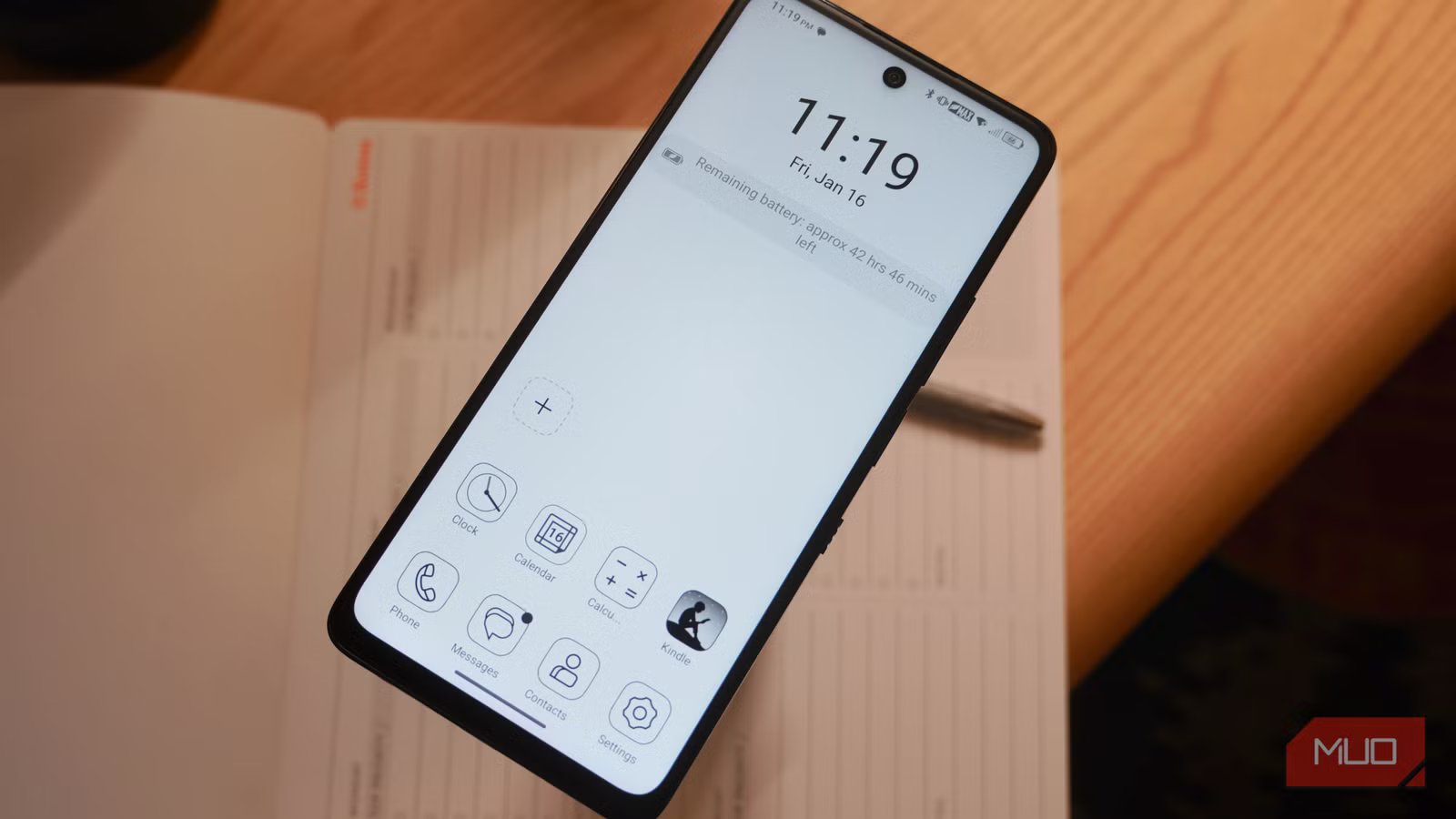
There are four viewing mode options: full color, Max Ink mode, Ink Paper mode, and Color Paper mode. The standard full color mode works like any Android phone you’re used to, displaying vibrant colors behind a matte covering. Then, you can change things up with Ink Paper or Color Paper. These modes simulate the paper-like feel of an eReader either in black-and-white or color. The switch also activates Max Ink mode, which opens a black-and-white paper-like experience with a minimalist home screen launcher.
Credit: Brady Snyder / MakeUseOf
Max Ink is like a “dumbphone” mode for your Android phone, and it’s incredibly clever. The mode closes all running apps and presents a minimal home screen with only the apps you allow. If an app isn’t added to Max Ink mode, its notifications won’t appear until you go back to another viewing mode. This is intended for intentional phone usage, like reading, without distractions.
This viewing mode is satisfying for reading, simulating the experience of an e-ink panel without the drawbacks. It’s also a major battery saver — with 60% battery remaining, my phone says it’ll last over 38 hours in Max Ink mode. Being able to dumb down my phone and restrict unwanted notifications with the flip of a switch is something I’ve always wanted, and the TCL 60 XE NXTPAPER 5G delivers on the idea.
Related
Onyx Boox Palma 2 Review: A Distraction-Free Device With the Apps You Need
More than just an eBook reader.
What about the rest of the phone?
It’s very usable, only slow compared to modern flagships
If you haven’t tried a budget Android phone in a while, you may be surprised at how far they’ve come. For around $200 for the 128GB model, the TCL 60 XE NXTPAPER 5G has a great display, a triple-camera system headlined by a 50MP Sony primary shooter, and a 5,010mAh battery. There are some drawbacks — the MediaTek Dimensity 6100+ chip is capable, but slow at times. Ironically enough, the visual animation when changing NXTPAPER modes seems to always stutter.
I’m also not a fan of the stereo speakers found on the TCL 60 XE NXTPAPER 5G. They’re some of the worst I’ve ever heard, both in terms of quality and volume. The operating system, which is Android 15-based but uses a custom TCL skin, is quirky and manages volume, vibrate, and sound strangely. If you raise the volume without media playing, vibrate mode will turn off, and there’s no easy way to change this behavior.
There are benefits to using a budget phone that some flagships won’t have, though. The TCL 60 XE NXTPAPER 5G has a 3.5mm headphone jack, a microSD card slot, and a SIM card tray.
I’m not sure if I’ll stick with the TCL 60 XE NXTPAPER 5G — I’ll almost certainly upgrade to the 70 Pro if it indeed launches stateside — but this smartphone exceeded my expectations. It’s cheap, a pleasure to view, and versatile. It helps me create an intentional and healthy relationship with my devices, and that’s more important than having the fastest chip or the best camera.
SoC
MediaTek Dimensity 6100+
Display
6.78-inch IPS LCD (120Hz)
Operating System
Android 15
Connectivity
2G: 900/1800/1900/850MHz 3G: B1,2,4,5 LTE: B1,2,3,4,5,7,12,13,17,20,25,26,28,29,30,38,41,42,66,71 5G: n1,2,3,5,12,20,25,28,30,38,40,41,48,66,70,71,77,78
The TCL XE NXTPAPER 5G is a budget Android phone with a paper-like IPS LCD screen featuring a matte finish. The eye-friendly display and NXTPAPER viewing modes make it an excellent option for reading, web browsing, and limiting screen time.
