

Note-taking is one of those things that sounds easy until you try to do it well. Capture fast enough to keep up with your thoughts, but structured enough to find things later. Connected enough to surface patterns, but flexible enough not to slow you down. It’s a hard design problem, and most apps, even the beloved ones, only solve part of it.
I’ve tried most of the big note-taking apps, and I can say without much hesitation that Tana is doing something none of them are. It’s not just another entry in the list of free note-taking apps with flawless sync, but a different kind of tool entirely. One built on the idea that your notes should connect the way your thoughts do. It also happens to look stunning, which doesn’t hurt.
OS
Windows, iOS, Android
Developer
Tana Labs Inc.
Price model
Free (paid plans available)
Tana is a powerful note-taking workspace that blends outlining, knowledge graphs, and AI to help you capture and organize ideas in one flexible system. It turns notes, tasks, and projects into structured, interconnected information so you can think and work more clearly.
Tana reimagines every note as a living object rather than a page
What if your notes could think about where they belong?
The most important thing to understand about Tana is that it doesn’t think about information the way most apps do. There are no pages nested inside folders nested inside workspaces. Instead, everything in Tana is a node. This is a single, living unit of information that can be anything: a thought, a task, a meeting, a person, a project. Nodes can contain other nodes, link to each other, and be referenced from anywhere in your workspace. This structure is similar to how Google’s AI notebook uses mind maps to help you visualize connections between concepts rather than digging through a hierarchy.
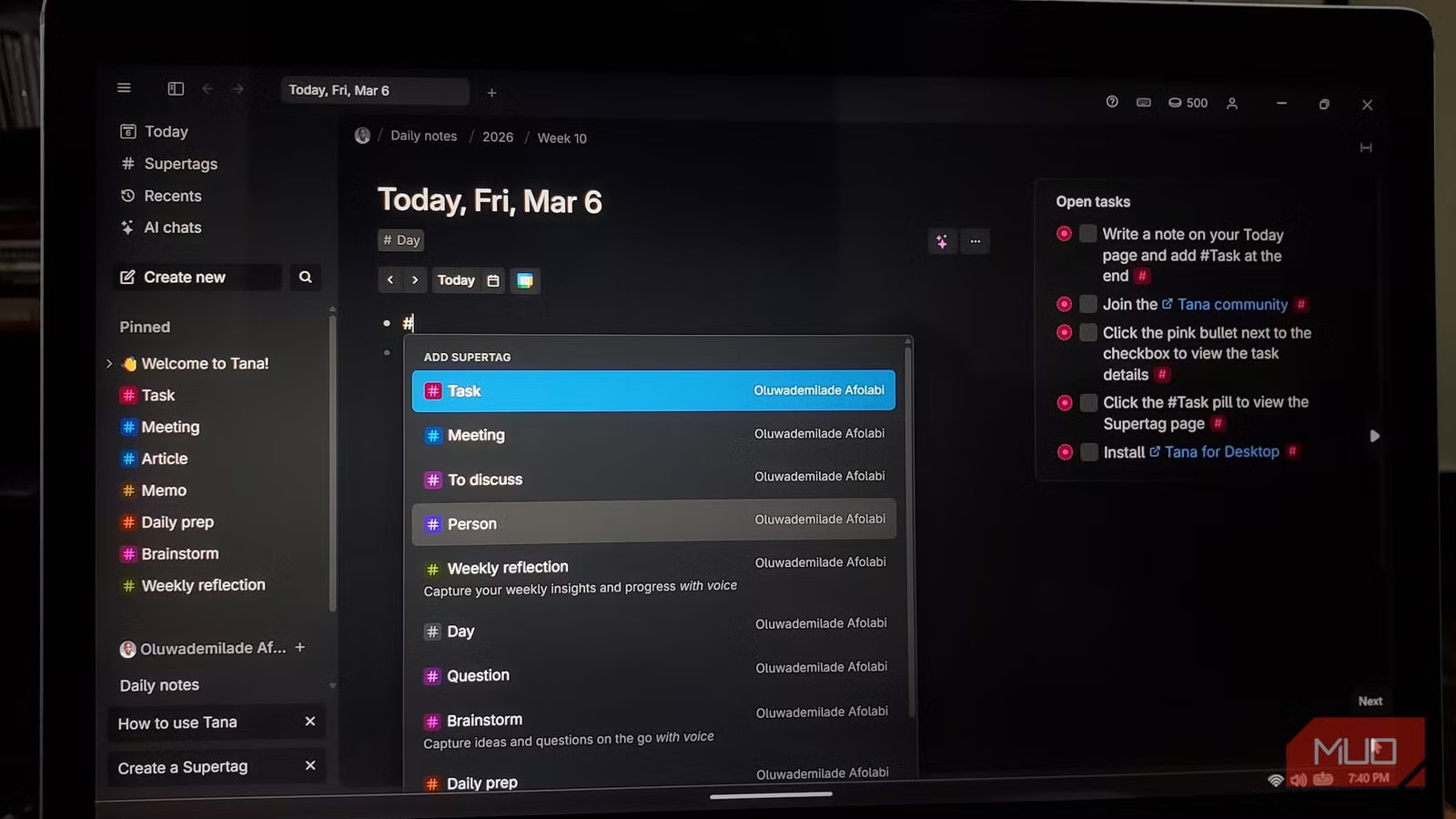
The feature highlight of Tana is Supertags. The concept is borrowed from object-oriented programming, but you don’t need to know what that means to benefit from it. The short version: you can turn any note into a typed, structured object just by tagging it. Say you write down a person’s name during a call. If you tag it with #person , a set of fields appears, be it email, company, relationship, follow-up date, or whatever you decide matters. Similarly, if you type #project on a work item, it inherits fields for deadline, priority, collaborators, and progress. The good thing is that you define those fields yourself, once, and they apply everywhere that tag appears, regardless of where the note lives.
You can create Supertags for meetings, books, decisions, habits, and anything that benefits from consistent fields. You can even combine Supertags, so a node that’s both a #task and a #client-note inherits the properties of both. And once your notes are tagged and structured, Tana lets you build live search widgets, which are auto-updating panels that display filtered results based on criteria you set. You can embed one of these anywhere: on your home page, inside a project note, or on your daily planner. A live search for all #tasks due this week, filtered by #project, will always be up-to-date. If you add a new task anywhere in your workspace, it will automatically appear in every relevant live search.
Tana’s AI capabilities go well beyond a chatbot bolted onto a text editor
This is what AI in a productivity app is actually supposed to feel like
A lot of apps have added AI in the past two years in ways that feel cosmetic. You have a button that summarizes text and a sidebar that generates generic suggestions. Tana’s approach is fundamentally different, and the AI here feels purposefully integrated rather than decorative. The foundation is solid note-taking, and the AI builds on top of it in ways that actually accelerate real work.
On mobile, Tana lets you record a voice memo, and the AI doesn’t just transcribe it. It processes the recording according to whatever Supertag and instructions you’ve assigned. Speak out a list of article ideas on your commute, and by the time you’re at your desk, they’ve been formatted and filed under your content Supertag, ready to query and build on. On desktop, the meeting notetaker captures live conversations natively, which is a welcome feature for anyone who wishes colleagues would stop inviting bots to online meetings, and automatically extracts follow-up tasks, decisions, and summaries, linking everything to the relevant people and projects in your graph.
Because meeting notes are nodes like everything else, they’re searchable, referenceable, and connected. A follow-up task from a call last month is linked to the person it involves, the project it belongs to, and the original meeting it came from — all of which are navigable in seconds.
One of Tana’s most powerful — and underappreciated — features is command nodes: reusable AI-powered actions you can attach to any Supertag or trigger from any node. If you want a command that takes a rough voice memo and rewrites it as a formal Slack summary, you can build it once, attach it to your #voice-memo Supertag and run it on any note with a single click. If you want an AI agent to review your OKRs (Objectives and Key Results) and suggest improvements, Tana has a template for that, and you can customize it to match your team’s language and priorities.
Related
What Are AI Agents and How Do They Work?
AI Agents can help you solve complex problems, but how do they actually work?
The platform now also supports multiple AI providers — including models from OpenAI, Anthropic, and Google — so you can choose which model handles which task based on speed, reasoning depth, or cost. And for developers or power users, the recently launched Tana API and MCP (Model Context Protocol) integration means tools like Claude Code can read, reason over, and write directly back to your actual Tana workspace. Your knowledge doesn’t stay siloed anymore.
Some tools you use; some tools you live in
Tana offers a free tier with 500 AI credits per month. It has a learning curve (anyone who tells you otherwise is underselling how much is under the hood), but the payoff is a workspace that gets smarter the more you put into it. And then you have notes that connect, thoughts that resurface, and a system that is built around how you think, not the other way around.
