

Android Central Labs
(Image credit: Nicholas Sutrich / Android Central)
Android Central Labs is a weekly column devoted to deep dives, experiments, and a focused look into the tech you use. It covers phones, tablets, and everything in between.
Last year, the world got its first real batch of E Ink phones. Sure, there have been many attempts in the past, but phones like the Minimalist Phone, Mudita Kompakt, and Bigme HiBreak Pro offered real ways to keep up with the modern world while still delivering on the E Ink promise. But all of those phones were only available in black & white, which isn’t a terrible experience, per se, but it does make some things hard.
Like any E Ink device, this isn’t something that everyone is going to enjoy, but it’s edging closer to perfection for a few groups of folks. Whether you’re looking for a phone that encourages digital detox without missing out on important features like NFC, or a truly flicker-free phone to keep you in the modern age, this is a pretty impressive little device.
You may like
Today’s best Bigme HiBreak S Color deals
What’s an E Ink phone like?
(Image credit: Nicholas Sutrich / Android Central)
Since I’ve been testing E Ink phones, I’ve had a lot of people ask me about them. What’s the experience like? Can it run normal Android apps? Does it have the Google Play Store? Can it take pictures? Can I watch Instagram or TikTok videos on it?
Yes. The answer to all of these questions is yes, and you’ll find that the HiBreak S Color is surprisingly similar to a typical Android phone, aside from its unique display. It’s not the fastest phone you’ll ever use, but it’s not trying to be either. The latest color E Ink displays can refresh at around 40 FPS, a massive improvement from just a year or two ago, when black-and-white E Ink was still stuck in the sub-30Hz range.
Obviously, that’s a fairly notable difference from most modern 120Hz OLED or LCD phone displays on paper, but the actual experience doesn’t feel terribly different at the end of the day. Videos are very watchable, although you probably don’t want to watch your next Lord of the Rings marathon on it, and even basic daily tasks like typing and swiping feel responsive and tactile.
It’s got a haptic motor inside that’s fine enough, and while I occasionally missed letters while typing from time to time, Gboard’s excellent autocorrect mostly made up for it. It’s a phone that’ll teach you to slow down life just a little bit, be a little more intentional with what you’re doing on it, and even encourage less mindless activity (like scrolling through social media feeds).
Color E Ink at its best
(Image credit: Nicholas Sutrich / Android Central)
The Bigme HiBreak Color S sports the best E Ink display I’ve seen to date, even if it’s still not quite as bright when passively lit as the black & white HiBreak Pro. That’s all down to how color E Ink works, but the built-in front light helps make up for that in all the right ways. It’s fully dimmable, as you might expect, and doesn’t resort to nasty PWM dimming or other flickering tactics to achieve the task.
It’s also got a fully customizable color range that’s achieved through separate warm and cool frontlights. That means it doesn’t use temporal dithering to alter or artificially deepen the display’s colors, a problem that often plagues LCD-based (and some OLED) phones in this price range.
It’s a truly flicker-free display that’s perfect for even the most flicker-sensitive users, a godsend for people who feel like they’re slowly being pushed out of society due to the hidden flicker in many modern displays and lights.
You may like
Image 1 of 6
(Image credit: Nicholas Sutrich / Android Central)(Image credit: Nicholas Sutrich / Android Central)(Image credit: Nicholas Sutrich / Android Central)(Image credit: Nicholas Sutrich / Android Central)(Image credit: Nicholas Sutrich / Android Central)(Image credit: Nicholas Sutrich / Android Central)
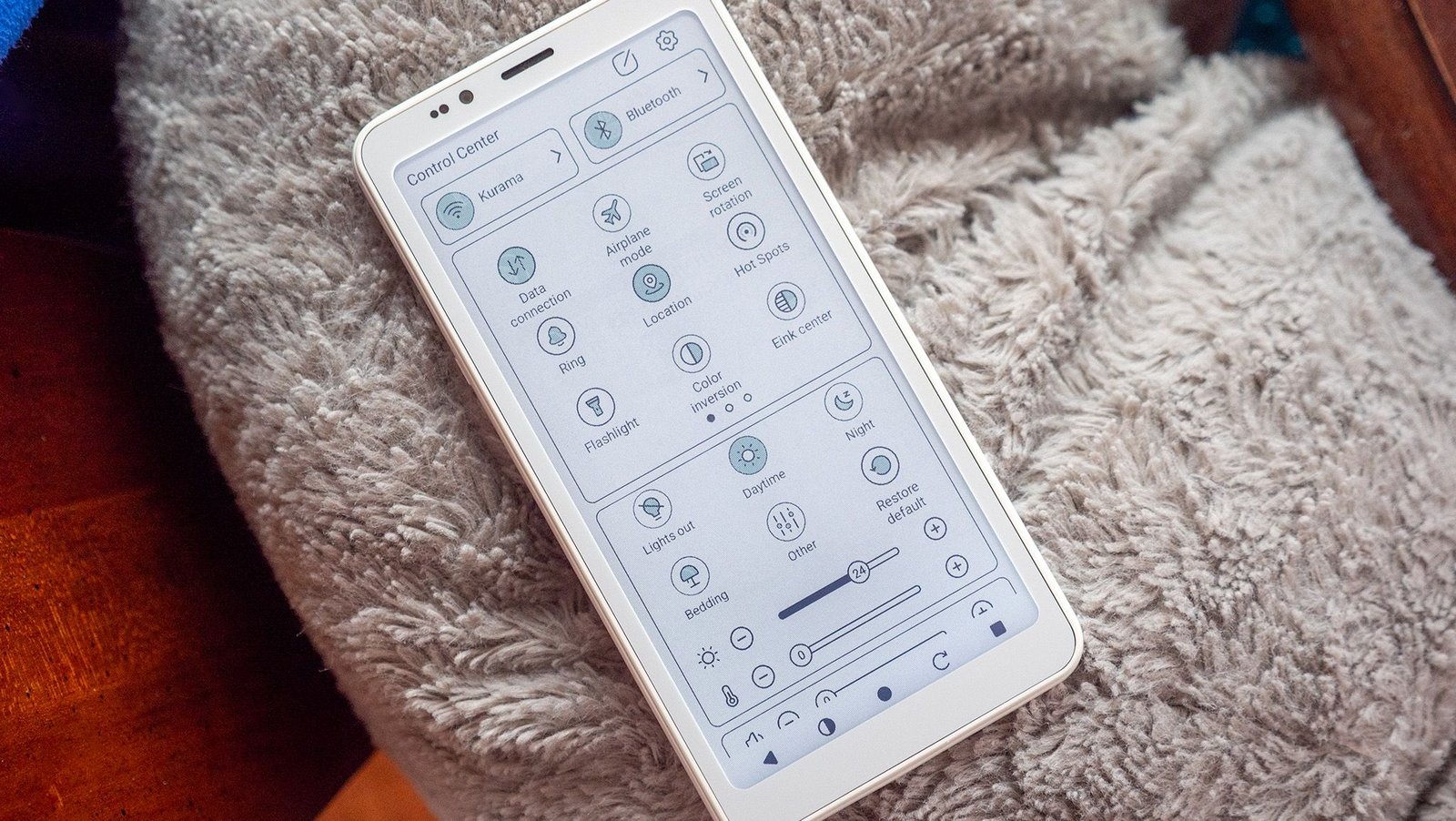
Bigme OS 5, based on Android 14, also features an upgraded E Ink center and a ton of customization for the phone’s multitude of buttons. I normally prefer navigation gestures on Android phones, but found that a customized row of five buttons was best for this phone. In order from left to right, I’ve got them set up as back, E Ink center, home, full display refresh, and multitasking.
Scrolling through Instagram or YouTube videos was fine, as I mentioned before, but playing games is a bit of a mixed bag. Games with less movement — puzzle games like Wordle or Sudoku — are just fine, but more graphically intensive games aren’t recommended.
I could walk around in Minecraft just fine, for example, but actually playing the game is a different story. There’s a slight delay between your input and what happens on the screen, and that, combined with the reduced color palette and lower contrast, makes these types of games very difficult to play.
Do I recommend it?
(Image credit: Nicholas Sutrich / Android Central)
The Bigme HiBreak S Color is the best E Ink phone I’ve used to date. It looks and feels like a normal Android phone and does everything you’d expect from one. It’s got NFC for mobile payments, supports T-Mobile’s 4G in the US and 5G elsewhere in the world, and generally works extremely well.
E Ink phones are a paradigm shift, and while last year’s first crop of E Ink phones weren’t easy to switch to, the Bigme HiBreak S Color makes that change substantially less arduous. It’s a great way to get some relief for your eyes and help wean yourself off smartphone addiction without going cold turkey.
The E Ink phone revolution has begun, and Bigme is leading the charge with the HiBreak S Color, a new color E Ink Android-powered phone that does everything you need without the harsh, eye straining display of other phones.
