

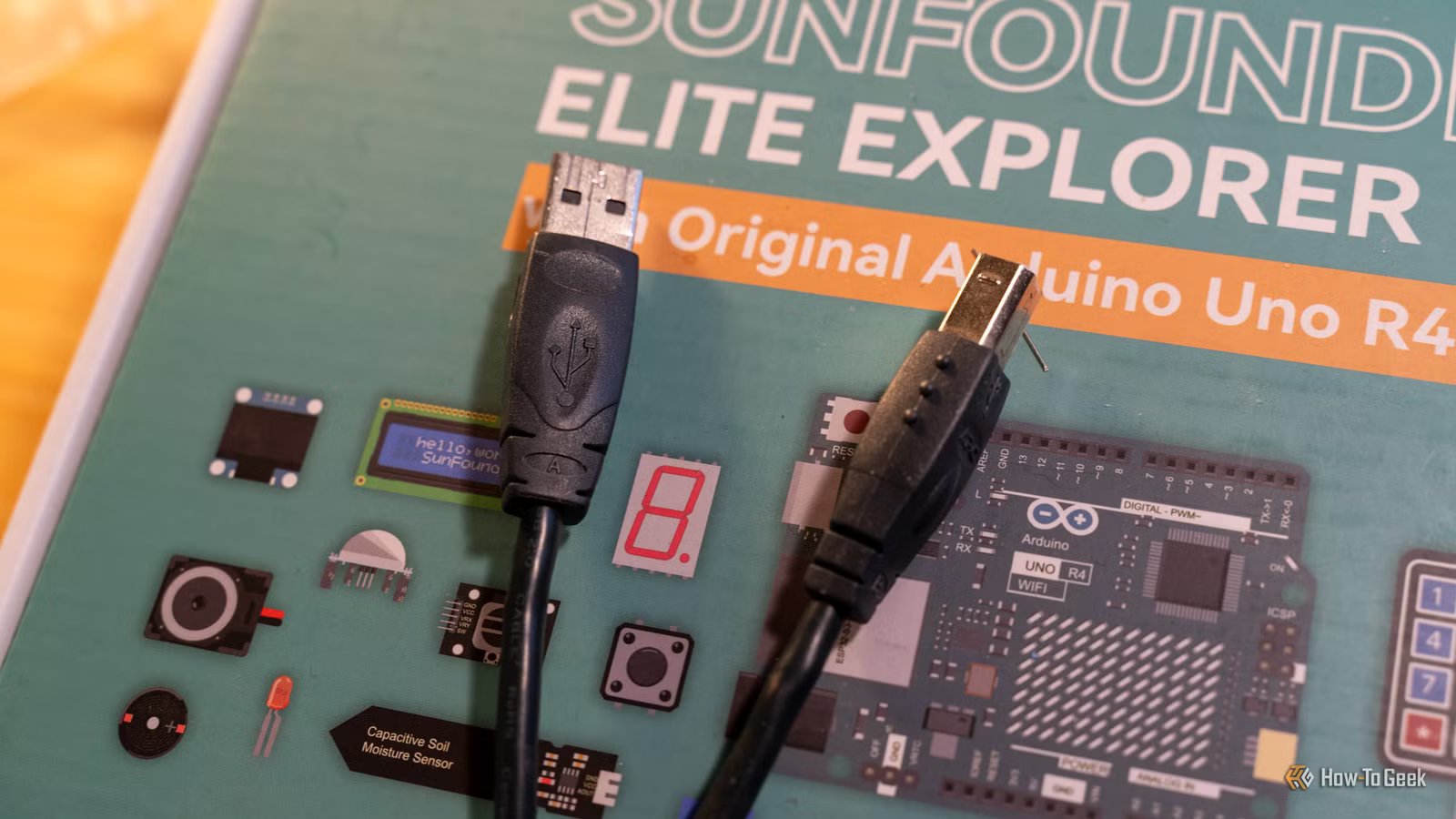
We have been using USB connectors for three decades now—yet many people don’t even realize there’s a Type-B connector. For most, there’s the older, rectangular USB-A connector, the modern, petite USB-C connector, and a few micro-USB connectors in between. I know folks who think the square-ish, chunky, beveled connector hiding behind their printer or connecting their audio gear is actually a proprietary connector. But guess what—that’s actually a USB Type-B connector—and here’s why this forgotten middle child of tech is still essential.
Related
Blue? Yellow? Red? USB Colors Explained
Somewhere, over the USB rainbow.
Why people forgot USB Type-B
Many folks don’t even know it exists
USB Type-B was never truly mainstream, so calling it “forgotten” might be generous. When I mention USB-B to people, I’m usually met with confusion—almost as if it isn’t real. They think that USB-B is like Windows 9 or iOS 19—the companies just decided to skip a generation.
And the confusion makes sense. When was the last time you actually saw a USB-B port?
Wired keyboards, mice, and speakers typically shipped with fixed cables ending in USB-A, rather than using detachable Type-B ports. USB Type-B was—and still is—reserved for larger stationary peripherals that require removable cables. From the beginning, it occupied a narrow niche.
On top of that, you rarely plug and unplug these devices. My Epson printer and Snowball iCE microphone use USB Type-B, and I couldn’t tell you the last time I disconnected either cable. That lack of interaction makes the connector even more obscure—often overlooked by people who already own devices that use it.
Brand
Anker
Ports
4
Power supply included
No
USB Type-B wasn’t really the ‘sequel’ to Type-A
Let’s break this common misconception
Credit: Dibakar Ghosh | How-To Geek
Looking at the naming scheme—USB Type-A, Type-B, and Type-C laid out alphabetically—it’s easy to assume they represent generational upgrades. But that isn’t how it worked.
The USB Type-A and Type-B connectors were introduced together in 1996. They were literally the two ends of the same USB cable. Type-C arrived much later, in August 2014, making it the younger and more modern sibling. But Type-A and Type-B were more like twins than sequels.
But Type-C wasn’t paired with a Type-D—so, why did Type-A and Type-B have to come in pairs? The answer comes down to power delivery and device roles. USB was designed around a host–device architecture, where power and data flow from the host (like a computer) to the peripheral (like a printer). If both ends used the same connector, people could accidentally connect two hosts together, causing power conflicts or damaging hardware.
To prevent that, the connectors were physically different. USB Type-A was designed as the host end—a flat, rectangular connector that plugs into a computer or power source. Type-B was the device end—a square, almost D-shaped connector that plugs into peripherals like printers, scanners, and audio interfaces. By making the connectors incompatible with each other’s ports, it eliminated the possibility of plugging the wrong end into the wrong device.
Related
6 reasons why you need to fix your bad cable management
Is the Spaghetti Monster hiding in your PC?
USB-C is taking over—so, what happens to Type-B?
USB-C can do alone what Type-A and Type-B did together
Credit: Cable Matters / Amazon
USB Type-C was introduced as the modern successor to the older Type-A and Type-B connectors. It fundamentally solved the limitation that made the Type-A and Type-B pairing necessary in the first place. Type-C supports USB Power Delivery, which allows connected devices to dynamically negotiate and decide which one supplies power and which one receives it. As such, you can plug it in either way—it doesn’t matter.
Beyond power delivery, the connector itself is symmetrical, meaning there’s no wrong orientation. You plug it in either way, and it fits. Future generations will never understand the frustration of flipping a Type-A connector multiple times before it finally goes in. It’s also compact, making it ideal for modern hardware that keeps getting thinner—phones, laptops, tablets, even monitors.
It seems that in almost every measurable way, USB Type-C is the superior connector. Even Apple—long resistant to industry-wide standards—eventually transitioned its iPhones and Macs to Type-C. In fact, at the time of writing, Type-A is gradually disappearing from many new devices, replaced by Type-C ports and cables. So, in a world where Type-C is eating everything—how does Type-B still have a place?
Related
It’s time for USB-A to die: Why my next PC will be USB-C only
Step aside grandpa, it’s time for the younger generation to take center stage.
Why USB Type-B will continue to thrive in the era of Type-C
From a technical standpoint, USB-C can support all the data protocols handled by USB-B, along with newer standards and higher power delivery levels. In most cases, USB-C is fully capable of replacing Type-B. However, connector choice isn’t determined solely by electrical capability.
Type-B’s larger, keyed housing provides a secure and predictable friction fit. It feels solid and stable once connected. Also, its asymmetrical, beveled shape makes the correct orientation obvious—avoiding the trial-and-error frustration we all faced with USB Type-A.
Furthermore, Type-B is common in industries where larger devices are the norm. Printers, commercial equipment, and professional audio gear often have ample internal space, making a larger, more robust connector practical—and sometimes preferable.
Longevity plays a major role as well. Products like high-end audio interfaces and commercial printers can remain in active use for a decade or more. Redesigning hardware to adopt a new connector involves engineering revisions, compliance testing, retooling, and production costs. Considering that the existing connector already meets people’s expectations for reliability and performance, there’s little incentive to change it.
Related
What Is “Planned Obsolescence,” and How Does It Affect My Devices?
Companies often have a plan to make your gadgets obsolete, even before they’re manufactured.
When you view the discussion from this perspective, all of a sudden, USB-C stands out as merely the “modern” alternative to USB-B—not necessarily the “better” alternative. And since most manufacturers prefer stability and backward compatibility over modernization for its own sake, it’s likely that USB Type-B will keep its relevance well into the foreseeable future—even as USB-A starts to fade away.
