

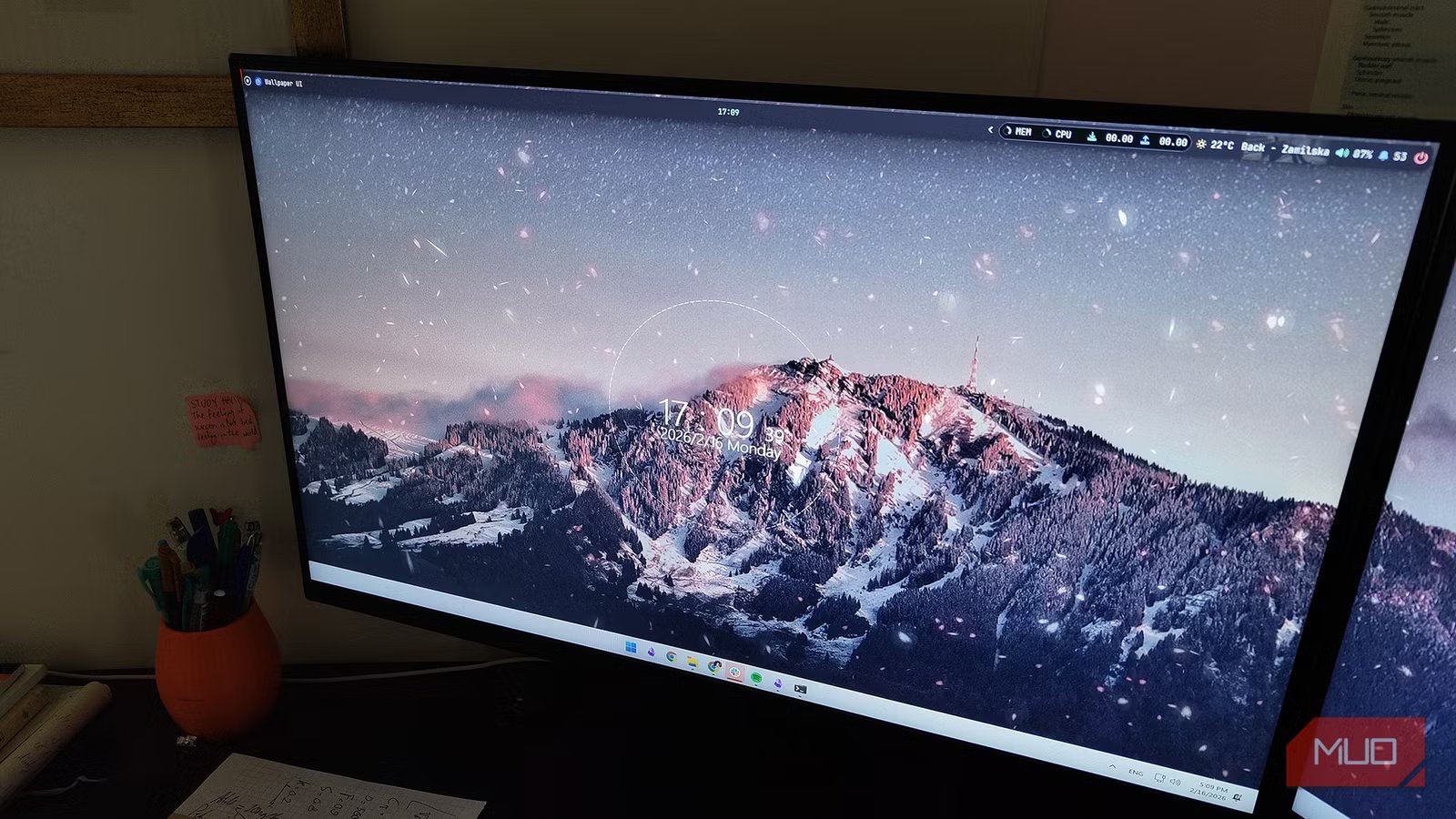
Knowledge is power, and information is… gold? Silver? Let’s just say it’s valuable. When it comes to your PC, the more you know, the better. Wouldn’t it be nice to have the data that actually matters to you displayed in a neat, subtle way? Right there on your desktop, without needing to click a tray icon or Alt+Tab away from your work?
macOS has had this for years — it’s that sleek bar at the top of the display. Windows, unfortunately, is still lagging behind. It’s a shame, but in 2026, it seems like Microsoft actually isn’t so good at making Windows apps anymore. That’s where YASB comes in. Aptly named Yet Another Status Bar, it lets you get a lot more from your computer in real-time.
What does YASB do?
It adds stuff. Lots of stuff.
Amir Bohlooli / MUO
YASB is quite similar to the Nilesoft Shell app. I’ve talked about Nilesoft Shell before — it’s a simple utility that lets you customize the right-click context menu, and by customize, I mean really customize. You can do just about anything. Seriously.
The same applies to YASB. It adds a sleek status bar to the top of your display, managed by two primary files you’ll need to adjust: config.yaml and styles.css.
The first file is for setting up your widgets and the main structure of the bar, while the second is for styling it exactly the way you want. I’ll repeat that it’s very similar to Nilesoft Shell, as you had a config.yaml for that one, too. OK, enough talking. Just look at the screenshots below to see my current setup.
I’ve got the power settings, volume, playback (currently showing what I’m listening to on Spotify), a weather widget, and then my system performance monitors. These include memory, CPU, and network stats. If I click the arrow, it opens up the apps running in the background. It’s functionally the same as the default Windows taskbar tray, but much more clickable.
Everything you see is fully customizable
Clicking the tiny circle in the top-left corner reveals a menu of shortcuts, including power settings, Task Manager, and more. Everything you see is fully customizable.
Customizing YASB
The possibilities are seriously infinite
Amir Bohlooli / MUO
After installation, your workspace lives in C:/Users/[your username]/.config/YASB. Or, you can just right-click the tray icon and select Open config.
There, you’ll find config.yaml. This is where the magic happens. The first thing you’ll deal with is the bars element. You’ll see your primary-bar defined here, where you can decide which screen it attaches to (the default is “primary”). Within that same element, you’ll find the widgets list. This is where you add the widgets you want displayed on that specific bar. The widgets themselves are defined further down in the config; you can define a widget without using it in a bar, but if you do use it in a bar, it must be defined.
A cool little trick: you can create as many bars as you want. You could have the same primary bar extend to your second display, but you can also create a completely separate bar for it. I’m doing exactly that because I’d like a different set of information on my secondary screen. All I need to do is write a secondary-bar entry, set it to enabled, and attach it to my second display (which is an ASUS VG27V). I won’t add anything to it just yet, so the result is a clean, blank bar on the second display.
Amir Bohlooli / MUO
Now, to declutter the main bar a bit, I’m going to move the clocks to the secondary bar and keep only the system time on the primary one. Doing this is incredibly easy. I literally just delete the clocks from the primary bar and add them to the second. The bar automatically reloads whenever there’s a change to the config, so… that’s all. Check out my new secondary bar!
Amir Bohlooli / MUO
It still looks a bit desolate, so I’m going to add a tiny Pomodoro widget to it as well. I don’t use Pomodoro much these days, but it’s good to have the option. Since Pomodoro is a built-in widget, all you need to do is quickly define it in the config and add it. You can see the details in the YASB Docs. I’ve placed mine on the left side of the bar, and clicking it brings up the timer.
Amir Bohlooli / MUO
Last showcase and then I’ll let you go, promise. CAVA is a simple, lightweight audio visualizer engine, and YASB has built-in support for it. It only makes sense to put them together, right? I’ll dedicate the right side of my secondary bar to the audio visualizer. You can see it in the screenshot below.
Amir Bohlooli / MUO
I said that was the last showcase, but you can seriously do so much more. I could add two tiny buttons to quickly mute input and output audio. I could write a custom Python script and integrate that into the bar. The sky’s the limit. Seriously.
Customizing the looks of YASB
Import themes or build your own
Amir Bohlooli / MUO
That level of customization for the widgets and bars also extends to the style and aesthetics. I mean, you’re styling with CSS—what else would you expect besides full customization?
You’ll need a bit of working CSS knowledge to tweak it, but in exchange for that learning curve, you get total control. If that feels like a turn-off, please don’t let it be! If you’re reading this, you clearly care about customization. Some basic programming knowledge is the key to that world. Even if you refuse to learn, you can always throw your requirements at an LLM like Gemini. Gemini is seriously good at making apps, and it won’t have any trouble handling your simple CSS requests.
Amir Bohlooli / MUO
That said, there are also loads and loads of themes made by the community. YASB hosts these on a neat gallery page where you can preview and download them. You’ve got plenty of options.
YASB made me feel younger
You should give it a try
Amir Bohlooli / MUO
I’d close by saying that YASB brings the macOS status bar to Windows 11, but that’s an understatement. YASB brings so much more. Playing around with it and customizing it, I’m embarrassed to say, made me feel young again. When was the last time you changed your Windows wallpaper? Mine had been stuck on the default for over a year.
I’m happy to say that YASB reminded me of the joy of customization; it even made me go dust off Wallpaper Engine to get some action back on the desktop. I now have four separate clocks all showing the exact same time… but they look great.
OS
Windows
Price model
Free, open-source
YASB (Yet Another Status Bar) is a highly configurable status bar for Windows 10 and 11, written in Python. It’s a customizable alternative to the native taskbar and let’s you display a wide range of widgets — such as system monitors, media controls, and workspace indicators — through CSS styling and YAML configuration.
