

Having an e-reader means having the ability to bring your books with you wherever you go. Rather than having to carry around a physical copy that might be hundreds of pages and take up a ton of space, e-readers easily fit in bags and even into back pockets. They provide you with all the power of a library in one small device.
Amazon Kindle is one of the top e-readers on the marketplace. There have been many variations of the Kindle over the years and, depending on what features you’re looking for, you can opt for an Oasis, Paperwhite, Colorsoft, Fire, or Scribe. I’ve been using a Kindle Fire 7 for nearly a decade now and have really enjoyed reading books on it. But there are other apps besides the Kindle app that have made it useful to me.
Related
10 things you should try on your Amazon Kindle besides reading books
Discover ten surprisingly useful ways to use your Kindle beyond reading.
Hoopla can deliver the goods
All you need is a library card
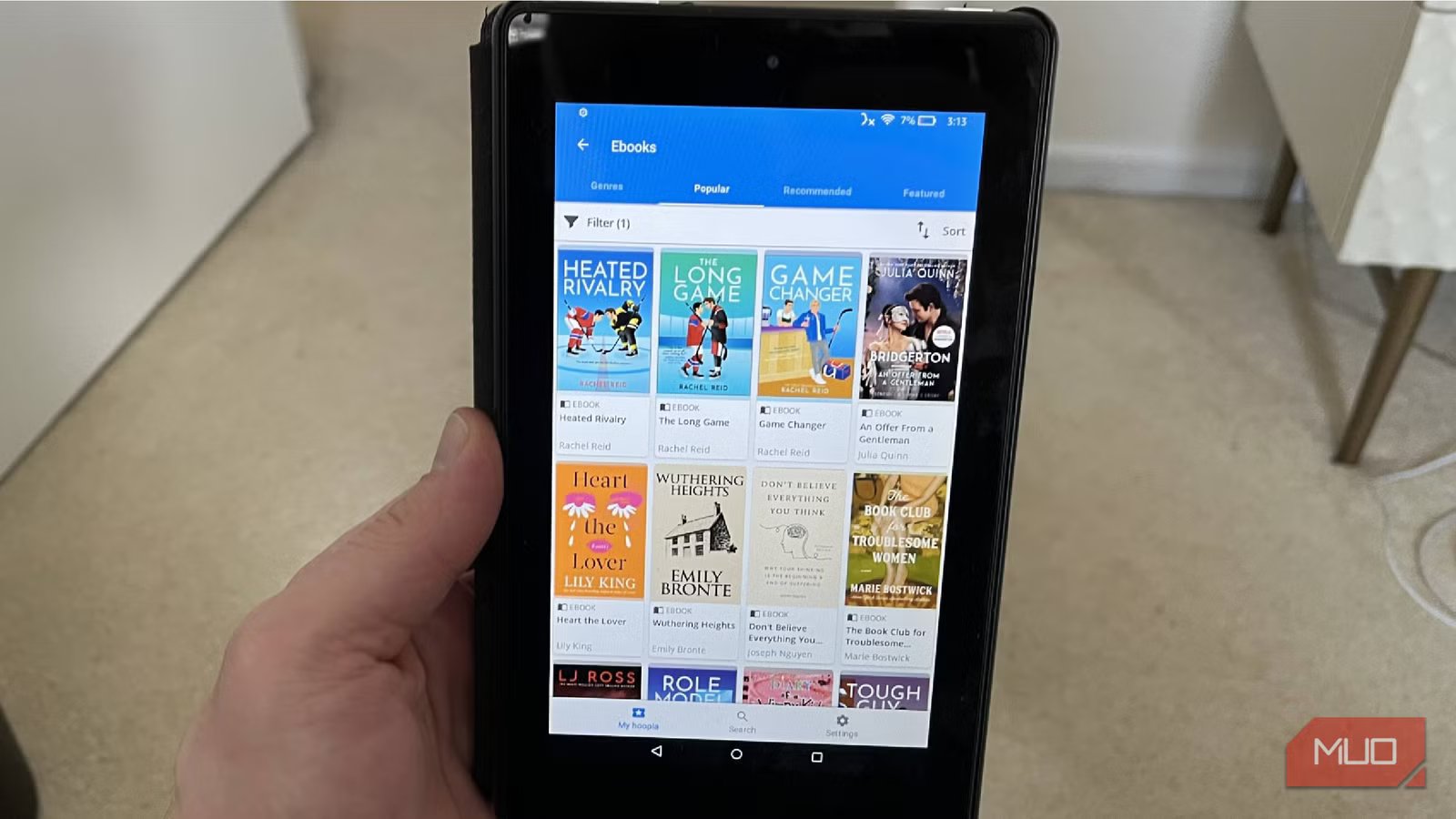
The Hoopla app makes it incredibly easy for you to rent ebooks, audiobooks, movies, and TV series right to your app. All you need is a valid library card. You’re actually renting the options that your local library has to offer.
Hoopla is an underrated service that works with your library to virtually lend you books and movies for specific limits of time, just like you would at a physical location. The piece of media will download to your account and you’ll be able to access it from there.
Depending on how well stocked your library is, you can read up to thousands of books. You can also borrow up to 15,000 titles in a month, which is ridiculous, and there’s no way you’ll actually do that. But it is possible on the app.
It is up to your individual library to set the rental limits on Hoopla, so it varies by location.
There are titles that are available right away when you log into the app. The more popular books are going to be listed as Flex options, which means they are treated like popular options at the library with a waitlist and a shorter rental time. But, once they are available, you’ll be able to access them quickly.
Hoopla lets you download and watch seasons of TV series as well as countless movies at a time. It all downloads straight to your Kindle. Hoopla is also available via browser, so you don’t strictly need to use it on your Kindle. You can just log into your account on whatever device you want to interact with the media that you’re borrowing.
Bring your favorites right to your Kindle
Credit: Chris Hachey / MakeUseOf
VLC is one of the most well-known media players today. The open-source platform lets you compile your own library of media and play it on a lot of different devices.
The app lets you play all kinds of audio and video files, so you don’t need additional codecs. VLC is known for its compatibility with numerous devices and operating systems, making it widely used.
Downloading it to your Kindle gives you a free way to watch and stream whatever you want to watch. You can either plug in an outside device and download your library to your Kindle or you can upload it to a VLC account and then use that to stream on Kindle.
It’s the perfect way to watch all of those DVDs and Blu-rays that you’ve downloaded to your account. Now, you can bring them with you wherever your Kindle goes, freeing you up to avoid boredom while you’re traveling or wanting to watch something.
OS
Android, iOS, Windows
Price model
Free, open-source
VLC can read every format ever invented, from modern files to the digital relics on old drives. It opens whatever you throw at it, turning your device into a centralized hub for all your scattered media.
IPVanish is a VPN for your Kindle
Pick up servers from other countries
Credit: Chris Hachey / MakeUseOf
Adding a VPN service to your Kindle gives you better opportunities to use it abroad, protect what you’re searching for, and keep cloud storage secure. IPVanish is a top VPN that offers a Kindle app in the Amazon Appstore.
If you’re someone who brings their Kindle with them when they travel, especially to different countries, it can be hard to always use Wi-Fi. If you want to stream on your favorite e-reader or use the Internet more easily, IPVanish can deliver for you.
This is something that makes a ton of sense if you happen to be going on vacation during a big sporting event or important time of year for sports. I used IPVanish on my Kindle when I was on vacation during March Madness and it was the perfect way to be able to stream basketball on my Kindle while I was in a different country.
IPVanish offers over 3,200 servers to choose from in more than 150 countries. You can split your traffic and hide your IP to protect your data. No user activity is recorded within IPVanish.
Audible brings the audiobooks to you
Listen to a story as you go about your day
Credit: Chris Hachey / MakeUseOf
While it may seem silly to add an audiobook to a tablet, it’s actually a perfect way to carry on with your tasks and listen to a book. Audible is a must-have for anyone who enjoys audiobooks or just realizes they are scrolling on their phone way too much.
Audible offers memberships that provide access to thousands of audiobooks, giving you plenty to listen to while you’re doing other things. With a Kindle Fire, which has speakers in it, you can listen out loud to your audiobooks while you’re making dinner or doing other chores. For Kindle Scribe, Oasis, or Paperwhite users, they offer Bluetooth connectivity, so pop in some earbuds and get to listening.
There is also a Car Mode feature on Audible that helps you listen while you’re in the car, as it makes the buttons very large and easy to navigate. You can download your audiobooks to listen to on the go when you don’t have Internet access.
The Audible app can store an extensive library, just like your Kindle library can, letting you keep all your audiobooks in one place. If you have a Kindle, you may very well be an Amazon Prime subscriber. While Audible is owned by Amazon, it is a separate subscription from Amazon Prime. Prime subscribers do get two free credits when they trial Audible. This gives you a taste of what you can fully get out of Audible.
Use your Kindle as a remote for your Fire TV
Sync up your device to your Kindle
Credit: Chris Hachey / MakeUseOf
If you’re invested in the Amazon ecosystem, you may have an Amazon Fire TV or an Amazon Fire TV Stick. These deliver a streaming experience that many love, as they enable you to stream millions of titles.
The Fire TV app on your Kindle can help your e-reader act as a remote if you happen to lose yours. It will connect to your Fire TV or Fire TV Stick and provide you with playback buttons to control what’s happening on your TV.
There is also a microphone feature that lets you speak the name of the title you’re looking for, rather than having to search for it. Arguably, the best feature that the Kindle offers is a full keyboard to type in a title, so you don’t have to go through the tedious task of moving the cursor of your remote around to do so.
This isn’t a very showy app. However, it makes your Kindle more useful because the Amazon Fire TV remote is small and can easily get lost. This provides you with a backup.
Get a ton of free entertainment with Pluto TV
The free streamer delivers a great interface
Credit: Chris Hachey / MakeUseOf
For anyone looking for free streaming services on their Kindle Fire, the Pluto TV app has to be considered. This provides an easy-to-navigate interface and thousands of titles to view.
Not only can you watch live channels that range from TV series to movies 24/7, but there is an extensive on-demand library, providing you with so many choices to view. You can log in with a free account and save your progress on shows and movies, so you don’t have to watch them all in one sitting. You can also save titles that you want to view on your Watch List.
There is content for everyone, as you can get kids’ shows, sports, movies, comedy, news, and more. Pluto TV gives you free ad-supported streaming TV (FAST) channels that show all kinds of shows throughout each day.
Anyone who has cut the cord on cable may be looking for free streaming services. Pluto TV is up there with the best of them and is easy to access through the Kindle.
founded
2013-00-00
number of users
80 million+ monthly
Pluto TV is a free, ad-supported streaming service that offers live TV channels and on-demand content across news, entertainment, sports, and movies. It provides a traditional TV-like viewing experience with hundreds of curated channels available online.
Your Kindle can become more useful with the help of some apps
While all versions of the Kindle are amazing at providing a welcome reading environment for users, some apps can make them more useful. Whether you want to stream more on your Kindle Fire or listen to audiobooks through a service like Audible, Kindle can provide you with an easy way to get them. Kindles are great companions at home or on the road.
