

My research workflow in NotebookLM had a tiny flaw. However, despite my great curation, the NotebookLM sources lived in a single silo. The ever-changing world with news and live context lived elsewhere on the web. Separately, each tool has a ceiling. NotebookLM has changed how I study and work with knowledge. Gemini is changing how we search the web. When Google quietly rolled out the NotebookLM integration inside Gemini in late 2025, I almost missed it in the dropdown. Once I tried it, I could see the potential in the hug between the two AI tools. I had already combined Gemini with Google Maps for photography help. So, tying Gemini with NotebookLM is my latest research workflow optimization experiment.
OS
Android
Developer
Price model
Subscription
Gemini fills the gaps your notebook can’t answer
Make your curated sources and the web talk to each other
NotebookLM is great at grounding answers in documents you select and upload. This cancels hallucination. But the moment you ask something that isn’t covered by your sources, it simply says it doesn’t know. Attaching your notebook inside Gemini dissolves that wall. You can make Gemini draw from your uploaded sources first, then reach out to the web when the original information runs dry.
My first instinct was that mixing grounded sources with open web search would muddy the attribution. Would I know which insight came from my notebook, and which came from a random, low-quality webpage Gemini found? Google isn’t actually known for prioritizing the best search results after all.
Fortunately, Gemini is surprisingly transparent. It labels which answers come from your notebook and which come from external sources. That separation actually makes citations easier to manage, keep, or discard. The key is to ask explicitly with a prompt:
Answer using my notebook first, then supplement with any recent external evidence.
Deep Research reports can grow as reusable knowledge sources
Begin a Gemini Deep Research and finish it in NotebookLM
Saikat Basu/MakeUseOf
Gemini’s Deep Research feature generates dense, multi-page reports by crawling dozens of sources (including Google Drive, Gmail, and Chat). Sometimes, the report’s verbosity makes it hard to understand everything we need. NotebookLM can treat this as an imported Source. Within a notebook, you can break down this report the way you’d interrogate any other paper, with the full slew of its Studio tools or these smart prompts that make NotebookLM more useful.
You can ask if Gemini already synthesized the web results into a report, or if uploading it back into NotebookLM just adds an extra step for no gain? And what about NotebookLM’s own Deep Research option, as both use the same LLM under the hood?
The gain is depth and understanding it from all angles. Gemini’s report is a finished summary. For instance, you can draft a powerful thesis with Gemini before you start collecting sources in NotebookLM. As a NotebookLM source, it’s now raw material for pulling specific threads, comparing it against other sources you’ve uploaded, and generating study guides or briefing documents from it. You stop consuming the research and start actively working with it. You can also do deep research from within NotebookLM with the Web or Drive option selected in the dropdown.
Related
Gemini Deep Research wasn’t useful to me until I did this
It’s now my favorite feature!
Let multiple notebooks finally talk to each other
Gemini can manage more than one notebook
Saikat Basu/MakeUseOf
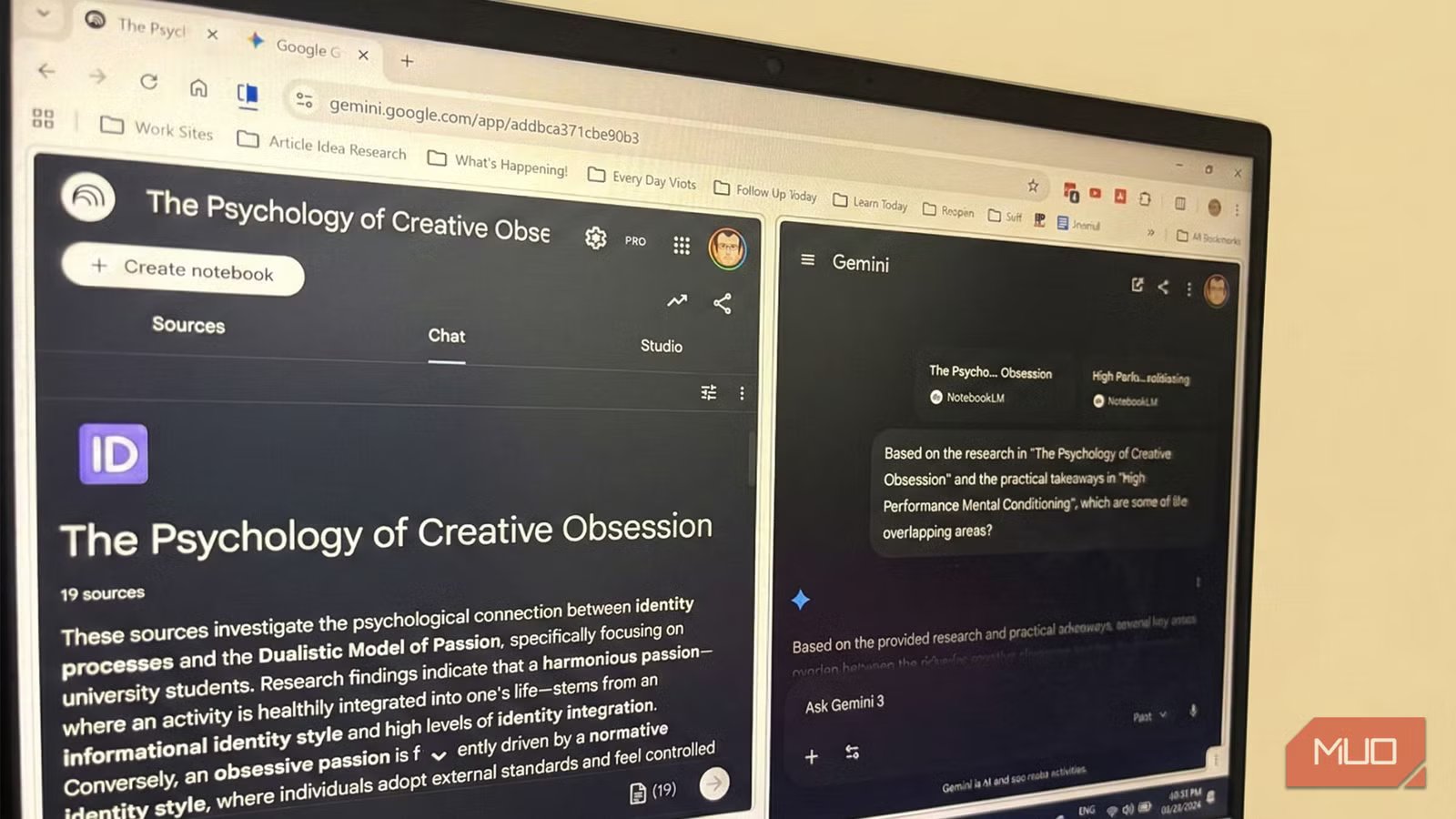
One of NotebookLM’s biggest frustrations is its isolation. Each notebook is like its own container, which keeps things organized but makes cross-pollinated thinking difficult. Inside Gemini, you can attach multiple notebooks simultaneously and ask questions that span all of them, something NotebookLM itself simply cannot do natively so far.
I worried this would increase the density of knowledge and create a mishmash. Blended answers can dilute the focus of each individual notebook.
The fix is specificity. Instead of asking broadly, I ask directed questions, like this:
Based on the research in Notebook A and the practical takeaways in Notebook B, which are some of the overlapping areas?
The risk of hallucinated answers remains, but this also forces Gemini to treat each notebook as a distinct source rather than as a single big blob. In my experience, this comparison between two large notebooks always takes a bit of time in Gemini.
OS
Android, iOS, Web-based app
Pricing model
Free
Notebooks can help Gemini avoid hallucinations
Attaching NotebookLM keeps Gemini in check
Saikat Basu/MakeUseOf
Gemini is a generative model, which means it can and does improvise when it lacks solid grounding. For technical writing, legal summaries, or anything where accuracy is non-negotiable, AI hallucination is a genuine risk. Attaching a notebook with authoritative source material forces Gemini to stay tethered. You can get the best of both prepped research and finding new ideas.
But this only works if your notebook sources are themselves reliable. Upload low-quality or outdated documents, and you will just hand Gemini a confident-sounding wrong answer with citations attached.
This can be a counterintuitive way to build better research habits. Now, it’s forcing me to double-check sources more intentionally rather than letting NotebookLM curate them automatically. A well-maintained notebook can become a permanent quality filter, making every Gemini result better by default.
Combine Gemini with NotebookLM for a powerful second brain
Go from curation to active research
Saikat Basu/MakeUseOf
You can do a lot of interesting experiments by combining Gemini with NotebookLM. For instance, I sometimes notice that NotebookLM’s generated outlines feel a bit dry and repetitive. It sticks so rigidly to my source material that the summary or final briefing document lacks any real creative flair or pacing.
That is exactly where Gemini steps in to add some variety. Take the structurally sound but boring outline from NotebookLM, and then you can ask Gemini to sprinkle relevant examples or engaging analogies to make the piece compelling.
You can feed this back into NotebookLM. Then use the Audio overview feature to turn it into a podcast-like format. Sometimes, I use Gemini to search for relevant YouTube videos and turn them into study podcasts on NotebookLM.
Use Gemini to test your critical thinking
Gemini can roleplay whatever you ask it to be. With your NotebookLM notes in the background, use Gemini to generate counterarguments or bring out alternate perspectives. Try this face-off between your localized data in NotebookLM against the open web via Gemini.
