

Why you can trust Android Central
Our expert reviewers spend hours testing and comparing products and services so you can choose the best for you. Find out more about how we test.
Tecno remains a relatively small player in the broader Android ecosystem, but the company continues to push the boundaries of technology in emerging markets while keeping prices well below those of its competitors. It’s this expertise that has made the company embrace “practical AI” that can be truly useful for its consumers, and much of this can be seen in the rather excellent Tecno Camon 50 Ultra.
The latest entry in the Camon series has a heavy focus on AI, more than I remember seeing from previous Tecno devices, and while it may seem overwhelming to some, I think the phone does a great job pushing its chipset by providing as many AI features as it can in a package that looks great and performs well at an accessible price.
Swipe to scroll horizontallySpecs
Category
Tecno Camon 50 Ultra
OS
HiOS 16 (Android 16)
Chipset
MediaTek 7400 Ultimate
RAM
8GB, 12GB
Storage
256GB, 512GB (non expandable)
Display
6.68-inches, OLED, 1.5K (1208 x 2644), 144Hz
Rear Camera 1
50MP wide LYTIA 700C
Rear Camera 2
8MP ultrawide
Rear Camera 3
50MP periscope, 3X
Front Camera
50MP wide
Battery
6,500mAh
Charging
45W wired
Protection
Gorilla Glass 7i, IP69/IP69K + IP68
Dimensions
162.4 x 77 x 7.6mm
Weight
178g
Colors
Moonshadow Black, Cypress Green, Nebula Titanium, Luminous Orange, Misty Purple
Image 1 of 3
(Image credit: Derrek Lee / Android Central)(Image credit: Derrek Lee / Android Central)(Image credit: Derrek Lee / Android Central)
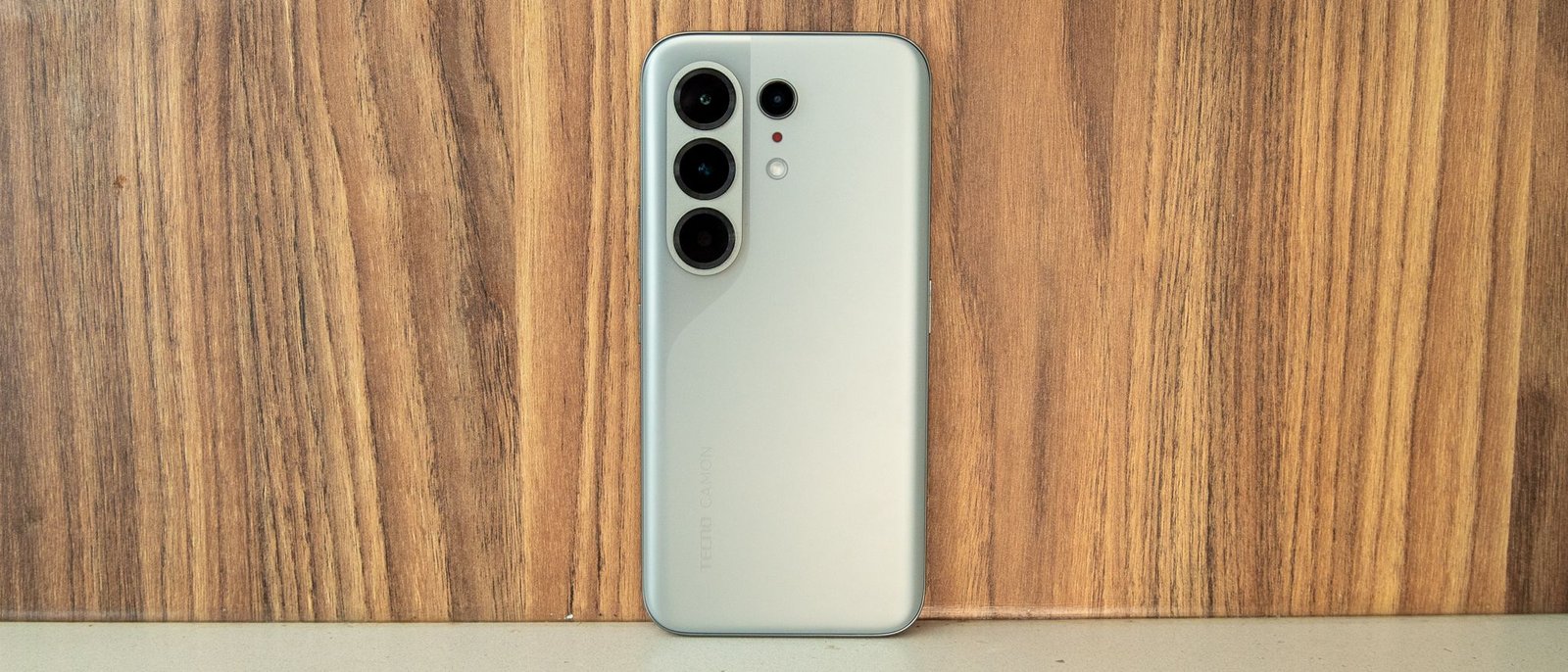
When you first hold the Camon 50 Ultra, it feels thinner than its gigantic 6,500mAh battery would suggest. Part of that is due to the slight curve of the display and the more prominent curve of the back panel. The effect is actually quite nice, and the phone looks and feels surprisingly premium. It’s also light at just 178g, weighing not much more than the Galaxy S25 Edge, which is frankly impressive.
In fact, several people have mistaken the Camon 50 Ultra for the Galaxy S26 Ultra because its rear camera design is strikingly similar to Samsung’s.
On the front, the 6.78-inch AMOLED display is gorgeous and bright, with a 1.5K resolution and a 144Hz refresh rate that makes everything incredibly fluid. The bezels are fairly minimal as well and appear even smaller due to the slightly curved display. And while curved screens are often pretty troublesome for me, I find I haven’t been bothered by any accidental touches.
(Image credit: Derrek Lee / Android Central)
When you first turn on the Camon 50 Ultra, you’re introduced to Ella, Tecno’s AI assistant, who guides you through setup, making a usually monotonous task somewhat enjoyable. It’s also a precursor to just how AI-focused this phone is, which becomes fairly evident as you go further into the process.
After setting up the phone, I was immediately surprised by how fluid and responsive everything felt. The home screen icons almost float onto the screen, apps stack upwards when sliding up to open the app drawer, and the quick settings menu seems to inflate open.
(Image credit: Derrek Lee / Android Central)
The UI itself feels like a mix of Samsung’s One UI and Apple’s iOS. Many UI elements, such as the aforementioned quick settings menu, are visually similar to liquid glass with a very translucent effect. However, the effect isn’t quite as in-your-face as Apple’s divisive UI, which I quite like. Meanwhile, Tecno’s HiOS 16 takes after Samsung’s One UI in other ways, such as how notification bubbles stack over each other until tapped to reveal the entire stack.
Even the settings menu resembles Samsung’s, with options grouped together, colorful icons, and a persistent search bar at the bottom.
Image 1 of 2
(Image credit: Derrek Lee / Android Central)(Image credit: Derrek Lee / Android Central)
Another way the Camon 50 Ultra reminds me of Samsung is in its approach to making its AI features accessible. When you’re typing somewhere, you can easily access AI writing tools by selecting a section of text, which lets you rewrite, proofread, generate text, or summarize. If you press and hold two fingers on the display, you can activate Ella Smart Touch, which is similar to Circle to Search or Samsung’s AI Select, and Ella can describe whatever you highlight or extract text from the screen.
The AI Gallery app is also packed with fun AI features. Similar to Samsung’s Gallery app, these can be easily accessed by tapping the floating sparkle icon, which will intelligently suggest AI actions based on the image. For instance, if your subject is too far away, it might suggest AI Auto Zoom, or if it notices a glare in the photo, it will surface the AI Flare Remover to make the image clearer.
The full suite of AI editing options is also accessible in the Edit field, including AI Art Studio, a fun way to change the style of your photos to look like Picasso, Van Gogh, or even anime.
Image 1 of 5
(Image credit: Derrek Lee / Android Central)(Image credit: Derrek Lee / Android Central)(Image credit: Derrek Lee / Android Central)(Image credit: Derrek Lee / Android Central)(Image credit: Derrek Lee / Android Central)
The Camon 50 Ultra also integrates many of its AI features into the camera app, and I feel like this is where Tecno takes things a step further than Samsung. Instead of waiting until after I capture an image to add any AI flair, I can enable Auto Zoom directly in the viewfinder or swipe to the AI Art Studio to preview how an image would look in a specific style before I capture it.
FlashSnap is one of the camera features I can see myself using quite often if I had a pet or kids, as it uses a high-speed shutter to capture 15 frames per second and uses AI to select the clearest image of the lot. It’s insanely good at capturing fast-moving objects, much better than I’ve seen from other manufacturers.
Image 1 of 2
(Image credit: Derrek Lee / Android Central)(Image credit: Derrek Lee / Android Central)
But beyond the extra modes and features, the regular camera experience is surprisingly adequate. Photos taken during the day are quite good, and while some AI enhancements occur in the background, it does a good job of cleaning up the images and balancing the lighting. This is also the case at night, where the camera does a decent job reducing noise and retaining quite a bit of detail.
Tecno also highlights the capabilities of the 3x telephoto zoom lens, which supports up to 60x digital zoom. The results aren’t too bad at various zoom levels up to 10x, although things can start to look a little muddy at 20x. Still, the AI does a good job of cleaning things up at this level and even makes 60x-zoom images legible, though AI upscaling appears to do quite a bit of heavy lifting, especially when text is involved.
Still, for a phone under $600, I’m quite pleased with the quality of images.
Image 1 of 18
(Image credit: Derrek Lee / Android Central)(Image credit: Derrek Lee / Android Central)(Image credit: Derrek Lee / Android Central)(Image credit: Derrek Lee / Android Central)(Image credit: Derrek Lee / Android Central)(Image credit: Derrek Lee / Android Central)(Image credit: Derrek Lee / Android Central)(Image credit: Derrek Lee / Android Central)(Image credit: Derrek Lee / Android Central)(Image credit: Derrek Lee / Android Central)(Image credit: Derrek Lee / Android Central)(Image credit: Derrek Lee / Android Central)(Image credit: Derrek Lee / Android Central)(Image credit: Derrek Lee / Android Central)(Image credit: Derrek Lee / Android Central)(Image credit: Derrek Lee / Android Central)(Image credit: Derrek Lee / Android Central)(Image credit: Derrek Lee / Android Central)
Now, Tecno has squeezed so much AI into this phone that it almost seems overwhelming, but thankfully, there’s Zero Screen, a section to the left of the home screen, normally reserved for Google Discover. Here, you get an easily accessible hub of all the AI features you need, from image generation tools to translation and more general tools like problem-solving and document summarization.
This is also where you can talk to Ella, which has received a bit more of a Gemini-like remodel. You can type, talk, and even add files to the conversation. There’s also a Gemini Live-like button that lets you start a more seamless conversation with the assistant or practice your English if you’re trying to improve.
Image 1 of 3
(Image credit: Derrek Lee / Android Central)(Image credit: Derrek Lee / Android Central)(Image credit: Derrek Lee / Android Central)
The Camon 50 Ultra actually takes an interesting approach with its AI, which you’ll notice when you start using Ella. Tapping the top of the screen, you’re actually able to change which AI model you want to chat with, including ChatGPT, Gemini, Meta AI, and Grok. You can easily switch between them and even compare how they handle queries, choosing whichever you prefer for any particular instance. It’s similar to Motorola’s approach of stuffing as many AI models into a phone as possible, and I appreciate the choice here.
This theme of choice extends to the One Tap button, which is essentially an AI button on the side that, when pressed, allows Ella to analyze your screen. You can easily view the results of these in MindHub, which stores select AI interactions and dialogue.
The One Tap button can also be customized, which is my favorite part. It defaults to the Ella Assistant, so you can press and hold it to speak to it, or you can change it to something like Gemini, though the integration isn’t as seamless, and it will simply open the app rather than start a conversation.
Still, I love it when an OEM gives us an AI key that we can actually change to our liking (looking at you, Motorola).
Image 1 of 3
(Image credit: Derrek Lee / Android Central)(Image credit: Derrek Lee / Android Central)(Image credit: Derrek Lee / Android Central)
Powering all of this is a mid-range MediaTek Dimensity 7400 Ultimate, which doesn’t sound all that powerful, but I’ve yet to really find much of a limit to this chip in day-to-day use beyond gaming. You can get away with playing some heavier games like Honkai: Star Rail or Where Winds Meet, but don’t expect a smooth experience on the highest settings. Otherwise, the phone performs exceptionally well, including in terms of battery life.
Furthermore, the massive 6,500mAh battery easily lasts all day and then some. I often go to bed without charging the phone after a full day of use, and I’ve averaged about 6-8 hours of screen-on time or more.
The only downside of such a big battery is that the 45W charging speed can’t quite keep up; it takes about an hour and a half to go from empty to 100% (or just 33 minutes to reach 50%).
(Image credit: Derrek Lee / Android Central)
Fortunately, I couldn’t find many downsides to the Camon 50 Ultra. It’s a sleek phone with incredible battery life, great performance, and a solid trio of cameras. It’s a phone that’s all about choice and making AI accessible to the masses. Instead of spending $1,300 on a Galaxy S26 Ultra, for example, you can spend less than half that on this mid-range doppleganger, and you wouldn’t miss a beat.
