

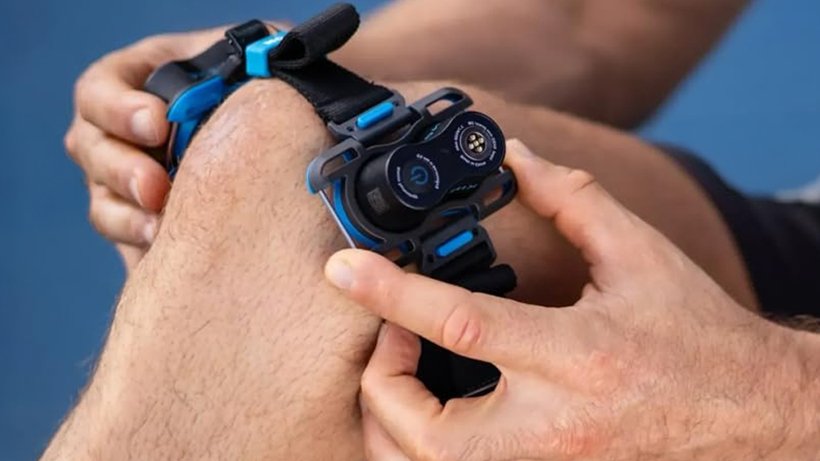
Kineon MOVE+ Pro feels like a thoughtful upgrade
I have been testing Kineon MOVE+ Pro for a couple of months to see if it’s worth the hype. I came to the conclusion that the original Kineon MOVE+ was a solid start, but the MOVE+ Pro takes it up a notch with improved laser intensity, a more comfortable build, and a refined wrap design that may help your targeted knee therapy feel more effective. The app experience also received an upgrade. Now it offers personalized treatment insights, educational materials, and progress tracking. All of this combined, Kineon MOVE+ Pro felt superior in my testing.
Easy to operate with no particular learning curve
Portable and easy to use
FDA-cleared, CE, RoHS, and certifications
Advanced low-level laser technology
Needs frequent charging
Some features require the app
In the past few years, red light therapy (RLT) has gained massive attention, and this won’t change anytime soon. This is unsurprising because the wellness industry constantly seeks non-invasive ways to improve skin rejuvenation and hair growth and to reduce pain.
The last part caught my attention since I have been fighting knee pain for half my life (yes, I even had surgery). That is how I discovered Kineon MOVE+ Pro, which focuses on aiming to relieve joint and knee pain. It combines LED technology with medical-grade lasers and is FDA-approved.
Knowing my issues, I consulted my doctor and decided to test it to see if I noticed any improvements. For the last three months, I’ve been putting it over my knee for 15 minutes before bed, hoping it will help reduce stiffness and inflammation. It promises a lot for at-home pain relief — but can it really deliver? After weeks of hands-on testing, here’s my in-depth review of the Kineon MOVE+ Pro.
Price and competition: Is Kineon worth the cost?
I’d place the Kineon MOVE+ Pro at the mid-range to premium end of the wearable therapy market. Here is why I think like that. At the time of writing, you would spend around $420 for a single device after discounts, with bundles (including multi-device packs or accessory kits) pushing closer to $600. That’s quite an investment for a knee-specific product.
However, Kineon offers a 30-day return window and a 1-year warranty, which is helpful given the price. Moreover, it’s often eligible for HSA/FSA spending, making it more accessible to U.S. buyers.
Advertisement
Looking at competitors, instead of being a premium wearable, it sits more in an interesting middle ground. For example, Joovv Max 3.0 Red Light System devices range from $1,000 to over $7,000. They target the entire body rather than specific areas, such as joints.
More flexible options like Recharge Health FlexBeam are similarly priced but less targeted, while cheaper options like LifePro Red Light Therapy Knee Brace are less powerful wellness gadgets. That is why I think the Kineon MOVE+ Pro should be considered a premium device with mid-range pricing, especially if you have knee pain.
What is Kineon? A quick overview
Kineon MOVE+ Pro uses a combination of red and near-infrared light, claiming it provides pain relief, potentially reduces inflammation, and helps improve mobility, particularly for joint-related issues. However, where Kineon stands out is its use of both LED and laser technology.
LEDs cover a wider surface area, while lasers are more focused and can penetrate deeper into tissue. That is why I think the device should be positioned as more targeted than standard LED-only wraps.
You will often come across the terms Low-Level Light Therapy (LLLT) or Photobiomodulation (PBM). Not going too deep into terms, these hard-to-remember words may encompass both laser and LED light therapies. While the exact mechanism of RLT is still being explored, it has been proposed that it primarily acts on the cell’s main powerhouses.
Advertisement
Studies suggest one of the ways it could help is by increasing the production of a molecule that provides energy for cellular processes. This way, it may contribute to a range of potential therapeutic benefits. If we are talking about your knee or joint problems, using it may help relieve your pain and inflammation. For me, it sounded really promising, that’s why I decided to try it.
Features and technology: What powers Kineon
As I mentioned, the exact potential benefits of RLT depend on several factors. In my opinion, Kineon MOVE+ Pro stands out here.
The device uses red light at 660nm to target surface tissues, potentially reducing knee inflammation and helping improve circulation around the joint. Complementing this, 808nm near-infrared laser light is used, which we don’t usually see in panels.
Unopened box with Kineon MOVE+ Pro (Image credit: Wareable)
This is because it’s more expensive; however, it may penetrate deeper into muscles, tendons, and joint structures. Compared to other LED-only devices, you might notice MOVE+ Pro may help relieve knee pain more effectively.
The best part is you don’t have to use Kineon for extended periods to achieve results. You only need to use it for 10–15 minutes daily (up to twice per day), depending on your pain level or the program you select.
Advertisement
Safety is also built in: MOVE+ Pro limits exposure to safe levels. It automatically shuts off at the end of each session, so you’ll never have to worry about forgetting to take the device off. Moreover, everything is easy to track on its app, which offers personalized treatment insights, educational materials, and progress tracking.
How easy is it to actually use?
If you order the Kineon MOVE+ Pro, you get an adjustable strap with three holders, three light modules, a charging dock, a travel case, a charging cable, and a user manual.
To use it, you just need to remove the three modules from the charging dock and place them in the holders. You’ll know it’s secured when you hear a click. Then decide which body part to wrap it around. The only downside is that for larger areas, you’ll need more straps and additional light modules.
But for joints, it’s a perfect choice. After wrapping it around an area, adjust the straps to make it tighter or looser. Then turn on each light module by pressing the power button. To adjust therapy time, press the power button for 2 seconds—this extends therapy time in 5-minute increments, up to 15 minutes.
The device turns off automatically when the set time is complete. Even if you’re new to RLT, you’ll get the hang of it within a session or two.
Design and build: How Kineon is put together
Right out of the box, Kineon MOVE+ Pro feels solid and thoughtfully engineered compared to its predecessor (Kineon MOVE+). The new version features refined materials, a more comfortable build, and an improved strap for added ergonomics. Once it’s on, it’ll stay put on your joints without slipping, even if you move during a session.
Advertisement
Putting Kienon in use (Image credit: Wareable)
Portability is another strength. The unit is lightweight and compact, and the included travel case makes it convenient to take it on the go. The charging system is also easy: just place light modules into a charging dock and plug it in. It takes approximately 3 to 4 hours to charge.
The only downside is that the battery lasts up to 240 minutes. If you use it for 15 minutes per session, you get around 16 sessions per charge. That is not bad if you plan to use it for one knee. However, if you do it twice a day for both joints, it will last only 4 days. So keep in mind you might need to charge it more frequently than expected.
Results: Does it actually work?
I think that the Kineon MOVE+ Pro is more about consistency over time than instant results. Based on its website, most users notice changes within 1–4 weeks. In my testing, I found the claim to be accurate.
I feel that the benefits are subtle early on. Things like less stiffness after sitting or slightly easier movement during the day occurred to me at first. What I’ve found is that you just need to stick with it, and those small changes may build into something more meaningful, especially as I’m dealing with chronic pain.
However, this should not be seen as a dramatic overnight fix, and RLT shouldn’t be used as a sole method for pain management—if you’re dealing with any unpleasant symptoms, see your healthcare provider for a diagnosis and an adequate treatment plan first. I don’t want to go into it too deeply, but some facts about the potential effects of RLT are worth mentioning.
Advertisement
Using Kineon for joints (Image credit: Wareable)
Some studies suggest that combining light therapy with a therapeutic exercise program may help reduce pain intensity in people with knee osteoarthritis. This only reinforces the idea that you shouldn’t treat MOVE+ Pro as a standalone solution. In practice, I would use Kineon as a support tool alongside my doctor’s recommendations, including movement, rehab, or strength work, not a replacement.
There’s also some evidence that LLLT may help with meniscus problems, including potentially reducing pain. But for the right treatment for a meniscus tear, you should consult a doctor.
The same goes for acute injuries like torn ligaments. Emerging evidence suggests RLT may help lower inflammation and potentially support healing, but it’s not a cure. There isn’t strong proof that it can fully heal your ligament tears, so I recommend talking to a professional to find the best treatment plan.
Safety considerations and precautions
Your knee pain may result from various factors, including injury, overuse, or arthritis. Yes, many people may use RLT devices alongside a medically approved treatment plan, but they should not replace professional help or delay seeking it.
Although I came across many studies on LLLT in general, research on specific RLT devices is scarce, so their long-term safety and efficacy remain generally unestablished. You should always follow your doctor’s recommendations and device instructions, including the recommended treatment time, to reduce the risk of adverse effects. Moreover, choosing an FDA-cleared device provides reassurance that it compares well with similar devices on the market in terms of safety and efficacy.
Advertisement
RLT may not be suitable for all people. Consult your healthcare provider before using RLT devices, especially if you have preexisting medical conditions. The safety of RLT in children, pregnant, and breastfeeding individuals is not established due to the lack of studies in these groups.
Kineon vs alternatives: How it compares
Deciding which RLT to try can be tough, especially with so many options on the market. I had the same issue. If your goal is skin rejuvenation or anti-aging, a device like Omnilux is likely a better fit, while iRestore is better if you’re concerned with hair regrowth.
But if you’re concerned about your joint pain, you should be eyeing the Kineon MOVE+ Pro. Unlike Hooga Panels or Joovv devices, which cover larger areas, Kineon is more precise. Hooga and Joovv are great for full-body RLT, but they aren’t made to wrap around joints. Honestly, I feel like using Joovv for joint pain is too expensive and might not work as well as Kineon.
Compared to knee braces or physical therapy, the MOVE+ Pro isn’t a replacement for medical care or exercise. Instead, RLT might help recovery by potentially reducing inflammation, improving circulation, and easing pain, which may make rehab or daily movement easier.
Final thoughts
After testing the Kineon MOVE+ Pro for some time, I concluded that it may be worth considering as an adjunct method for people with chronic knee and joint pain who are ready to use it every day. It isn’t the cheapest option, and it’s not meant for full-body therapy, but the targeted laser and LED lights may help if you stick with it.
Advertisement
Whether it’s right for your joints, you should decide it with your doctor, considering your pain goals, how committed you are, and your overall treatment plan. If you see it as something to add to your other treatments, not as a complete fix, it’s easier to see the value. In the end, choose what works best for you.
