

I’m sure every one of us has a service or product we use because it is just so convenient. I recently realized that meeting transcription tools fit right into that category. There was a time when I looked at apps like Otter.ai as though they were magic. I mean, these apps kind of sat beside us during Google Meet/Zoom sessions, transcribed everything, and provided impressive summaries.
Lately, however, I’ve been asking myself an important question: Are these services worth what I pay? More importantly, do I make use of all the features I get with this subscription? Well, the answer wasn’t reassuring, but it led me somewhere better.
Related
NotebookLM’s audio overviews turned my research paper backlog into actually useful summaries
I stopped fighting dense PDFs and let them explain themselves while I went about my day.
I’d been paying for a transcription app for a while before I looked at what I actually used it for
The audit took ten minutes, and the result was eye-opening
Screenshot by Ben Stegner; no attribution required
There’s no denying that meeting transcription apps are super convenient. As I said, they join your meetings and record everything, so you get a detailed summary. Most of the time, these services also offer dedicated plugins or apps. You are also supposed to get collaboration features. However, the question I kept asking myself was a little different: Am I actually using these features?
It turns out I wasn’t. My workflow depended on either uploading the meeting or retrieving the meeting data from the platform and reviewing the summary. There were times when I could use the speaker detection options or some features, but those were not the majority of cases either. I was still relying on third-party servers and AI models to get this done, though.
This realization led me to another question: Why can’t I use already available tools to do the same thing without relying on third-party servers or services? Better yet, can I create a workflow that gives me better control over all these steps? It eventually led me to a workflow that uses Whisper and NotebookLM.
MacWhisper took a 46-minute interview file and came back faster than I expected
The free tier has model restrictions, and it still beat what I was paying for
The WhisperKit models are one of the best things to have happened to voice transcription in recent years. You can use Whisper’s power to create meaningful transcriptions from a meeting audio recording. This is exactly what I did with a one-minute meeting recording I had, and the results were more impressive than I expected.
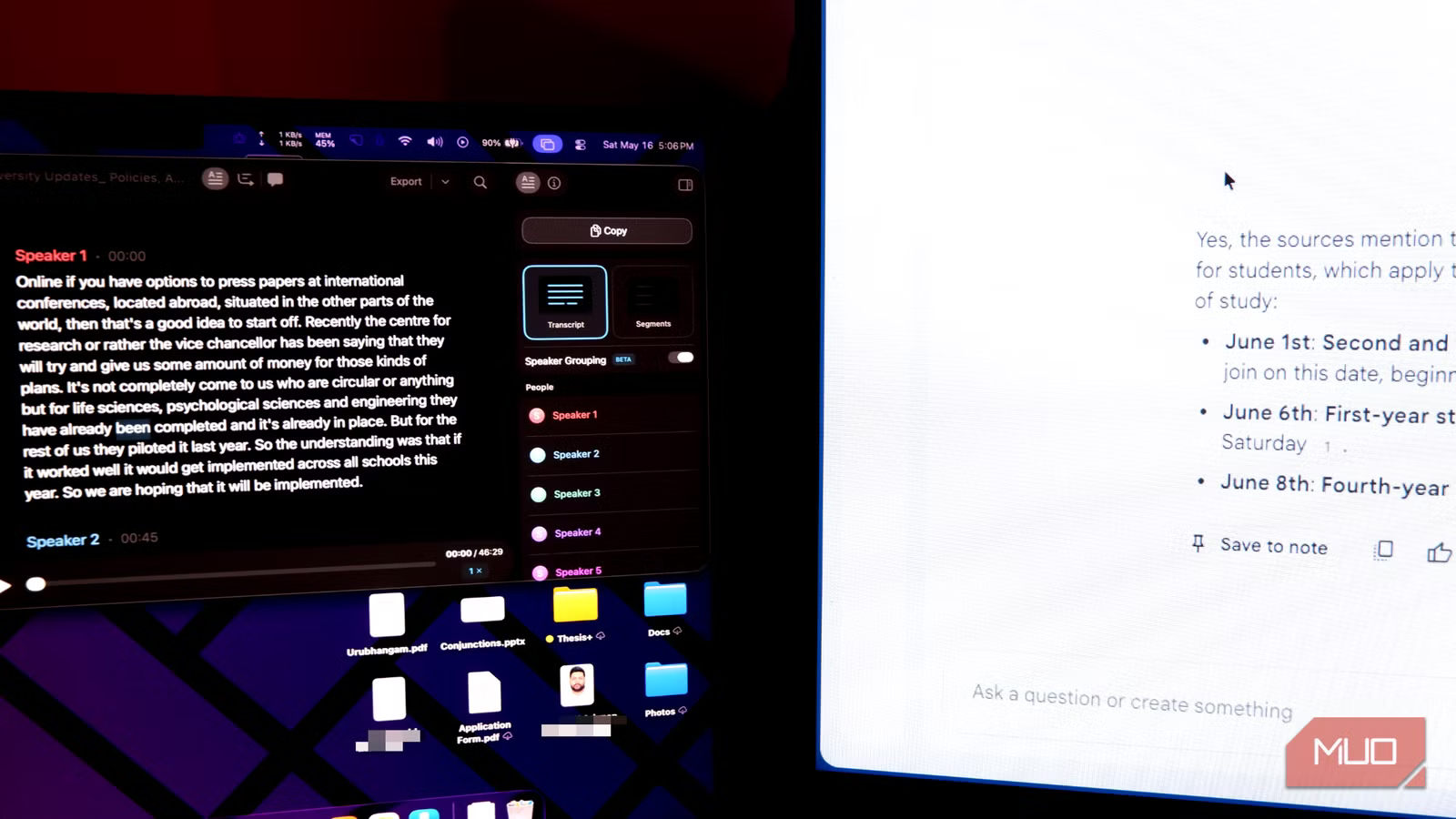
You can choose from the many ways to transcribe audio, and MacWhisper was my pick. I had a voice recording of a recent work meeting, and I wasn’t keen on uploading it to a paid transcription service. Instead, I wanted to transcribe it and create a text file for the workflow. I opened this MP3 file in MacWhisper, which lets me choose the right transcription model for the task and get everything done offline.
MacWhisper may require the paid version to access all the voice transcription models. However, the models included in the free version are great for basic English transcription.
MacWhisper not only transcribed the entire 46 minutes of this meeting but also intelligently separated the content by speaker. Considering that this meeting was not really professionally recorded, the experience was pretty impressive. Once transcription was complete, I could easily export the meeting in formats such as TXT, DOCX, or HTML. MacWhisper also lets you convert the content into subtitle files.
Anyway, within a minute, I had a ready-to-upload transcript file, all while keeping everything on my device.
Related
Google’s AI Notebook Just Got Smarter With Mind Maps
NotebookLM just got a visual upgrade.
NotebookLM did something the transcript file alone never could
Asking a 46-minute recorded meeting, “What did we agree to do about X?” feels different
The most impressive part of the workflow emerged when I started integrating NotebookLM. Normally, when you use a transcription service, you get a text-based response that you can read to understand what people said. You would also often have to use a function like Ctrl+F to find out what was said at a particular point in time. When you bring in NotebookLM, you unlock a new way to explore that meeting, and that is all thanks to the way NotebookLM finds connections within your source.
You don’t really have to transcribe the meeting content to use NotebookLM’s power. It can automatically transcribe an audio file. However, I noticed a significant improvement in accuracy when I used Whisper to transcribe the content.
Sure, NotebookLM took a minute to understand the source, but I was then able to ask some complex questions about the meeting. For instance, I could simply ask questions like:
- What was said about the opening of the semester?
- What was mentioned about this particular development initiative?
I could also ask NotebookLM to provide detailed summaries and other answers about the meeting content. However, the possibilities didn’t end there. NotebookLM also does a few things you cannot really do with a typical meeting transcription app. Some of them are:
- Create brief audio summaries of the meeting in a way that the situation demands
- Create custom mind maps, tables, and infographics from the meeting content
- Generate custom quizzes and reports for onboarding processes
Overall, bringing NotebookLM into the equation opens up many opportunities you don’t get from most paid meeting transcription services. I have also noticed that the Whisper + NotebookLM combination works well with non-native English speakers and other languages. Given that you can use any audio/video file, this option works great for offline meetings as well.
It’s ultimately about convenience vs. control
I don’t want to pretend that this workflow involving NotebookLM and Whisper will replace a fully fledged tool like Otter.ai or any other meeting transcription tool. From a convenience point of view, you also seem to spend more time setting up and managing everything with this free system than with a paid one.
That’s the exact point we are trying to make: you can choose between convenience and control. When you go for control, you get a lot of features that even some paid tools cannot really offer.
OS
Android, iOS, Web-based app
Developer
Pricing model
Free
NotebookLM is Google’s AI-powered research notebook that reads what you upload and helps you transform it into structured summaries, explanations, and visuals.
