

Google Keep has been my go-to note-taking app for over a decade now, and I have always loved its simplicity, integration, and speed. Sure, I prefer other dedicated tools for research or writing, but Google Keep felt like the ideal place to store important snippets, links, or images I frequently come across.
Its features, like real-time synchronization and color-coded organization, have been the staple of my grocery lists and some credentials, and this is not to say that the experience with Google Keep has been perfect. Lately, I have felt Google Keep has been holding back my productivity.
Related
I turned my notes app into a personal knowledge hub, and it’s one of the smartest moves I’ve made
Google Keep captures ideas, Docs organizes them, and Gemini connects it all into a queryable brain.
My Google Keep has been chaotic for a while
Organized chaos is still chaos
I know people who still use messaging apps like WhatsApp to store their notes. Compared to that option, Google Keep is something better. As I said, quick synchronization and web-based accessibility have been great as well. However, I felt a loss of control as the number of notes increased. Sure, Keep had introduced labels and colors by then, but these features could help only so much.
There was also something about the limits of what could be stored on Keep. It allows you to store text, lists, audio, images, and drawings, but not everything else. For instance, if I come across an interesting PDF document, Keep cannot help me store it. Similarly, while Keep is well-integrated with some Google services, you don’t have enough options for exporting content from a web page or an Android app.
Though Google Keep had a search function, the lack of connections between multiple nodes was also something to address. At the end of the day, while Google Keep remained a quick way to capture and store ideas, it did not really help me work with ideas over time or maintain an organized collection of things I wanted to keep. These thoughts pushed me to find a better alternative to Google Keep.
Fabric felt different from the moment I started using it
It was a different approach to note-taking
Before I started using Fabric, I had tried multiple options, such as Notion and Chrome. While one of them seemed like overkill, the other seemed a little too bloated for my taste. However, the moment I started using Fabric, the interface caught my attention from the get-go. It felt like a modern, minimal way to capture ideas, equipped with a workspace.
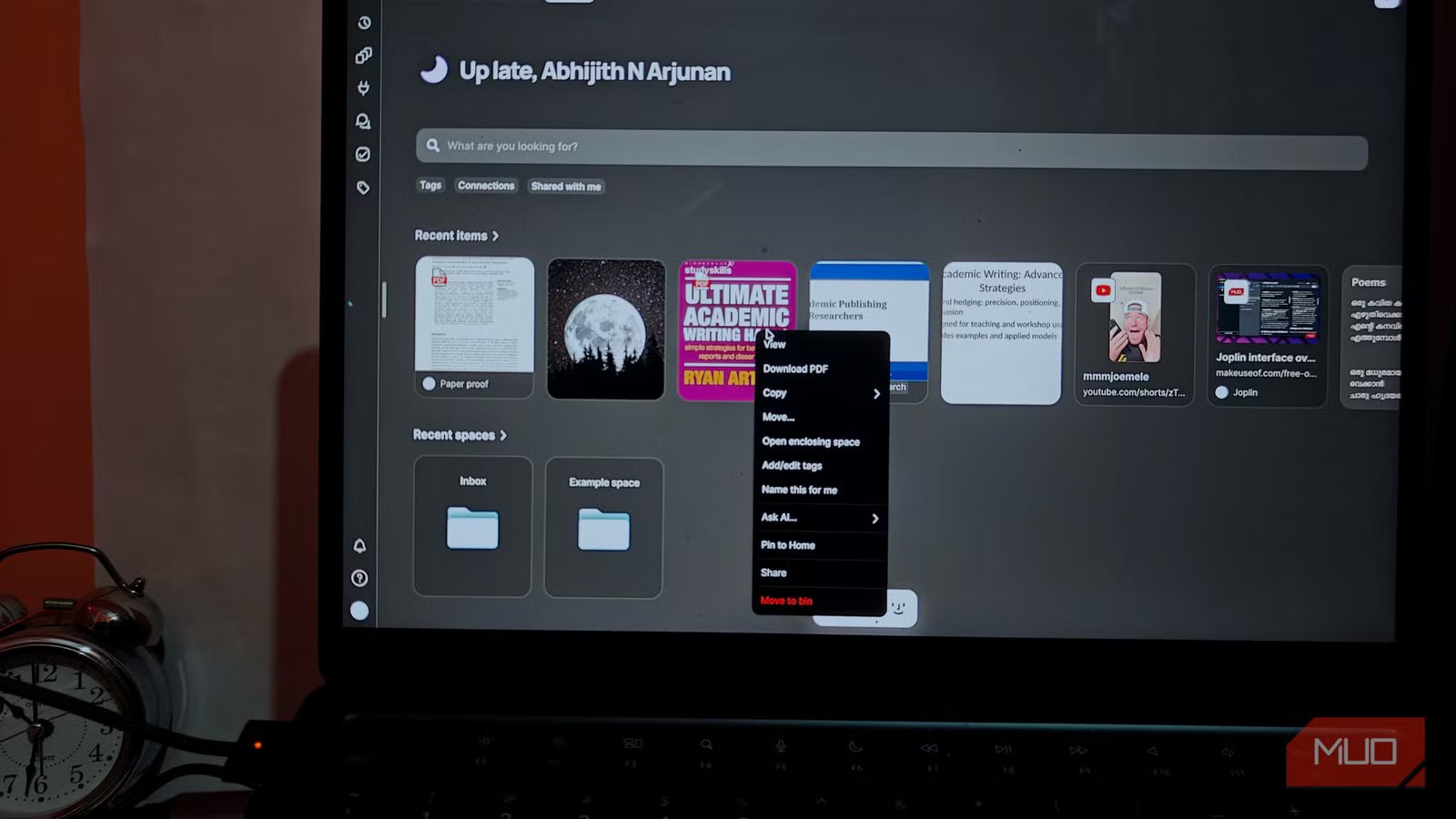
At its core, Fabric works as a storage space for your digital items. It could be a piece of note, an image you frequently use, a link you come across while scrolling, or a short video. You can throw anything at Fabric, and it will keep it stored. Fabric lets you create multiple spaces to keep different items. It offers a couple of advanced features that can boost your productivity, but they are optional and placed without intruding on the core experience. That is, if you want to use Fabric as a simple note-taker, you can do it.
Something I loved about the Fabric onboarding process is how well-optimized it is. It gathers information from you and optimizes the interface and features accordingly. Unlike Google Keep, you may get a unique interface on Fabric, which means you are more likely to focus on the features that you actually need.
I can save almost everything to Fabric
Everything stays together
As I said earlier, I can save a wider variety of content in the space that Fabric offers. Unlike Google Keep, Fabric offers advanced support for media files and documents. For instance, when I ultimately stumble upon an interesting journal article, I can save the PDF to Fabric and read it there. Similarly, I can throw MP3 files and short videos at Fabric, and they are added to the corresponding spaces.
A couple of features included in Fabric actually make the process easier, the more you use the platform. For instance, when I upload an academic PPT or PDF, it is quick to recommend tags and categories, so everything is properly organized. As a result, you don’t need to worry about manual organization. Instead, Fabric attempts to build connections when you add a note, file, or something else.
Also built into Fabric is a minimal task manager and reminder. You can create tasks, add related items, and set reminders and due dates for them. The priority option also adds value. Because Fabric continuously learns from your behavior, the search function also becomes more powerful over time. You can use natural language and descriptors to find a specific note, file, or recording.
Overall, the productivity-focused features of Fabric helped me quite a lot.
Fabric’s extensions and apps simplify everything
Its AI establishes relevant connections
While a platform that lets you organize everything is impressive, you still need a few more things. Fortunately, Fabric addresses many of those concerns using its web browser extension and companion apps for Android and iOS. The browser extension makes it effortless to add content to your Fabric library.
In a way, Fabric’s browser extension can easily replace applications like Pocket because it lets you quickly add a website link for further reading. In addition, you also get options to annotate the web page or take a screenshot and upload it to the library. You can use the extension to quickly add a note as well. The mobile applications are also great because you can add files, documents, and more through the share menu on your Android or iPhone. These are options I used to miss while using Google Keep.
It is also great that Fabric packs a lot of room for integration and customization. You can also rely on AI for not only organizing your notes and other digital items but also to answer questions based on the things you have stored in the library.
The transition takes time
I must add that the transition from Google Keep to Fabric takes a little time. You might miss some AI and integration-based features if you stick to the free version of the app, too. However, these minor conveniences do not matter much compared to the productivity boost you get. The way Fabric manages your notes and lets you interact with them helps you think better, and I have seen that result in the personal, work, and academic realms alike.
Individual pricing
Free, subscription available
Platforms
Web, Android, iOS
Fabric is a note-taking app that self-organizes your notes, files, and other attachments.
