

Working in the tech industry, I always aim to get my hands on the latest devices, especially smartphones. As a result, I have a drawer full of old but fully functional phones and accessories. These devices are too good to throw away, but outdated for my daily use. I have already repurposed an old phone as a baby monitor since the cameras on the phones were still excellent.
Recently, while researching other uses, I discovered a few apps that can transform an old phone into a fully functional dashcam, and that too, for free. In just a few simple steps, I had a high-resolution dash cam with GPS and huge storage. Here is how you can do this, too.
Related
9 Ways to Make Your Old Android Phone Useful Again
Don’t toss that old Android device just yet! With a little creativity, you can give it a second life.
Why is an old phone better than buying a dashcam?
The hardware is far superior to most of the dash cams out there
Credit: Christine Persaud / MUO
Frankly speaking, smartphones have almost reached a saturation point where new features are a bare minimum. A smartphone from half a decade ago is still quite capable and comparable to most modern phones. This is where they shine when compared to a dedicated dash cam.
Also, I am not saying you should get a used phone just to convert it into a dashcam. This makes sense only when you have an extra phone lying around in your drawer.
Most budget dash cams use cheap sensors that struggle even in sufficient light. The video looks blurry, and it is quite hard to extract details from it. On top of it, the processor is also mediocre at best, which makes the system lag or stutter.
A smartphone has a high-end lens (most often with image stabilization) that produces crisp video. The processor inside a smartphone is also far superior to that of a dashcam. This means you can upload clips to the cloud or record in the background while you use the screen for navigation. Other smart features include 4G/5G, Wi-Fi, GPS, dual-camera recording, making them a better option to be used as a dash cam.
You do need a few accessories if you don’t have them
You can’t just stick your phone to the dashboard
There are a few accessories, such as a USB cable and a car mount, that you would need to use your old phone as a dash cam. A car mount is required to mount the phone on the dashboard or windshield. Mounts with clip-on grips are recommended, as magnetic mounts may not withstand the vibrations of the road.
A USB cable is required to provide continuous power to the phone. Smartphone batteries drain very fast, and the process may be rapid, especially on an old phone. Make sure that the cable is long enough so that it can be easily hidden under the crevices of the inside of the car, ensuring that it doesn’t obstruct the driver’s view. You can also purchase a dual USB cigarette lighter to have a vacant USB port always available.
Droid Dashcam is the app for Android
Many features that can give dash cams a run for their money
Credit: Sagar Naresh/MakeUseOf
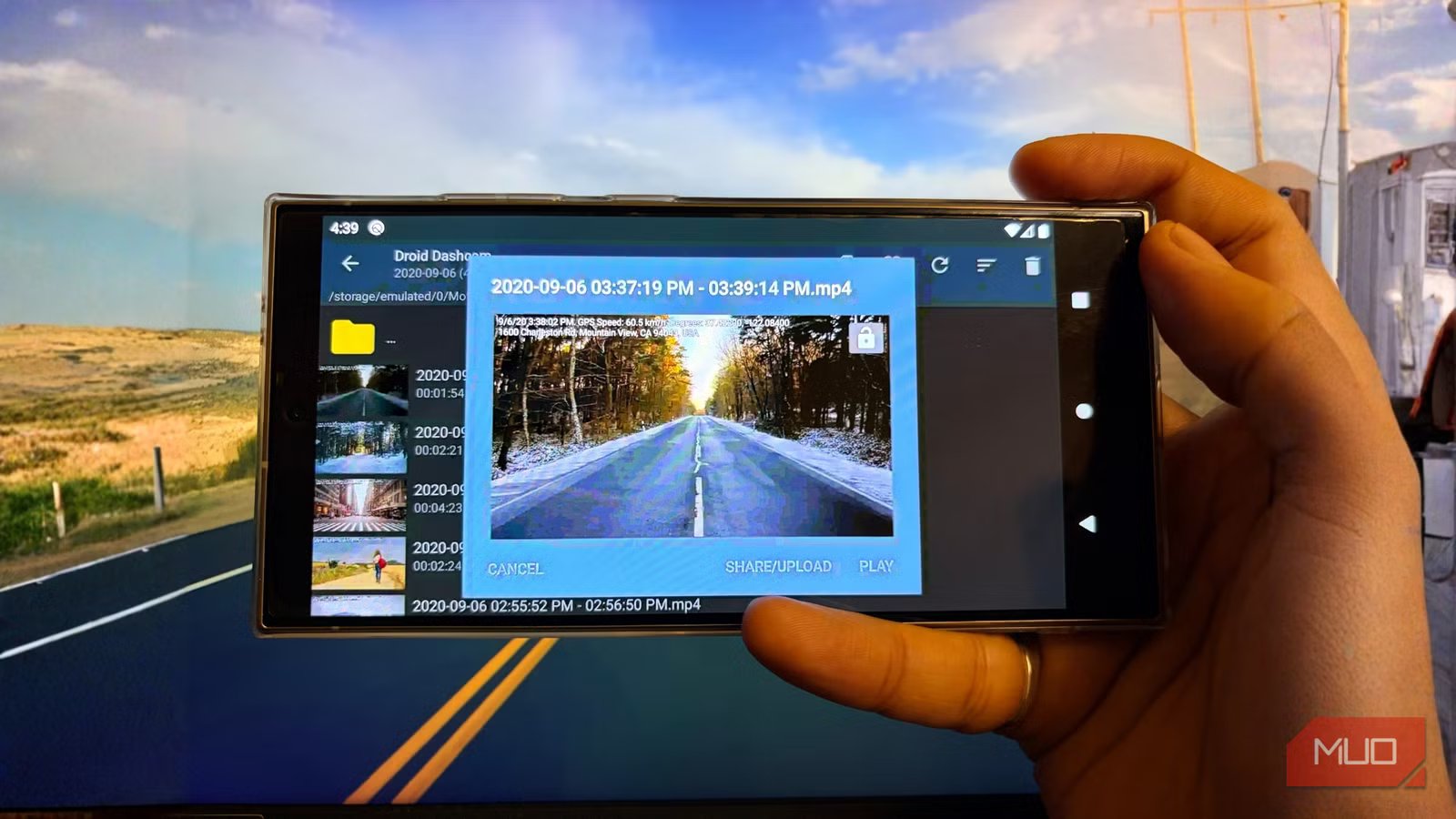
I tried several dashcam apps for Android. My criteria were a free app, fewer ads, and to give me as many options as possible. Droid Dashcam was the one that fit the bill. It is one of the most feature-rich options available for turning an old Android phone into a dashcam.
One of the standout features of Droid Dashcam is that it doesn’t just record video; it also records what I like to call “proof.” It automatically records the current date and time, exact location address, GPS coordinates, and even driving speed. There is also the option to add your car’s license plate number, making it an ideal claim for insurance.
Loop recording is another feature that overwrites the oldest data to continue recording. Droid Dashcam also comes with different auto-start features, including the option to configure the app to start recording when it is plugged into the car via USB, when it connects to Bluetooth, or when it simply boots up. This ensures that you never forget to start recording before a trip.
You can choose which camera to record from, supports landscape and portrait orientations, has automatic day/night mode, and the option to choose where to save the footage, i.e., internal storage or external SD card.
Setting up your free dashcam with Droid Dashcam is easy
Install an app, and you are ready to go
If you have an Android phone lying around, you can use Droid Dashcam to get a free dashcam. Here’s how you can set it up:
- Download the Droid Dashcam app from the Play Store.
- After installation, open the app.
- You will be asked for a few permissions, such as location, camera, and notification. Grant them all.
- You will see the interface of the app with the default camera selected and a banner ad at the top. It can be removed by making a small donation.
- Pressing the center button starts recording, and the recording gets saved in the selected storage space.
- Connect one end of the USB cable to your phone and the other to your car’s USB port to continuously charge it while you are on the road.
You can open the Settings menu in the app and tweak various settings, including video, audio, subtitle, recording, autostart recording, interface UI, and location (GPS).
Put your old phone to good use
Dedicated dash cams are convenient and a must-have gadget for every car owner. However, that is one more gadget to buy and maintain. Also, buying a dash cam isn’t a good idea, as you won’t get optimal results, and better-quality dash cams are expensive. If you want to try out the same stuff on your old iPhone, then I would suggest you check out the Smart Dash Cam. It will convert your iPhone into a basic dashcam, but you have to get around a few ads.
