

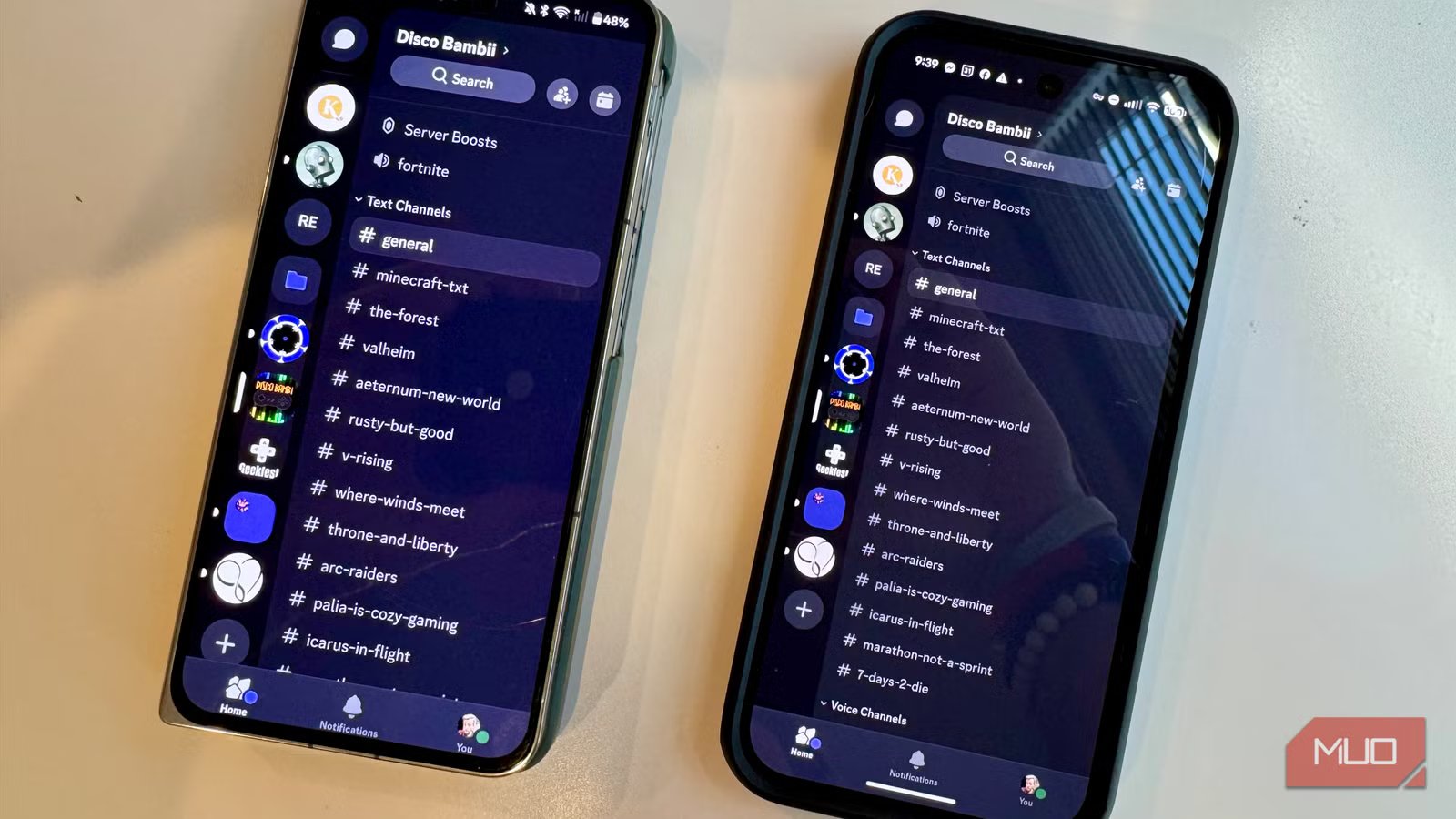
I have two Android phones sitting on my desk right now, a Google Pixel 9 and a OnePlus Open. A few days ago I noticed that Discord notifications showed up instantly on my Pixel but arriving late on the OnePlus. It’s the same app with the same version number, using the same Wi-Fi network and the same Discord account. I figured it was a Discord issue, but it turns out it’s not. Discord is just one of many apps that behave differently across Android phones, and there are several reasons for that.
I dug a little deeper to find out, and here’s what I discovered.
Related
These 3 Android settings look useful but they can quietly break your phone
Because “looks helpful” and “is helpful” are very different things.
You’re probably not running the same APK
How Google tailors each install to the device
Since 2021, Google requires all new apps on its Play Store to be published as Android App Bundles (AABs) instead of traditional APK files. AABs aren’t installable files, they’re more like blueprints for the actual file. When you hit Install, Google’s servers analyze the specific device you’re on (CPU architecture, screen density, language settings, etc.) and generate a custom APK specifically for that phone. The system is called Dynamic Delivery.
So if I install a photo editing app on my Pixel and my OnePlus Open, I’m not getting the same file. Google slices the app bundle and hands each phone a different package. Both devices run on ARM, so they’ll get native libraries built for its that type of chip.
But the GPU is a different story: the Pixel’s Tensor G4 pairs with an ARM Mali-G715, while the OnePlus’ Snapdragon 8 Gen 2 uses Qualcomm’s Adreno 740. For apps that declare OpenGL texture compression support in their manifest (mainly games), Google Play can route different assets to each device based on what the GPU supports.
While the pixel density is similar on both devices, Google Play may load different image resources based on the larger panel on the OnePlus.
In other words, the “same app” you’re running on two different phones can have meaningfully different code on them. That’s by design and generally a good thing as it helps apps load faster and take up less space on your phone than they used to. It does also mean that differences in behavior are basically set on delivery before you even launch the app.
With even more different phones, the CPU architecture differences can be significant. One handset might get a library for hardware acceleration that the other doesn’t support.
The phone manufacturer adds a layer, too
OEM battery management is a good example
Even if your two phones get essentially the same APK, they still might not behave in the same way. That’s because Android isn’t really one single thing. Google publishes the Android Open Source Project, or AOSP, and then manufacturers (OEMs) like Samsung, Xiaomi, OnePlus, and Oppo take that base and add their own layer on top, like One UI, HyperOS, ColorOS, etc.
One of the biggest spots where this makes a difference is in how they deal with background process management.
Google introduced Doze mode in Android 6.0 to limit what apps can do when your phone is idle. But manufacturers don’t have to only stick with that. Many of them can layer more aggressive battery policies on top of Android’s baseline so that the same app can behave completely differently on different phones.
The site Don’t Kill My App has been tracking this problem for years. Their data flags that phone makers like Samsung, OnePlus, Xiaomi, Huawei, and Oppo are particularly aggressive. Samsung, for example throttles background work for apps you haven’t opened recently, while Xiaomi’s autostart permission system can block apps from launching at all.
One developer wrote about a safety monitoring app he made that needed to run all day and night on elderly users’ phones, but ran into issues across different OEMs resetting battery exemption permissions after OTA software updates, which meant that the functionality stopped working every time the user updated their phone.
Many developers identify which OEMs are “misbehaving” just by looking at their Play Store reviews, according to Android Police. The devs have noticed negative feedback around background-dependent features tending to cluster around specific phone brands. That includes things like notification delays, missed alarms, or fitness apps that no longer run in the background.
Beyond background behavior, some app features are delivered conditionally based on hardware. Google let’s developers declare hardware requirements in their app manifests (things like NFC, specific cameras, or gyroscopes). If your phone doesn’t have that feature, the app won’t install or, if it does, will appear with those features disabled.
Developers using Dynamic Delivery can define feature modules, or chucks of functionality that only download if certain conditions are met, like the amount of RAM on your phone.
What you can actually do about it
Start with battery settings, then work outward
On OnePlus, you can go to Settings > Battery > Battery Optimization, find your app, and set it to “Don’t Optimize.” Also check Settings > Apps > Special App Access > Auto-launch to make sure the app is allowed to start itself. For other phones, check out the Don’t Kill My App site for step-by-step guides for every major OEM out there.
If it’s not a battery policy issue, then there’s usually less you can do about it: missing hardware is missing hardware. One option might be to sideload a universal APK from a site like APKMirror and see if that works.
Android is still pretty fragmented
Android has to run on thousands of device models across dozens of manufacturers. The fact that most apps work as well as they do across all of that hardware is truly impressive. It also means, though, that “the same app” is rarely actually the same app. Google Ply serves you a tailored binary matched to your device’s CPU, screen, and language, while your OEM could run its own battery and process management policies on top of Androids. Plus, the app itself might make runtime decisions based on how much RAM or processing power it detects. That’s a lot of variables.
SoC
Google Tensor G4
Display
6.3-inch Actua pOLED display, 1080 x 2424 resolution, 60-120Hz, 3000 nits peak brightness
RAM
8GB
Storage
128GB, 256GB
Battery
5,100 mAh
Ports
USB-C
The Google Pixel 10a is a budget-oriented smartphone with a flat back and long battery life. It’s powered by the same Tensor G4 chip as its predecessor, and many key specs are identical to the Pixel 9a. However, you do get a brighter screen, better modem, new software features, and Android 16 with seven years of software support.
