

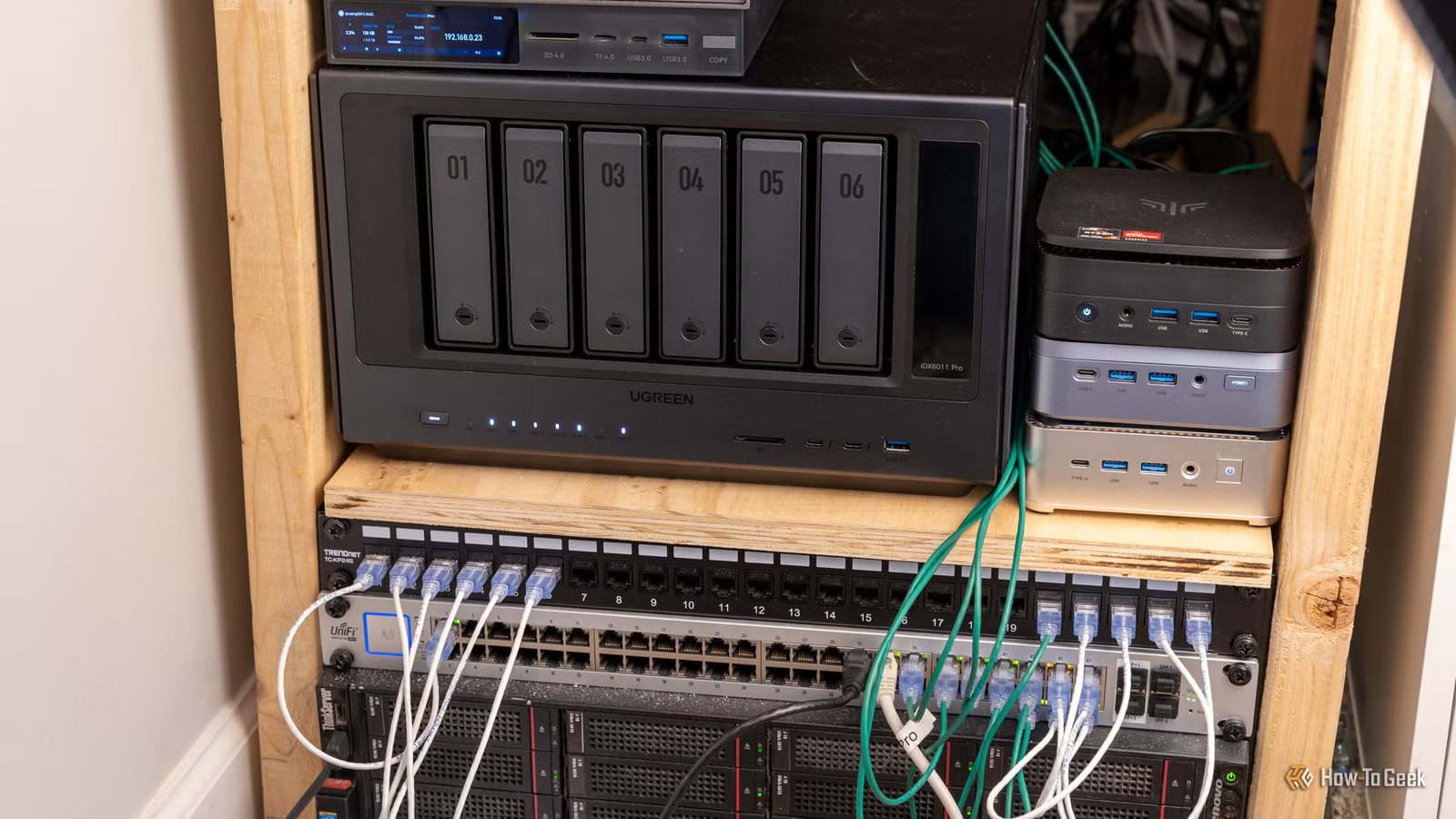
When I first built my homelab, I did what most people do—I put everything on one machine. My NAS, my services, my containers—all of it running on the same box. It made sense at the time: why buy two machines when one can do the job? But eventually, I started to see the issues this supposed “optimization” introduced. Here are the three main reasons I decided to separate my NAS from my homelab.
A NAS and a homelab aren’t the same thing
One needs peace and quiet. The other needs room to make a mess
This sounds obvious when you say it out loud, but it’s easy to miss in practice. A NAS has one job: store files and serve them to devices on your network. That’s it—it doesn’t need to do anything else.
A homelab is different. It’s where you run services like Docker containers, virtual machines, self-hosted apps—whatever you’re experimenting with this week. The whole point of a homelab is that it’s powerful, constantly changing, and something you’re always working on.
Quiz8 Questions · Test Your Knowledge
Quirky and creative homelab projects
Trivia challenge
From Pi-holes to Proxmox clusters — how well do you know the wild world of homelab tinkering?
NetworkingHardwareSoftwareDIYSelf-Hosting
Begin
What is the primary purpose of running Pi-hole in a homelab?
ATo overclock a Raspberry Pi’s CPUBTo act as a network-wide DNS-based ad blockerCTo create a private VPN tunnel to the internetDTo monitor hard drive temperatures across the network
Correct! Pi-hole acts as a DNS sinkhole, intercepting requests to known ad-serving and tracking domains before they ever reach your devices. It runs beautifully on a Raspberry Pi and can block ads for every device on your network without installing anything on individual gadgets.
Not quite — Pi-hole is a DNS-based ad blocker that works at the network level. Instead of filtering ads on each device separately, it intercepts DNS queries for known ad domains and returns nothing, effectively blocking them for your entire home network.
Continue
Which hypervisor platform is most popular among homelab enthusiasts for running multiple virtual machines on a single server?
AVirtualBoxBVMware FusionCProxmox VEDHyperKit
Correct! Proxmox VE (Virtual Environment) is a free, open-source hypervisor based on Debian Linux that supports both KVM virtual machines and LXC containers. Its powerful web UI and active community have made it the go-to choice for homelab builders who want enterprise-grade features without the enterprise price tag.
The most popular choice is actually Proxmox VE, a free and open-source hypervisor built on Debian. Unlike VirtualBox or VMware Fusion, which are primarily desktop tools, Proxmox is designed to run headless on a server and manage dozens of VMs and containers through a sleek web interface.
Continue
What kind of software is Nextcloud, commonly self-hosted in homelabs?
AA network packet analyzerBA personal cloud storage and collaboration platformCA distributed cryptocurrency mining toolDA smart home automation controller
Correct! Nextcloud is a self-hosted alternative to services like Google Drive or Dropbox, letting you store files, sync calendars, share photos, and even video chat — all on your own hardware. It’s one of the most popular self-hosted apps in the homelab community because it replaces so many paid cloud services at once.
Nextcloud is actually a personal cloud storage and collaboration platform — think of it as your own private Google Drive. Homelab enthusiasts love it because it lets them take back control of their data, syncing files, contacts, and calendars across devices without relying on a third-party cloud service.
Continue
What is a common homelab use for old enterprise switches picked up cheaply from eBay, such as a Cisco Catalyst?
ARepurposing them as external GPU enclosuresBUsing them as VLAN-capable managed switches to segment home networksCConverting them into NAS (network-attached storage) devicesDRunning Docker containers directly on the switch firmware
Correct! Old enterprise switches like Cisco Catalysts are homelab gold — they support VLANs, link aggregation, and quality-of-service features that consumer switches lack entirely. Homelabbers use VLANs to logically separate IoT devices, guest networks, and trusted machines, adding a meaningful layer of security to their home setups.
The right answer is using them as VLAN-capable managed switches. Cheap enterprise switches from eBay are a homelab staple because they bring real network segmentation features home. With VLANs, you can isolate your sketchy smart fridge from your personal computers — a genuinely useful security practice.
Continue
What does the homelab tool Grafana primarily do?
AAutomates backups of virtual machine snapshotsBScans the network for unauthorized devicesCVisualizes metrics and time-series data through dashboardsDManages SSL certificates for self-hosted web services
Correct! Grafana is an open-source analytics and visualization platform that turns raw metrics into beautiful, interactive dashboards. Paired with data sources like Prometheus or InfluxDB, it’s commonly used in homelabs to display everything from CPU temperatures and network throughput to power consumption and disk I/O in real time.
Grafana is actually a data visualization tool that creates dashboards from metrics. In homelabs, it’s typically paired with Prometheus or InfluxDB to display system stats, network graphs, and sensor data in real time. Once you see your server’s CPU load as a glowing graph on a big monitor, there’s no going back.
Continue
What is a ‘NAS’ in the context of a homelab, and which brand is most commonly associated with beginner-friendly NAS devices?
ANetwork Access Server — most associated with UbiquitiBNetwork-Attached Storage — most associated with SynologyCNode Authentication System — most associated with pfSenseDNetwork Analysis Suite — most associated with Netgear
Correct! NAS stands for Network-Attached Storage, and Synology is widely considered the most beginner-friendly brand in the space. Their DiskStation lineup runs a polished Linux-based OS called DSM, which makes it easy to set up file sharing, media streaming, and automated backups without touching a command line.
NAS stands for Network-Attached Storage, and Synology is the brand most associated with easy-to-use consumer and prosumer NAS devices. Their DSM operating system gives even newcomers a clean interface for managing drives, running apps, and backing up data — making it a classic first homelab purchase.
Continue
Which open-source project allows homelab users to self-host a full media server that can stream movies and TV shows to almost any device?
AJackettBSonarrCPlex Media ServerDBazarr
Correct! Plex Media Server is one of the most beloved homelab applications, letting you organize your personal media collection and stream it to phones, smart TVs, game consoles, and browsers. While Jellyfin is a fully free and open-source alternative, Plex pioneered the category and remains hugely popular thanks to its polished apps and remote access features.
The answer is Plex Media Server, which lets you host your own Netflix-style streaming service from your homelab. Jackett, Sonarr, and Bazarr are companion tools used to find and organize media, but Plex (or its open-source sibling, Jellyfin) is the actual server that streams it to all your devices.
Continue
What quirky homelab project involves setting up a miniature version of the internet’s routing infrastructure at home, often using software like BIRD or FRRouting?
ARunning a Tor exit nodeBBuilding a home BGP lab to simulate real-world internet routingCCreating a mesh Wi-Fi network with OpenWRT routersDDeploying a recursive DNS resolver with DNSSEC validation
Correct! Some dedicated homelabbers go deep enough to simulate BGP (Border Gateway Protocol) — the same routing protocol that underpins the entire internet — using software routers and tools like BIRD or FRRouting. Some enthusiasts even obtain their own ASN (Autonomous System Number) and a block of real IPv6 addresses to participate in the actual global routing table.
The answer is building a home BGP lab. BGP is the protocol that makes the real internet work by telling routers how to reach every network on earth. Hardcore homelabbers recreate this at home using virtual routers, and some even get their own ASN and IPv6 block to peer with real internet exchanges — a truly wild rabbit hole.
See My Score
Challenge Complete
Your Score
/ 8
Thanks for playing!
Try Again
The same hardware can technically handle both a homelab and a NAS. But the moment you separate them, each has its own space to function in a more optimized fashion.
Type
Network-attached storage
Dimensions
10.14″D x 7.01″W x 7.01″H
UGREEN’s NASync DXP4800 Plus offers exceptional power for the price. It features four drive bays, a pair of M.2 NVMe slots, 10GbE and 2.5GbE Ethernet jacks, an SD card reader, and upgradable DDR5 RAM.
My NAS needs to be on 24/7—my homelab doesn’t
One machine doing two jobs means paying the power bill for both
Credit: Patrick Campanale / How-To Geek
Think about what your NAS actually does overnight. Your phone syncs photos to it. A download manager finishes a job at 2 a.m. Your backup software runs its nightly job. If you have surveillance cameras, footage is constantly being written to it. None of this requires you to be awake or paying attention—it just needs the NAS to be there.
Your homelab services are a different story. No one’s accessing Jellyfin or a dev environment at 3 a.m. Most homelab services have a pretty predictable usage window, and it usually overlaps with when you’re home and awake.
When everything runs on one box, you can’t act on this difference. Either everything stays on all night, or everything shuts off. You lose the ability to control each system independently.
This matters for power. A dedicated NAS idles at around 15–20W. A homelab server running real workloads can draw 80–150W or more, depending on your setup. Running everything on one box overnight means you’re paying the homelab’s power cost even when nothing on it is being used.
Related
Don’t throw away your old PC—it makes a better NAS than anything you can buy
Doing it yourself is way more cost effective.
Having my homelab and NAS on the same box made me too conservative
You can’t really experiment when your files are on the line
Credit: Lucas Gouveia/How-To Geek | Narmtey/Shutterstock
The biggest thing I noticed after separating the two was how much more freely I started experimenting on my homelab.
When your files live on the same machine you’re tinkering with, you start second-guessing everything. You want to try a new container setup, but you pause—what if something goes sideways and file access goes down? You want to update the OS, but you hold off—it’s not a great time for downtime. The homelab starts to feel less like a playground and more like something you have to handle carefully.
Once the NAS is in a separate box, that hesitation disappears. You can break things, rebuild them, try something stupid and roll it back—and your NAS doesn’t care. Your files are still there, backups are still running, and everything that depends on your storage keeps working.
That freedom is kind of the whole point of having a homelab in the first place.
Related
Your first year of homelabbing: What to expect, what to break, and what to learn
You’re going to break stuff, and that’s okay.
A homelab failure could take my storage down with it
When things break—your NAS shouldn’t be collateral damage
Credit: Lucas Gouveia/How-To Geek | Anucha Cheechang/Shutterstock
Apart from the risk of breaking your system through tinkering—you should also consider the times when things break due to happenstance. A bad update breaks a service. A container goes rogue. Something in the OS breaks. These mishaps—while not guaranteed—are more likely to happen in a homelab because it runs a lot of moving parts.
When your NAS is on the same box, all of that becomes your NAS’s problem too. File access can go down, backups stop running, and anything on the network that depends on your storage just stops working. The worst part is that none of this has anything to do with your storage.
The same point applies to security. Homelabs often run services exposed to the internet—Jellyfin, Nextcloud, a VPN, and the like. If something on that side gets compromised, your files are immediately affected because they’re on the same machine. That’s a much bigger problem than a compromised service alone.
In contrast, a dedicated NAS sitting quietly on the network, doing nothing except serving files, has a small attack surface. It doesn’t run your experimental containers. It doesn’t have ports open for your homelab services. It’s just a file server—and that simplicity is the whole point.
Related
4 privacy settings that homelabbers almost always get wrong
Sometimes you just need to close your ports.
When keeping them together still makes sense
One box is a great starting point—it’s just not a great ending point
Credit: Patrick Campanale / How-To Geek
If you’re just starting out, one box is completely fine. Budget matters more than architecture when you’re still figuring out how everything works, and there’s real value in learning how it all fits together before you start thinking about separating the services.
The split starts to pay off once you’re running enough services that the tension between “I want this to be stable” and “I want to experiment” actually shows up. When you catch yourself holding back on a homelab change because you don’t want to risk your storage—that’s the sign.
Related
I turned my potato PC into a $0 homelab in 45 minutes—and I didn’t even use the terminal
I turned an old Ryzen 3 into a homelab without spending a dime
Treat them differently, and both get better at their jobs
A NAS is infrastructure. A homelab is a playground. Once I realized this and optimized my setup accordingly—keeping the NAS boring and stable while letting the homelab be whatever it needs to be—both got noticeably better at their jobs.
Related
My single homelab server became a nightmare, so I split it into eight
I stopped running everything on one server, and my homelab is finally stable
