

Valve’s mid-November 2025 Steam Machine whipped gamers into a frenzy, only for the company to be rather coy with the release date. Valve is confident the revival of the Steam Machine, and the follow-up to the wildly popular Steam Deck, will hit our shelves in 2026… at some point.
The unending RAM shortage continues to put pressure on memory and storage prices, which is why Valve is playing the waiting game, choosing to delay the Steam Machine beyond its early 2026 window, hoping that hardware prices normalize a little.
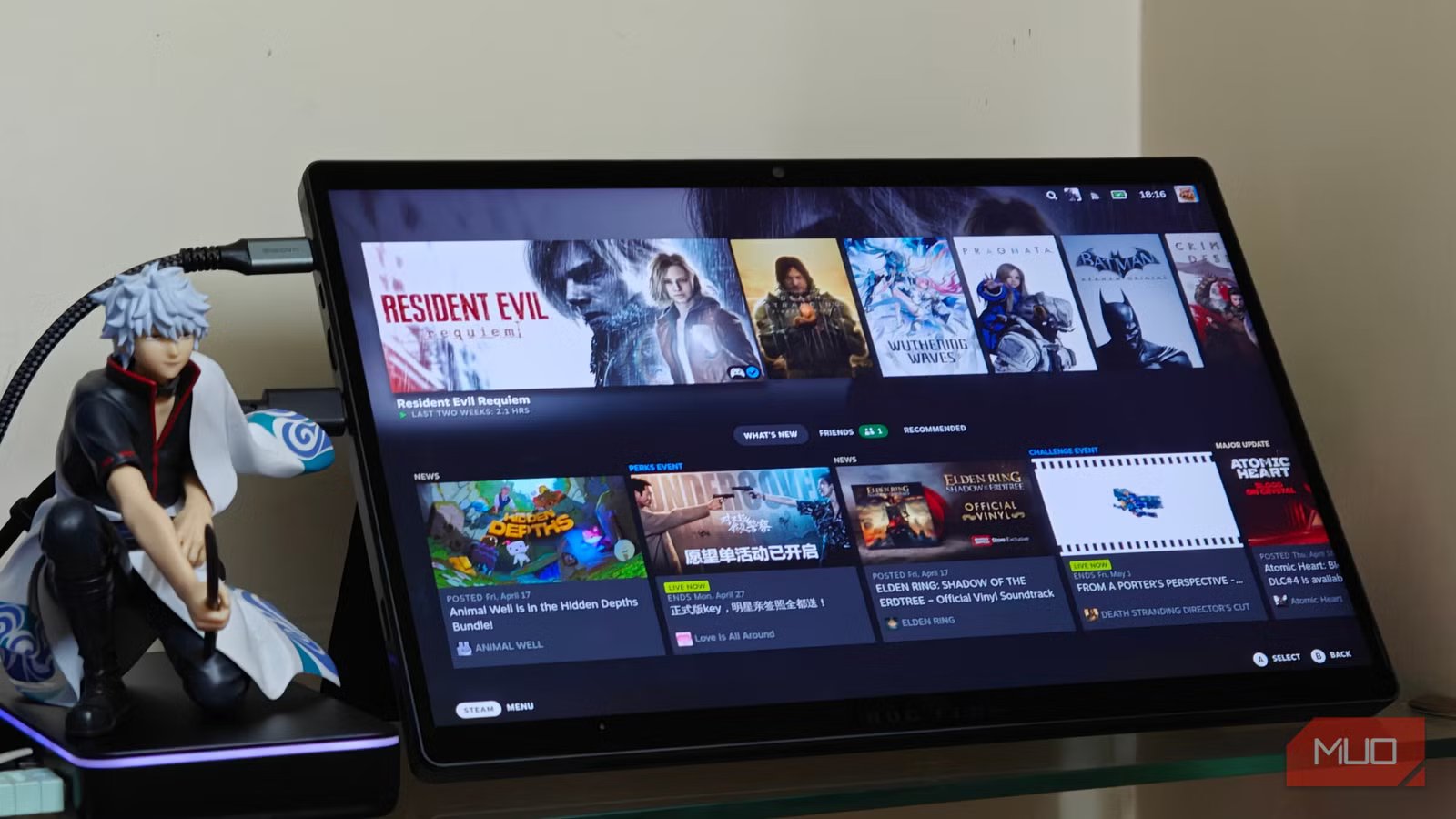
But I can’t wait that long. I decided to take matters into my own hands and revamp a gaming laptop into a sleek but powerful Steam Machine tablet. I know; I feel your eyes rolling. But stick with me, because my homebrew Steam Machine tablet is serving me well, and is also one of the most fun DIY hardware projects I’ve done in a while.
Hardware and software setup
Surprisingly painless
The laptop in question is more of a 2-in-1, with a detachable keyboard folio (the ASUS ROG Flow Z13), but this should apply to every gaming laptop out there. I started by swapping out the SSD in my FlowZ13 (GZ302), and I went with a standard Arch Linux install.
After setting up the base KDE desktop environment, all that was left to do was install Steam, the GPU drivers, and the game mode switcher interface itself. Since this is an all-AMD system, vulkan-radeon was enough to get me started.
For those with Nvidia cards, you’ll want to install the proprietary drivers and make sure the game is actually using the dedicated GPU (this can be set using the DRI_PRIME=x launch parameter).
Next, I had to fire up a terminal and use the arch-deckify script, a fantastic utility that automates the entire process for you. It installs all dependencies, including the actual SteamOS game mode session, along with a few custom SDDM configs that enable a seamless game mode-to-desktop transition.
You’ll need both SDDM and an AUR helper (Yay or Paru) installed and enabled for this to work. This step is mandatory.
One reboot and some waiting later, I was thrown into the SteamOS user interface, which was entirely functional, supporting touch input with proper display scaling and Decky Loader plugins.
Surprisingly decent performance
A Strix Halo miracle
What makes this particular tablet unique is its Strix Halo APU. In particular, this version has the AI Max 390, a 12-core, 24-thread mobile workhorse with a 32 CU integrated Radeon 8050S graphics.
It’s quite a phenomenally powerful system for the form factor, trading blows with an Nvidia GeForce RTX 4060 Mobile (which is its own, dedicated card!). All of this is while maintaining an average peak power draw of 120 watts.
Setting the VRAM to 8GB (and the free system RAM to 24GB), I was able to get respectable results across the board. Of course, this really depends on a per-game basis, with better-optimized titles like Resident Evil Requiem performing much better.
One of the harder to run games, Crimson Desert, also managed to pull off a respectable 40 frames per second, with no frame generation!
All of this goes to say that if you’re comfortable dialing things down to a reasonable level and not shy away from using some upscaling, you’ll find some surprisingly good results — even without frame generation. This was done with the stable Mesa and Vulkan-Radeon drivers at a resolution of 3440×1440, using the max TDP preset while plugged in.
One issue I encountered was that everything works great, except that the Z13 doesn’t hold a charge when powered via USB-C. The battery seems to drain slowly, no matter what I do. However, there is a basic fix, and the way I’ve kept it charged is by keeping the proprietary Asus charger plugged in. It’s just a tiny quirk that ruins the “fully-portable” setup I was going for.
What works and what doesn’t
Most of it actually just works
For the most part, everything you’d expect a Linux desktop to do just works. This is a very capable workstation, and gaming so far has been a pretty flawless experience. If you stick to the ones supported on Proton, that is. Most kernel-level anti-cheat games (like Battlefield 6 or even Call of Duty) will refuse to start. I consider this a win, though, since it gives me time to focus on my ever-growing backlog.
Overall, I’d say that repurposing the laptop as a dedicated Steam Machine was one of the smarter things I’ve done with tech in recent years, and Linux now feels vastly superior to the stock Windows 11 install. Even sleep works, which is kind of a hit-or-miss on Windows.
And if I ever need a bit of extra juice, I can always plug in an external graphics card, even if it’s not a perfect solution.
A great way to repurpose an older machine
The FlowZ13 isn’t the only option you’ve got here. With the right drivers and packages installed, it is entirely possible to repurpose an older gaming laptop (or even desktop) into a Steam Machine, often with better results.
Of course, your mileage will vary depending on your hardware, as will Linux support for it. Asus and Lenovo laptops seem to fare best, in my experience.
And that’s kind of the beauty and pitfall of PC gaming, wherein you have the ability to customize to your heart’s content but might find yourself lost in uncharted waters.
OS
SteamOS/Linux
Minimum CPU Specs
Intel Core i5-4590
Minimum RAM Specs
8GB RAM
Software Version
3.0
