

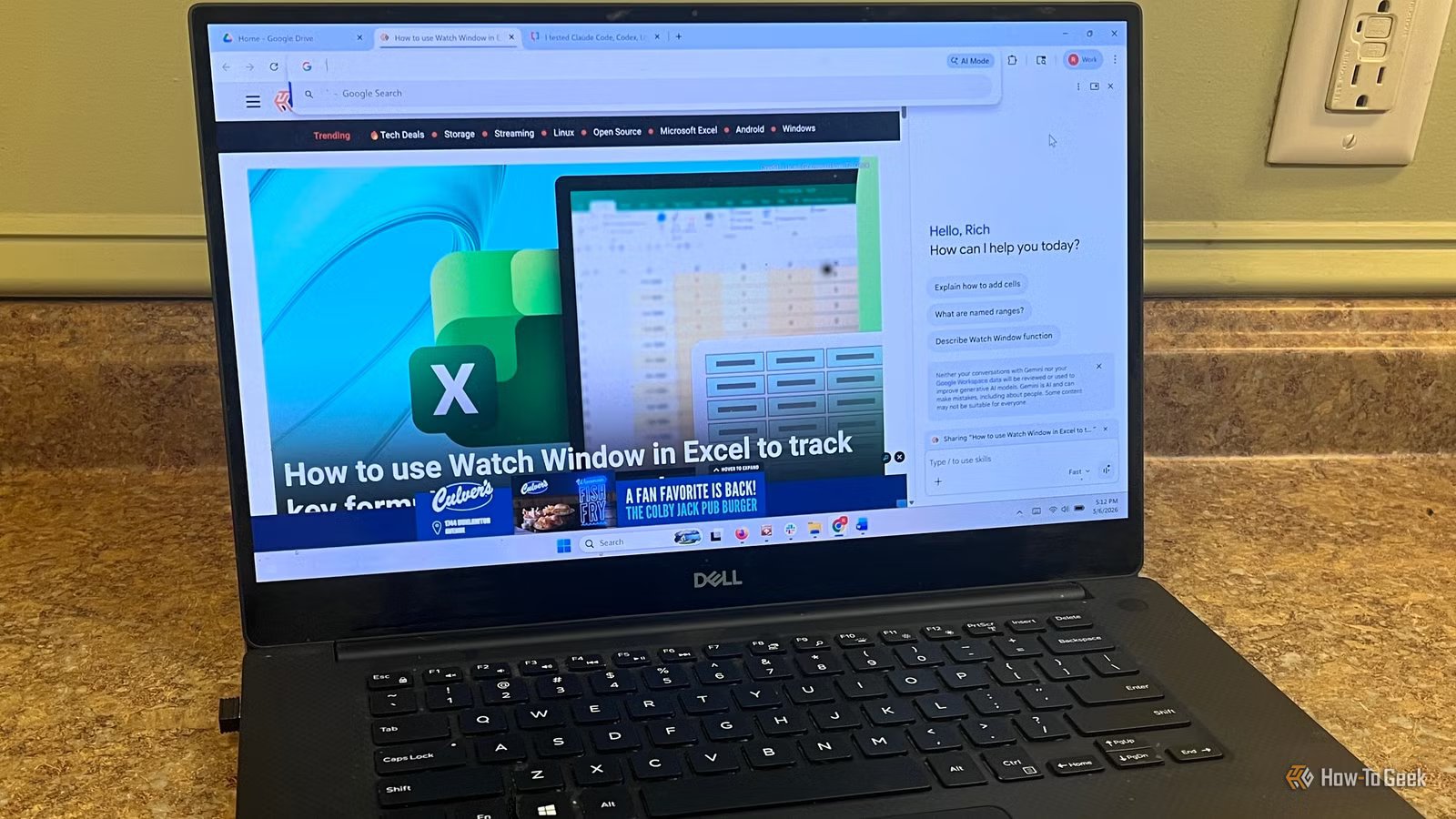
Like a lot of people working in tech, I’ve found AI creeping into more and more of my day. I’m summarizing long articles, cleaning up drafts, pulling key points out of research, and sanity-checking ideas before I move forward. The problem is, I kept using the same prompts over and over. Not just similar ones, the exact same instructions with small tweaks depending on the situation.
That repetition adds up fast. It’s not hard work, but it’s constant friction. Open the tool, paste or rewrite the prompt, adjust it slightly, run it, then do it again five minutes later. Chrome now has a built-in way to save those prompts and reuse them through Gemini, so you don’t have to keep rebuilding the same instructions every time. It’s a small feature, but once you start using it, it feels more like clicking a shortcut than starting from scratch.
What this Chrome feature does (and why it’s easy to miss)
It turns your prompts into reusable tools, but Chrome does a poor job surfacing it
At its core, this feature lets you take a prompt you’ve already written and save it as something you can run again later. Chrome calls them “Skills,” but it’s really just a way to turn your best prompts into reusable tools inside Gemini. It doesn’t carry over to tools like ChatGPT or Claude, but within Chrome it works across whatever page you’re viewing. Instead of typing the same instructions every time, you save it once and trigger it with a couple of clicks. When you run it, Gemini applies those instructions to whatever page you’re currently viewing, which makes it feel fast and context-aware in a way most AI tools don’t.
Quiz
8 Questions · Test Your Knowledge
Artificial intelligence basics
Trivia challenge
From chatbots to neural networks — find out how much you really know about AI.
ConceptsHistoryToolsEthicsModels
Begin
What does the term ‘machine learning’ most accurately describe?
AA robot physically learning to move its limbsBA system that improves its performance by learning from dataCSoftware that mimics human speech patterns exactlyDA computer that programs itself from scratch
Correct! Machine learning is a branch of AI where systems improve automatically through experience and exposure to data. Instead of being explicitly programmed for every task, these systems identify patterns and make decisions with minimal human intervention.
Not quite. Machine learning refers to systems that learn from data to improve their performance over time. It’s less about physical movement or exact mimicry and more about finding patterns in large datasets to make predictions or decisions.
Continue
Who is widely credited with coining the term ‘artificial intelligence’ in 1956?
AAlan TuringBMarvin MinskyCJohn McCarthyDClaude Shannon
Correct! John McCarthy coined the term ‘artificial intelligence’ at the famous Dartmouth Conference in 1956, which is considered the founding event of AI as a formal field of research. He later invented the Lisp programming language, which became a staple in early AI development.
Not quite. While Alan Turing, Marvin Minsky, and Claude Shannon were all AI pioneers, it was John McCarthy who coined the term ‘artificial intelligence’ at the Dartmouth Conference in 1956. McCarthy went on to shape the field enormously throughout his career.
Continue
What type of AI model powers popular chatbots like ChatGPT?
AA decision treeBA large language model (LLM)CA convolutional neural network (CNN)DA Bayesian classifier
Correct! ChatGPT and similar chatbots are powered by large language models, or LLMs. These models are trained on enormous amounts of text data and learn to predict and generate human-like language, making them capable of conversation, writing, and reasoning tasks.
Not quite. ChatGPT is built on a large language model (LLM). While decision trees and Bayesian classifiers are real AI tools, they’re used for much simpler tasks. CNNs are great for image recognition but aren’t designed for open-ended language generation.
Continue
What is ‘overfitting’ in machine learning?
AWhen a model uses too much computing powerBWhen a model performs well on training data but poorly on new dataCWhen a dataset is too large to process efficientlyDWhen an AI model is trained for too many tasks at once
Correct! Overfitting happens when a model learns the training data too well — including its noise and quirks — and then fails to generalize to new, unseen data. It’s like a student who memorizes practice exam answers but can’t handle different questions on the real test.
Not quite. Overfitting describes a model that has learned the training data so specifically that it performs poorly on new data. It’s one of the most common challenges in machine learning and is addressed through techniques like cross-validation and regularization.
Continue
What is ‘AI bias’ most commonly referring to?
AAn AI that deliberately favors one programming language over anotherBWhen AI hardware runs hotter on one side than the otherCSystematic and unfair outcomes caused by skewed training data or designDThe preference an AI has for faster processors
Correct! AI bias refers to systematic errors or unfair outcomes that arise when a model is trained on skewed, incomplete, or unrepresentative data. For example, facial recognition systems have been shown to perform worse on darker skin tones due to biased training datasets, raising serious ethical concerns.
Not quite. AI bias is about systematic, often harmful unfairness baked into a model’s outputs, usually due to skewed training data or flawed design choices. It’s a major ethical concern in areas like hiring algorithms, criminal justice tools, and medical diagnostics.
Continue
What does ‘GPT’ stand for in AI model names like GPT-4?
AGeneral Processing TechnologyBGenerative Pre-trained TransformerCGraphical Prediction ToolDGlobal Pattern Training
Correct! GPT stands for Generative Pre-trained Transformer. ‘Generative’ means it can create new content, ‘pre-trained’ means it was trained on a large dataset before being fine-tuned, and ‘Transformer’ refers to the neural network architecture that made modern LLMs possible.
Not quite. GPT stands for Generative Pre-trained Transformer. The Transformer architecture, introduced in a landmark 2017 paper called ‘Attention Is All You Need,’ revolutionized natural language processing and laid the groundwork for today’s powerful AI chatbots.
Continue
Which of the following best describes ‘deep learning’?
AAI that can only work on complex, research-level problemsBA type of machine learning using neural networks with many layersCLearning algorithms that require no training dataDA method of storing AI models on deep storage servers
Correct! Deep learning is a subset of machine learning that uses artificial neural networks with many layers — hence ‘deep’ — to model complex patterns in data. It’s the technology behind image recognition, voice assistants, and most modern AI breakthroughs.
Not quite. Deep learning uses multi-layered neural networks inspired loosely by the human brain. The ‘depth’ refers to the number of layers in the network, and more layers generally allow the model to learn more complex and abstract representations of data.
Continue
What was the name of the IBM AI system that famously defeated chess champion Garry Kasparov in 1997?
AWatsonBAlphaGoCDeep BlueDHAL 9000
Correct! IBM’s Deep Blue defeated world chess champion Garry Kasparov in a six-game match in 1997, marking a landmark moment in AI history. It was the first time a computer beat a reigning world chess champion under standard tournament conditions, shocking the world.
Not quite. The IBM system was called Deep Blue. Watson is IBM’s later AI known for winning Jeopardy!, while AlphaGo is Google DeepMind’s system that mastered the board game Go in 2016. HAL 9000, of course, is the fictional AI from Stanley Kubrick’s 2001: A Space Odyssey.
See My Score
Challenge Complete
Your Score
/ 8
Thanks for playing!
Try Again
The problem is that Chrome does almost nothing to show you this exists. The option to save a prompt only appears when you hover over something you’ve already typed, and the main way to access your saved prompts is by typing a forward slash in the chat box. If you don’t already know to look for those things, you’ll never find them. That’s what makes this feel like a hidden feature. It’s genuinely useful, but it’s buried behind interactions most people won’t stumble into on their own.
How to save and reuse prompts in Chrome
It’s simple once you know where to look, but Chrome doesn’t make it obvious
Using this feature isn’t complicated, but the way Chrome hides it makes it feel harder than it actually is. The key thing to understand is that you’re not saving prompts from a menu or settings page. You’re saving them directly from the prompts you’ve already used. Once you see it, it clicks, but until then it’s easy to assume the feature just isn’t there.
The first step is getting into the Gemini side panel, and Chrome doesn’t exactly surface that either. Click the three-dot menu in the top-right corner of Chrome, go to Settings, then click Start Gemini in Chrome. That opens the side panel where everything happens. Once it’s enabled, you’ll usually see the Gemini icon in the toolbar, which is a faster way to reopen it without digging back through settings.
From there, use it like you normally would. Run a prompt on any page, then hover over the lightning bolt next to the prompt you just sent. That’s where Chrome hides the Save as Skill option. Click it, name your Skill, edit it if necessary, and it’s saved to your account. To reuse it, open the side panel again, type /, and select your Skill from the list. Chrome applies those same instructions to whatever page you’re on, so instead of rewriting prompts, you’re just triggering something you’ve already built.
Where this actually saves time
The biggest wins come from the tasks you repeat every day
Credit: Google
This is one of those features that doesn’t look like much until you apply it to the stuff you already do on autopilot. If you’re summarizing articles, cleaning up emails, pulling key points from docs, or rewriting the same type of message over and over, this is where it starts to click. Instead of rebuilding the same prompt every time, you save it once and reuse it across whatever you’re working on. It’s not about doing something new. It’s about removing the small bits of friction that keep popping up throughout the day.
For most office and tech work, the value comes from consistency. A saved prompt gives you the same structure every time, whether that’s turning a page into bullet points, rewriting something in a specific tone, or extracting action items from a long document. Once you have a few of these set up, it starts to feel less like using AI and more like triggering shortcuts for common tasks. That’s when it actually saves time, not because it’s faster in isolation, but because it removes the repetition you deal with all day.
Limitations and what to watch for
It’s useful, but it’s still early and a little fragmented
Credit: Corbin Davenport / How-To Geek
As useful as this is, there are a few limitations worth knowing upfront. The biggest one is that it’s tied to Chrome’s Gemini panel, not Gemini as a whole. That means your saved Skills don’t carry over into apps like Google Docs or Sheets, even though that’s where a lot of this kind of work actually happens. You’re also dealing with a feature that’s still rolling out, so depending on your account or Chrome version, you may not see the same options or menus right away.
Key highlights
Access to advanced AI models, unlimited basic searchs and hundreds of Pro searches daily, multimodal capabilities, and more
Brand
Perplexity
Perplexity is a search engine that harnesses the power of AI to get you the information you need. And its Pro subscription provides more access to must-have features like unlimited free searches, hundreds of Pro searches, AI selection, and more.
There’s also the discoverability problem. The core functionality is hidden behind hover interactions and keyboard shortcuts most people won’t try on their own. If you didn’t already know to hover over your prompt or type /, it’s easy to assume the feature just isn’t there. And while saved prompts are great for repeatable tasks, they’re only as good as the instructions you write. If your prompt is too vague or too rigid, you’ll end up tweaking it anyway. It works best when you treat it like a shortcut for something you already do consistently, not a one-size-fits-all solution.
It’s a small feature that removes a lot of daily friction
This isn’t a major AI upgrade, but it’s one of those changes that actually sticks. Once you save a few prompts you use all the time, it stops feeling like you’re working with AI and starts feeling like you’ve built shortcuts into your workflow. It’s not perfect, and it’s not everywhere yet, but if you’re already using Gemini in Chrome, it’s an easy way to cut out repetition without changing how you work.
