

Managing a bloated inbox feels like a full-time job that nobody actually wants to do. Messages pile up constantly if you’re not organizing Gmail, important threads get buried, and the UI makes sorting through it all slow and repetitive. Fortunately, you don’t have to abandon your account to fix the problem. A handful of browser extensions can turn a messy list of messages into an organized workspace.
Related
The Gmail App Has a Secret Swipe That’ll Save You Hours
This tiny customization makes a big difference in your inbox flow.
Sortd lets you sort your emails
It’s like having a visual board instead of an inbox
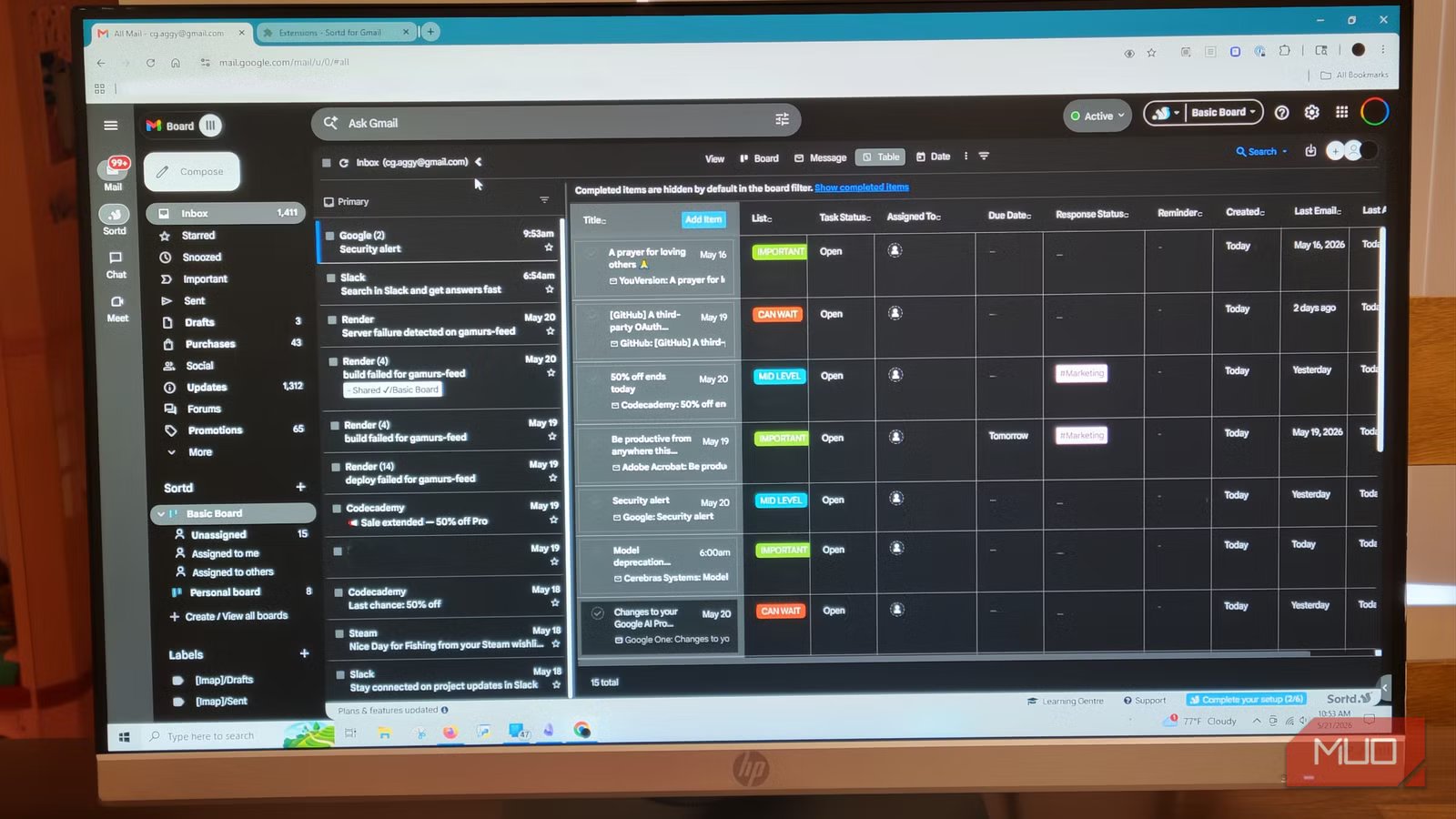
After you authorize Sortd and give it the permissions it needs, the extension starts an easy onboarding tutorial. This walkthrough shows how the tool puts its UI directly onto your dashboard. Sortd keeps your native Gmail inbox on the left side of the screen while adding a multi-column workspace on the right, like a Trello board.
Sortd speeds up your workflow by letting you turn unstructured text threads into separate visual cards. This way, you can drag and drop these email cards from your traditional inbox into custom, step-by-step task lists like To Do, Follow Up, or Waiting. It’s a much more fun way of handling emails.
Each email becomes an active task in a bigger project. You can rename it, track it, and focus on it visually without losing its original context. For instance, you can easily rename an incoming email with a vague subject line to a clear title, which makes it easy to remember what your next steps are.
Mailtrack tells you when people open your messages
You’ll know exactly when to follow up
Jorge Aguilar / MakeUseOf
The Mailtrack extension needs permission to send emails it’s for you. Since Mailtrack is a Google Cloud Partner that goes through annual security audits, has an ISO certification, and follows GDPR privacy regulations, you can use it without worrying about your data. That said, it uses all this to let you know if people are reading your emails.
Once you connect it, the extension works in the background to add a tracking pixel into the HTML body of your outbound messages. It monitors your outgoing mail and uses a double-checkmark system directly in your sent folder.
When it delivers your email, a single green checkmark appears; the moment the recipient’s email client loads the embedded tracking pixel, a second green checkmark appears to confirm the email is open. It sounds kind of sketchy, but you haven’t really violated anyone’s privacy. This is very similar to how your messaging app tells you when people read your messages.
This lets you know if your message came across, or whether you are being ignored or the email legitimately got buried.
Give yourself some Gmail notes
Jorge Aguilar / MakeUseOf
If you’ve ever saved emails without any surrounding context, only to completely forget why you saved them, you know how much time you waste. The Simple Gmail Notes extension may not seem valuable, but it really is. When you install it, the extension adds text boxes to the top of your email threads.
This is where you can write private, searchable digital post-it notes and attach them to specific conversations. The other person won’t be involved at all.
Since the tool needs permission to store your note data in your Google Drive as plain text files, you keep all your data in your own cloud. It is great for storing quick summaries, contact details, or next steps right where you need them most. The moment you reopen an older conversation, your notes appear automatically to refresh your memory.
I have used this while keeping tabs on employers and candidates, and I love it. This is a small but necessary app.
Joy for Gmail makes things simpler
Get rid of the busy sidebars and clutter
Jorge Aguilar / MakeUseOf
Installing the Joy for Gmail wrapper extension replaces the web layout with a cleaner UI. Gmail has gotten very cluttered over the years, and Joy makes it a lot calmer and more focused. It removes distracting ads, hides unnecessary sidebar buttons, and uses a design philosophy called progressive disclosure.
It also keeps navigation icons and colorful labels out of sight until you hover over them, removing the visual noise around every email. By hiding these elements and grouping your inbox rows by date, the extension keeps you from wandering over to promotional tabs or junk mail.
It might feel strange at first to hide your navigation bars, but you quickly realize you don’t need to look at them every second, anyway. It also solves the issue of having that cramped little box in the bottom corner of your screen. Joy for Gmail opens a clean, full-screen message editor right in the middle of your screen, which is what Gmail should always do.
GMass makes responses easier
Blast through a backed-up inbox in minutes and give the right names
Jorge Aguilar / MakeUseOf
GMass is one of the smartest extensions you can get. GMass lets you pick a name fast and syncs to your contacts. It makes sure you don’t accidentally say the wrong name when mass-replying. It is much better at working with your contacts than Gmail and doesn’t give you so many issues when trying to use multiple names. When you download the extension, you can use the Reply Project too.
You don’t have to deal with the tedious process of clicking Reply, waiting for a new compose window to load, hitting Send, and closing the message, only to go back to your main inbox and do it all over again. This gives you a screen filled with messages; it’s really handy.
Gmail can feel useful again
Adding multiple tools means you’re trusting external developers with access to your communications, and an update to the main platform can occasionally break how an extension functions. If you prefer a completely stock experience without any extra maintenance, these additions might not be for you. However, if you’re willing to spend a few minutes setting them up to save hours of sorting every week, these extensions are worth your time.
OS
Android
Price model
Free/subscription
Gmail is a free email service created by Google that lets people send, receive, and organize email online.
